LLR download: how to save and print your learner licence
LLR download means printing your learner licence, issued in Form 3, from the Sarathi portal once it is approved. Open sarathi.parivahan.gov.in, select the state that issued it, go to the Learner Licence menu, choose Print Learner Licence, then enter your application number, date of birth and captcha. The PDF opens for saving. If the status still says printing pending, wait or contact your RTO.
Key takeaways
- An LLR download works only after you pass the learner test and the licensing authority approves the application.
- You need the application number and date of birth; the LL number is printed on the PDF itself.
- Pick the state that issued the learner licence, not the state you live in now.
- A learner licence is valid for six months, and the driving test needs at least 30 days of holding it.
- Andhra Pradesh, Telangana, Karnataka, Odisha, Tamil Nadu and Puducherry all run learner licences through Sarathi; menu names can differ slightly.
On this page · 44 sections
What is an LLR download?
An LLR download is the step where you save the approved learner licence as a PDF from Sarathi, the national licence system run by NIC for MoRTH. The file is the Form 3 licence itself, so the copy you print is what you carry while learning. It is available only after approval.

What the file contains
The PDF carries your photo, name, date of birth, LL number, the vehicle classes you may learn, the issuing RTO and the validity window. CMVR rule 13 says every learner licence is issued in Form 3, which is why some menus call the option “Print Form 3”.
When it becomes available
The print option opens once the learner test is passed and the licensing authority approves the record. Before that, the same screen returns an error or a blank result. If you have only just finished the test, check the application status first.
Most states now expect you to print the copy yourself. The RTO can still print it at the counter if you have no device, but that means a visit, a queue and sometimes a small printing charge. The online route is quicker.
How to download LLR copy in online?
To download the LLR copy online, open Sarathi, pick the issuing state, choose Print Learner Licence in the Learner Licence menu, enter the application number and date of birth, fill the captcha and submit. The licence opens as a PDF that you can save or print straight away.
- Open Sarathi. Go to sarathi.parivahan.gov.in and select the state that issued your learner licence.
- Open the Learner Licence menu. Choose Print Learner Licence, sometimes labelled Form 3.
- Enter your details. Type the application number and date of birth exactly as in the application.
- Fill the captcha. Enter the characters shown and submit.
- Save the PDF. Download the Form 3 copy, keep it on your phone and print one page for the car.
Menu labels change between states
Some state pages show the item under “Learner Licence”, others under “Others” or “Print”. The underlying service is the same national one.
How do you get the LLR print PDF download?
The LLR print PDF download comes from the same Print Learner Licence screen. After you submit, the browser either opens the PDF in a new tab or saves it in the downloads folder. Save it under a clear name, such as your name plus “LL”, so it is easy to find on test day.
Learning licence PDF download on a phone
On Android, the file usually goes to Downloads; on an iPhone, tap the share icon and save it to Files. A learning licence PDF download that will not open often needs a PDF viewer app or a different browser.
Email the PDF to yourself or keep it in a cloud folder. If your phone is lost or damaged before the driving test, you can print it again without repeating the Sarathi steps from another device.
How do you print LLR at home?
To print LLR at home, open the saved PDF and print on plain A4 paper at actual size, not “fit to page”, so the photo and the QR code (where your state prints one) stay sharp. A black and white print is enough. Carry the paper copy while you practise.
Is a learning license PDF valid?
Yes. The learning license PDF printed from Sarathi is the Form 3 licence issued by the licensing authority; there is no separate “original” posted to you in most states. It stays valid for six months from the date of issue, as section 14 of the Motor Vehicles Act provides.
What validity does not cover
The PDF does not let you drive alone. CMVR rule 3 requires a licensed instructor beside you and red L plates at the front and rear. On a motorcycle, a learner may not carry any passenger except the instructor.
Digital copy on the phone
A printed copy is safer than a phone screen with a dead battery. For your permanent licence later, the DigiLocker app download guide explains how to keep a verified digital DL.
How to find learning licence number?
To find your learning licence number, open the downloaded Form 3 PDF; the LL number is printed near the top. If you have not printed it yet, use the application number in the Sarathi status screen. The LL number is generated only after the licence is approved.

If you have only an old printout
Look at the first line of the licence details. Copies seen on Sarathi start with the state and RTO code, then a serial number and the year, separated by slashes. Write it down before the paper fades.
If you have nothing at all
Search your phone for the Sarathi SMS sent after you applied; it carries the application number. With that number and your date of birth you can print the licence again and read the LL number from it.
What is an LLR number?
The LLR number is the unique number given to your learner licence after approval. It identifies the licence in the national Sarathi database and is printed on Form 3. You quote it when you apply for the driving licence, and officers can use it to check the record.
Why it differs from the application number
The application number tracks your request from Form 2 onwards; the LL number is created at issue. Two numbers is normal.
Expect to enter it in the DL application (Form 4), when booking the driving test in some states and when adding another vehicle class. Keeping it with your application number saves time later.
What is application number in driving licence?
The application number in driving licence services is the reference Sarathi gives each request, whether it is a learner licence, a driving licence, a renewal or a correction. It appears on the acknowledgement slip, the fee receipt and in the SMS sent to the mobile number you entered.
Using the LL application number
The LL application number is what you use to check status, book or move the learner test, and print Form 3. Without it, most learner screens cannot find your record, because they search by this number plus date of birth.
A new number for each request
The driving licence application you file after 30 days gets its own number. Do not reuse the learner number on DL screens; that mismatch causes several of the errors described further down.
Check the SMS inbox, the email linked to the payment, and the receipt PDF. If none of these exist, the RTO can trace the application from your name, date of birth and Aadhaar details.
How do you check LLR status?
To check LLR status, open Sarathi, choose your state and select Application Status. Enter the application number, date of birth and captcha. The screen lists each stage with a date, from scrutiny to approval and printing, so you know whether the download is ready.

Reading the stage list
Each line shows an action and whether it is pending or completed. When “Printing of learning licence” shows completed, the print option works. Our online licence check guide covers status screens for the full driving licence as well.
Test result recorded but nothing else
If the test result line shows completed and approval is still pending, the RTO has not signed off yet. That is a staff step; refreshing the page will not speed it up.
| Status line | What it means | What you do |
|---|---|---|
| Scrutiny pending | Documents not yet checked | Wait, or fix any objection raised |
| LL test result pending | Test not taken or result not uploaded | Take the test or check the result |
| Approval of LL pending | Passed, awaiting the licensing authority | Wait; follow up after a few working days |
| Printing of learning licence pending | Approved, copy not yet released | Retry later; contact the RTO if it stays |
| Printing completed | Licence ready | Download and print Form 3 |
What does printing of learning licence pending mean?
Printing of learning licence pending means your learner licence has passed approval but the system has not yet released the copy. In most cases it clears within a short time. Applicants on complaint forums report long waits at this stage, which usually needs action at the RTO.
Why it stalls
Common reasons are a failed photo or signature check, a biometric record needing an officer, or an office backlog. Odisha, for example, reported that applicants with multiple biometric records are approved by the RTO in person.
What to try
Wait a few working days and check again. If nothing changes, contact the RTO with your application number; do not pay agents who promise to “release” the print.
What is Form 3 learner licence?
Form 3 learner licence is the official format for every learner licence in India, set by CMVR rule 13. Whether you get it from Sarathi or the RTO counter, the layout follows Form 3. It is different from Form 2, which is the application you fill for the learner licence.
Form 2 versus Form 3
Form 2 is what you submit, with your details, vehicle classes and declarations. Form 3 is what you receive after passing the test. Rule 10 covers the Form 2 application for grant or renewal of a learner licence.
Form 3 in the next step
When you apply for the driving licence in Form 4, rule 14 requires an effective learner licence. The copy you printed is the proof, so keep it unfolded and readable.
How do you get the Form 3 learner licence download?
The Form 3 learner licence download is the same Print Learner Licence service described above. Some state menus label it “Print Form 3” or “LL Print”. Enter the application number and date of birth, and the PDF that opens is your Form 3.
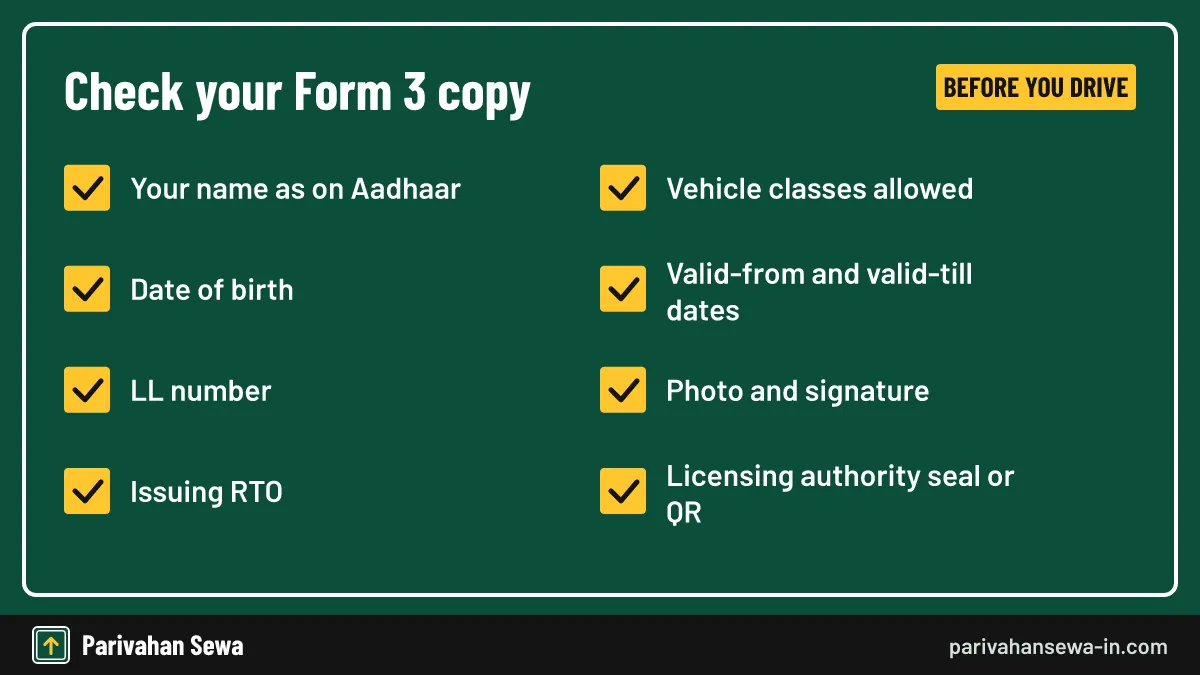
Check every field after download
Confirm the spelling of your name, the date of birth, the vehicle classes and the validity dates. An error on Form 3 will repeat on your permanent licence unless you correct it first.
Correcting a mistake
Apply for the correction on Sarathi under the learner licence services, or at the RTO. Telangana, for instance, lists learner licence name, address, photo and signature corrections among its faceless services.
What is the LLR full form in driving licence?
In driving licence language, LLR stands for the learner’s licence, often read as learner’s licence registration. It is the six-month permit you hold before the driving test. Our LLR full form guide explains the term, ages and classes in detail.
Why the extra R
The Motor Vehicles Act only says “learner’s licence”. The R comes from counter usage and older state portals that called the process registration. LLR, LL and learner licence all refer to one document.
What is the LL full form in licence?
The LL full form in licence services is simply “learner’s licence”. On Sarathi you will see it in menu names such as “LL Slot Booking” and “Print LL”, and in status lines like “LL test result”. It is the same document as an LLR, issued in Form 3.
LL and DL side by side
LL is the learner stage; DL is the permanent driving licence. You need an effective LL for at least 30 days before CMVR rule 15 lets you take the DL test.
What does LR licence mean?
“LR licence” is not a term used in the Motor Vehicles Act or on Sarathi. Most people who search for it mean the learner licence, with one letter dropped from LLR. There is no separate licence type called LR, so follow the learner licence steps on this page.
How to renew learners license?
To renew learners license validity, check your state’s Sarathi menu for a learner licence renewal service before the six months run out. Rule 10 allows a Form 2 application for renewal, but practice differs: Tamil Nadu says an expired LLR needs a fresh application, while some states accept renewal requests.

Before it expires
The safest plan is to book the driving test well before the expiry date. A learner can take the test after 30 days, so there is usually enough time if you book early.
After it has expired
Find out from the RTO whether your state renews expired learner licences or asks for a new application and a new test. Delhi once extended learner licences that expired between February 2020 and November 2021 to 31 January 2022, but such extensions are one-offs.
Fees for a fresh learner licence
If you must apply again, the central fees in the table below apply, plus any state service charge shown at payment.
| Item | Central fee (CMVR rule 32) |
|---|---|
| Learner licence, each class | ₹150 |
| Learner licence test or repeat test | ₹50 |
States may add online, card or service charges; Telangana, for example, added a ₹100 service charge to the learner licence from 28 July 2025. The total always shows on the Sarathi payment page. Our DL renewal guide covers renewing the permanent licence, which follows different rules.
How does LLR slot booking work?
LLR slot booking reserves a date and time for your learner test. After you submit Form 2 and pay the fee on Sarathi, open the slot booking item for the LL test, enter the application number and date of birth, and choose an open slot. States with a home test send you to the online test instead.
Booking the test at the RTO
Where the test is taken at the office, you pick an RTO, date and time from a calendar, then print the slot slip. Arrive early with your ID and the slip.
Online test from home
Several states let Aadhaar-authenticated applicants take the test at home on camera. The LL test online guide explains how that route works and what equipment you need.
Preparing for the questions
The test covers traffic signs, road rules and duties after an accident, and needs about 60 percent correct answers. Practise with our learning license test questions before booking.
How to reschedule DL test slot?
To reschedule a DL test slot, open Sarathi for your state, go to Appointments or Slot Booking for the driving test, find your booking with the application number and date of birth, and pick another open slot. Rules on how late you can move a slot differ between states.
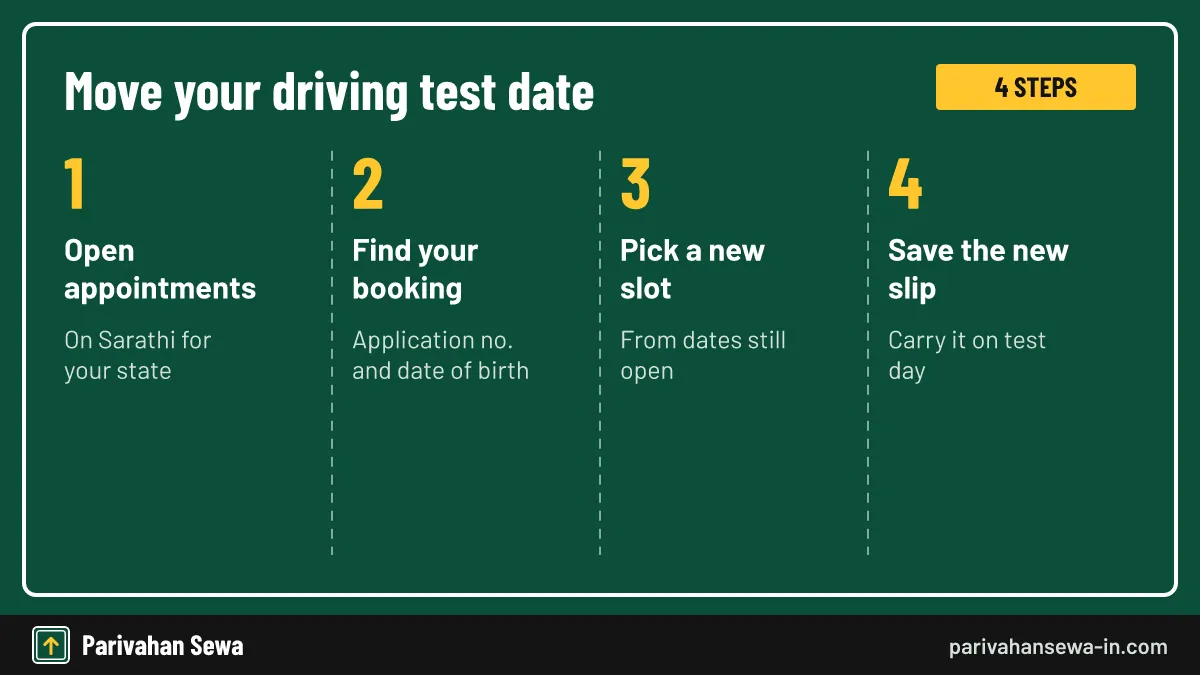
Mind the learner licence expiry
A new date must still fall inside your learner licence validity. Moving the test past the six-month mark leaves you without a valid LL on the day, which ends the attempt.
Cancelling instead of moving
Some states run a separate cancellation option. Odisha’s transport site, for example, has a slot cancellation item for DL tests that sends a security code to your mobile before confirming.
Missed the test
If you missed the slot, check whether your state lets you book again straight away or charges the repeat test fee. Our DL slot booking guide covers booking the driving test from the start.
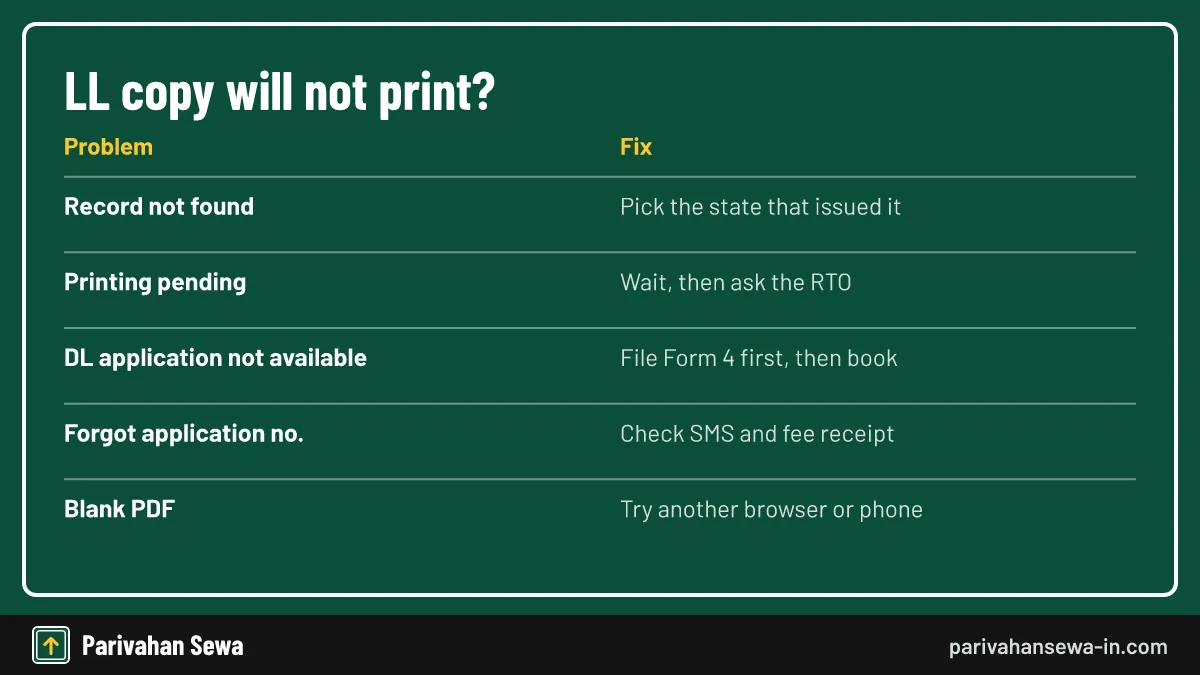
Why does Sarathi say DL application number is not available for the LL no?
The message “DL application number is not available for the LL no” appears when you try to book a driving test with only the learner licence number, before a DL application in Form 4 exists. The slot screen needs a DL application to attach the booking to.
The usual fix
File the driving licence application first, pay the test fee and note the new application number. Then return to DL slot booking and use that number. Forum users who switched to the DL application number report the error going away.
Other causes
You may be trying before the 30-day minimum, or the learner licence may be from another state. Check the LL issue date and the state you selected.
How does LLR apply online AP work now?
For LLR apply online AP applicants, the route now runs on Sarathi. In October 2026, NIC and the Andhra Pradesh Transport Department launched the Sarathi New Learner Licence Test, taken from home in a locked Safe Exam Browser instead of at the RTO.
Logging in for the AP home test
The test login asks for the application number, password and date of birth in day, month, year format. A live camera check asks you to smile and blink five times and matches your face with the application photo.
What stops the test
A face mismatch, a second person on camera or a pre-recorded video ends the attempt. Sit in good light with a working camera, microphone and internet connection before you start the 10 questions.
LLR slot booking AP: what replaced the RTO visit?
LLR slot booking AP used to mean reserving a test slot at an RTO through aptransport.org or Meeseva. With the home test, the slot step is largely replaced by logging in to the online test. Applicants who cannot take the test at home should ask the RTO which office slots are still offered.
Pay only on the official Sarathi payment page. Receipts from the older portals do not carry over to new Sarathi applications.
LLR download AP: where does the copy come from?
The LLR download AP applicants need comes from Sarathi’s print learner licence option with Andhra Pradesh selected. Once you pass the home test and approval is recorded, enter your application number and date of birth to save Form 3.
If you took the test earlier
Learner licences issued under the older AP system may not appear in the new screens. Ask the RTO that issued the licence for a printed copy or a data update.
After the download
Count 30 days from the issue date before applying for the driving test, and keep the LL valid while you wait for the slot.
Learners license Telangana: which portal handles it?
Learners license Telangana services moved to Sarathi in 2025. The tgtransport.net site now carries a notice telling applicants to use Sarathi for learner, driving and conductor licence transactions, while its old licence menu still lists reprint and slot items for earlier records.
The road safety module
From April 2026, Telangana applicants must finish a three-hour online road safety awareness course in six 30-minute modules before the learner test. The certificate unlocks the next step.
LLR Telangana help
The Telangana online services helpline numbers and timings are listed in our Telangana driving license guide, along with office codes.
LLR download TS: what are the steps?
For an LLR download TS applicants need, open Sarathi, choose Telangana, and use Print Learner Licence with your application number and date of birth. Older licences issued before the Sarathi move may still be reprinted through the “Learner License Reprint” item on tgtransport.net.
Which portal to try first
If you applied after the 2025 move, Sarathi holds your record. If you applied earlier, try the tgtransport.net reprint option, then contact the RTA office if neither works.
Duplicate learner licence
Telangana lists the duplicate learner licence and learner licence extract among its faceless Aadhaar-based services, so a lost copy can usually be replaced online.
TS learning license: what changed in 2026?
The TS learning license process gained two steps recently: the mandatory road safety course and fully online corrections. In May 2026, Telangana announced 17 licence services online with Aadhaar authentication, including learner licence corrections, duplicates and extracts.
What still needs a visit
The driving test itself is taken at an RTA test track. Telangana has said it plans camera-based checks on tracks in Hyderabad and Karimnagar, with no start date announced.
Fees in Telangana
Central learner fees apply, plus the ₹100 service charge added in 2025. Confirm the total on the payment page.
LLR download Karnataka: how does it work?
The LLR download Karnataka route is the national one: choose Karnataka on Sarathi, open Print Learner Licence and enter your application number and date of birth. The same steps answer searches for LL download Karnataka and download learner license Karnataka.
Where Karnataka users get stuck
The most reported problem is the DL slot error mentioned earlier, often from Bengaluru offices. Check that you are using the DL application number when booking the driving test.
Learners license Karnataka: what should applicants know?
For learners license Karnataka applicants, the rules are the central ones: six months’ validity, a test of about 60 percent correct answers and red L plates. The Karnataka High Court has held that a learner’s licence is valid for riding a motorcycle and that a motorcycle learner does not need an instructor, unlike a car.
LLR Karnataka and the test
Guides say Karnataka allows the test from home with Aadhaar authentication. If that option does not appear for you, take the test at the RTO.
Expect the central amounts in the fee table, and check for a state service charge on the Sarathi payment page.
Karnataka driving license images: what does the card look like?
People searching Karnataka driving license images usually want to know what their card or learner copy should look like. The learner licence is a Form 3 printout, not a card. The permanent licence is a smart card printed from the Sarathi record, and its design depends on when it was issued.
Use your own copy, not pictures online
Images of other people’s licences online expose private data and may be edited. Compare your card with your own Sarathi record.
Checking a card is genuine
Officers check the licence number against Sarathi or the DigiLocker copy, not the picture on the card. The same check is open to you through the licence status service.
LL apply Odisha: how does auto approval help?
For LL apply Odisha applicants, Sarathi handles the application and the computer test, called STALL. Odisha introduced auto-approval in 2020: when you pass, the result is recorded and the licence is approved without waiting for an officer.
Learning licence apply Odisha: the test
The Odisha computer test asks 15 questions and needs at least 10 correct. Applicants with more than one biometric record are approved by the RTO after the correct biometrics are matched.
Slot changes
Odisha’s site also lets you cancel a DL test slot online with a security code sent to your mobile.
LL download Odisha: when can you print it?
The LL download Odisha step is available as soon as auto-approval records your pass. Odisha described it as downloading the licence at your convenience, with no further approval needed. Use Sarathi’s print option with Odisha selected.
If the print is blocked
If your record needs RTO approval because of a biometric mismatch, the print opens only after the office acts. Visit the RTO named in your application.
Learning license Haryana: where do you apply?
Learning license Haryana applications run through Sarathi with Haryana selected; there is no separate state-only portal for the learner licence that we could confirm. To apply for learning license Haryana, fill Form 2 online, upload documents, pay and book the test.
Downloading the Haryana copy
Use the same Print Learner Licence service. If your application was made at a Haryana RTO counter, the record is still on Sarathi.
State charges
We could not verify a Haryana-specific fee list. Check the total on the Sarathi payment screen before paying.
How do you download learner licence Punjab copies?
To download learner licence Punjab copies, select Punjab on Sarathi and use the print option with your application number and date of birth. Punjab licence applications are made on Sarathi like most states, and the copy follows the Form 3 format.
Office codes on the LL number
The LL number begins with the code of the issuing office, for example PB-10 for Ludhiana (West) or PB-65 for Mohali.
Fees in Punjab
Central amounts are the base. Any Punjab service or online charge shows on the Sarathi payment page.
Learner licence download Assam: what is different?
Learner licence download Assam works through Sarathi with Assam selected. Assam moved driving licence work online from 1 June 2022, including online corrections of licence details. The print steps match the national process.
Assam office codes
The LL number starts with the issuing office code, such as AS-01 for Guwahati or AS-06 for Dibrugarh.
Test from home
The Assam route for the online learner test is explained in our LL test online guide linked above.
Learning licence Rajasthan: what should you check?
Learning licence Rajasthan applicants use Sarathi with Rajasthan selected for the application, test booking and download. We could not confirm a Rajasthan-only learner portal or state fee list, so use the national site and check charges at payment.
Common Rajasthan questions
The learner can drive only with a licensed person beside them and red L plates, the same as everywhere. The six-month validity and 30-day wait before the DL test also apply.
Learner licence download Jharkhand: which portal?
Learner licence download Jharkhand goes through Sarathi with Jharkhand selected. Enter the application number and date of birth to print Form 3. We could not verify any Jharkhand-specific change to the national steps.
If the record is missing
Make sure you chose Jharkhand, not a neighbouring state such as Bihar.
Download learner licence HP: what is special?
To download learner licence HP copies, choose Himachal Pradesh on Sarathi and use the print option. Himachal offers a faceless learner test at home, reported from Dharamsala,, with a road safety video, an Aadhaar face match and an objective test needing 60 percent.
After the home test
Once the result is recorded and approved, the Form 3 print opens. Check the validity dates on the copy.
Learner licence Chandigarh: who issues it?
A learner licence Chandigarh residents use is issued by the Union Territory’s licensing office through Sarathi with Chandigarh selected. The print and status steps match the national process. We could not verify any Chandigarh-only charges, so check the total at payment.
Chandigarh, Punjab or Haryana
Apply where your address proof is, and choose that same state when downloading.
Office codes
Chandigarh registrations use the CH prefix. Licences issued in Mohali carry Punjab codes instead.
How to get learning license in Delhi?
To get a learning license in Delhi, apply for learning license Delhi services on Sarathi with Aadhaar. Delhi launched faceless licence services on 11 August 2021, so Aadhaar users take the learner test online from home or work. Delhi issues the learner licence the same day you pass.
Downloading the Delhi copy
After passing, use Sarathi’s print option with Delhi selected. The faceless route means you normally never visit an office for the learner stage.
Without Aadhaar
Applicants who do not use Aadhaar authentication take the test at a Delhi licensing office. The LLR apply guide covers that route and the documents to upload.
LLR apply Tamilnadu: applying and downloading in Tamil Nadu
For LLR apply Tamilnadu searches, the Tamil Nadu transport department points applicants aged 18 and above to Sarathi. Select Tamil Nadu, fill the form, pay, take the test and then print Form 3. Tamil Nadu says an expired LLR needs a fresh application.
LLR Tamilnadu download
The Tamil Nadu copy uses the same print screen. Your LL number starts with the TN code of the office that issued it.
Booking the next test
After 30 days, file the DL application and book the driving test through Sarathi’s appointment section, choosing the RTO and an open slot.
How to apply LLR online in Tamil?
To apply for an LLR online in Tamil, you follow the same Sarathi steps; the form fields are in English, but Tamil-speaking help is available. The Puducherry transport department publishes its learner licence page in Tamil as well as English, which many Tamil readers find easier.
Test language
Ask at the RTO or check the test screen for language options before you begin. Do not rely on a coaching centre’s claim about languages offered.
LLR full form in Tamil
LLR stands for the learner’s licence in Tamil Nadu as everywhere else; Tamil-speaking counters and driving schools commonly use the English letters LLR. It is the same document, issued in Form 3.
LLR apply online Puducherry: what does the transport department say?
For LLR apply online Puducherry applicants, the Puducherry Transport Department runs the learner licence on Sarathi 4.0. On its site, choose the RTO for your address, open Online Service, then Sarathi Services, Apply Online and New Learner’s Licence.
The Puducherry steps
The department lists five steps: fill the application, pay the fee, verify the payment status, print the receipt and book the LL slot. After the test, print Form 3 from Sarathi.
Pondicherry driving license fees
A department document lists about Rs 230 for a fresh single-class LLR, including test, card and service charges. Confirm the current total on Sarathi.
Learning licence rules for car: what can you do?
The learning licence rules for car learners come from CMVR rule 3: you may drive only with an instructor who holds an effective licence sitting beside you, able to control or stop the car, and with red L plates at the front and rear. You cannot drive alone.

Car versus motorcycle
The Karnataka High Court has held that a motorcycle learner does not need an instructor, unlike a car learner. Either way, a motorcycle learner cannot carry passengers other than an instructor.
| Rule | Car learner | Motorcycle learner |
|---|---|---|
| Instructor beside you | Required | Not required (Karnataka HC view) |
| Red L plates | Front and rear | Front and rear |
| Passengers on a two-wheeler | Not applicable | No one except an instructor |
| Carry Form 3 copy | Yes | Yes |
| Validity | Six months | Six months |
Learners license requirements: what do you need before the download?
The learners license requirements are a filled Form 2, proof of age and address, photographs, the fee and a passed learner test. You must be 18 for a car or geared bike, or 16 for a gearless motorcycle up to 50cc with a guardian’s written consent.
Medical certificate
No medical certificate is needed for a non-transport learner licence under section 8, though CMVR rules ask for Form 1A if you are 40 or older.
Transport vehicles
A learner licence for a transport vehicle has needed a light motor vehicle licence held for at least a year.
Learning licence in India: what does the LLR allow?
A learning licence in India lets you practise driving on public roads for six months, under conditions, in the vehicle classes printed on it. It is the first step to the permanent licence. Our DL status hub lists every licence service, from learner stage to renewal.
From learner to driver
Hold the LL for at least 30 days, apply for the driving licence in Form 4, pass the driving test and wait for the card. Keep the LL valid throughout.

| State | Where you print the LL | Note |
|---|---|---|
| Andhra Pradesh | Sarathi | Home test in Safe Exam Browser from October 2026 |
| Telangana | Sarathi; tgtransport.net for older reprints | Road safety course first |
| Karnataka | Sarathi | Use DL application number for slot booking |
| Odisha | Sarathi | Auto-approval after passing |
| Tamil Nadu | Sarathi | Expired LLR needs fresh application |
| Puducherry | Sarathi 4.0 via transport.py.gov.in | Five-step department process |
| Delhi | Sarathi | Faceless test with Aadhaar |
Official links
Sarathi: learner and driving licence servicessarathi.parivahan.gov.in ↗Parivahan Sewaparivahan.gov.in ↗Puducherry Transport Departmenttransport.py.gov.in ↗Telangana Transport Department online servicestgtransport.net ↗Motor Vehicles Act, 1988 (India Code)indiacode.nic.in ↗LLR download questions
Is the LLR download free?
Printing your own approved learner licence from Sarathi has no separate charge. The learner licence fee and test fee are paid earlier, when you apply.
Can I download my LLR without the application number?
The print screen asks for the application number and date of birth. Find the number in the SMS you received, on the acknowledgement slip or on the fee receipt before trying.
My LLR status shows printing pending. Can I still drive?
Wait until you hold the printed or downloaded Form 3 copy. Until then you have nothing to show an officer, so do not practise on public roads.
Can I download the learner licence of a family member?
Yes, if you have their application number and date of birth. The copy should still be carried by the learner, not shared publicly.
Is a printed LLR PDF accepted by traffic police?
A Form 3 copy printed from Sarathi is the document the RTO issues for a learner. Carry it with your ID and display the red L plates while driving.
How long is the downloaded LLR valid?
The PDF shows the validity dates. Under section 14 of the Motor Vehicles Act, a learner licence is effective for six months from issue.
Can I download LLR on mobile?
Yes. Sarathi works in a phone browser. Turn the phone sideways if the form fields look cramped, and allow downloads in the browser settings.
Why does Sarathi say record not found?
The usual causes are a wrong state, a typing error in the application number or a different date-of-birth format. Check the SMS and enter it again.
What if my name is wrong on the LLR PDF?
Apply for a correction through Sarathi or the RTO before booking the driving test, because the DL is printed from the same record.
Does an expired LLR still download?
An old Form 3 may still print, but it shows the expired validity date and does not let you drive or book a test.
Parivahan Sewa (parivahansewa-in.com) is an independent information website and is not affiliated with MoRTH, Parivahan or any state transport department. Confirm fees and rules on the official portal before you pay or apply.