Airtel FASTag guide: how to buy, log in, recharge and close it
Airtel FASTag is the NETC toll tag issued by Airtel Payments Bank. You order it in the Airtel Thanks app for a car, jeep or van, using an Airtel Payments Bank account or wallet and your RC. Tolls come out of that account or wallet balance, so recharging means adding money to it. Airtel lists a ₹100 tag cost, a refundable ₹200 deposit and the helpline 400 or 8800-688-006.
Key takeaways
- An Airtel FASTag is ordered in the Airtel Thanks app and only for vehicle class 4: car, jeep or van.
- You need an active Airtel Payments Bank savings account or wallet; the tag draws tolls from that balance.
- Airtel lists ₹100 tag cost with GST, a ₹200 refundable deposit and a ₹150 minimum balance.
- RC checks take 6-8 working days and the tag arrives within 21 working days.
- For a lost tag, a wrong deduction or deactivation, call 400 from an Airtel number or 8800-688-006.
On this page · 25 sections
What is Airtel FASTag?
An Airtel FASTag is a passive RFID sticker issued by Airtel Payments Bank, one of the banks allowed to issue tags under the National Electronic Toll Collection (NETC) programme. Fixed inside the windscreen, it lets a toll plaza identify your car and take the toll from your Airtel balance without you stopping to pay cash.

Who stands behind it
Airtel Payments Bank is the issuer: it sells the tag, keeps the money and answers complaints. NPCI runs the switch that moves each toll from the issuer to the plaza’s bank, and IHMCL, NHAI’s toll company, sets programme rules such as KYC and One Vehicle One FASTag.
Why drivers choose it
Users of the Airtel Thanks app like having the tag beside their other Airtel services. At the lane it works like any tag. For wider toll rules, see our FASTag online pass guide.
How is Airtel FASTag different from other bank tags?
Most banks give a FASTag its own prepaid wallet that you top up separately. Airtel works the other way: its FAQ says the FASTag balance is part of your linked account or wallet balance. Tolls are taken from that Airtel Payments Bank balance first, and only then from the minimum amount held on the tag.
What this means in practice
There is no separate tag wallet. Money in your Airtel Payments Bank account or wallet pays tolls, so watch the balance before a long trip.
The minimum balance acts as a buffer
Airtel keeps a ₹150 minimum balance on the FASTag account, which pays a toll if your main balance runs dry mid-journey.
Who can get an Airtel FASTag?
Airtel’s FAQ limits app orders to vehicle class 4, which means a car, jeep or van. You also need an active Airtel Payments Bank savings account or wallet, the vehicle’s registration certificate and its registration number. One tag covers one vehicle, so a family with two cars orders two tags.
Vehicles that do not qualify online
Trucks, buses and light commercial vehicles fall outside class 4. Ask Airtel’s helpline, or buy from an issuer that serves commercial classes.
If you already have another tag
Under the One Vehicle One FASTag rule, in force since 1 April 2024 after NHAI extended the original 31 January 2024 deadline, only the latest tag linked to a vehicle stays active. Close any older tag once the Airtel one works.
How to buy Airtel FASTag in the Airtel Thanks app?
The Airtel FASTag buy process runs inside the Airtel Thanks app. You sign in with your Airtel number, open the NETC FASTag option, enter the vehicle number, upload the RC and pay. Airtel then checks the RC, ships the tag to the address you gave and links it to your account.

- Open the Airtel Thanks app. Sign in with your Airtel mobile number and check that your Airtel Payments Bank account or wallet shows as active.
- Choose NETC FASTag. Open the NETC FASTag option and pick the choice to buy a new tag.
- Enter vehicle details. Type the registration number of your car, jeep or van exactly as printed on the RC.
- Upload the RC. Add a clear photo or scan of the registration certificate so Airtel can verify the vehicle.
- Pay and receive the tag. Pay the tag cost and deposit, wait for delivery and fix the sticker inside the front windscreen.
Where the option sits in the app
App layouts change. Look on the home screen or under Banking, or search “FASTag” inside the updated app.
Buying offline
Airtel’s FAQ describes only the app route. If a counter offers an Airtel tag, check the receipt names Airtel Payments Bank and the tag appears in your app.
What documents does an Airtel FASTag buy request need?
An Airtel FASTag buy request needs few papers, because your identity was already checked when your Airtel Payments Bank account was opened. At the tag stage Airtel asks for the vehicle’s registration certificate (RC), its registration number and a delivery address.
Getting the RC upload right
Use a sharp image in which the registration number, owner name and vehicle class are readable. A blurred RC can send the request back.
If the RC is in someone else’s name
Airtel’s FAQ does not cover a car registered to a parent or spouse, so call the helpline before ordering.
What does an Airtel FASTag cost?
Airtel’s FAQ gives a three-part break-up. The tag cost is ₹100 including GST, which matches the national cap on what any issuer may charge for the sticker. On top of that sits a refundable security deposit of ₹200 and a ₹150 minimum balance held on the FASTag account.
| Charge | Amount | Refundable? |
|---|---|---|
| Tag cost (GST included) | ₹100 | No |
| Security deposit | ₹200 | Yes, on deactivation |
| Minimum balance on the tag | ₹150 | Used for tolls, part of your balance |
The deposit can vary
The FAQ adds that the deposit depends on the vehicle type. Third-party sites quote other figures; trust the amount the app shows at checkout.
Charges on top-ups
Airtel notes that additional charges may apply depending on the channel you use to load money. Check the fee line before paying by card.
How long does Airtel FASTag delivery take?
Airtel splits the wait into two parts. First the bank verifies the RC, which its FAQ says takes 6-8 working days. After approval, the tag is shipped to the address you entered, with delivery promised within 21 working days. Plan ahead if you have a highway trip coming up.
Tracking the order
The FASTag section of the app shows the request status. If it has not moved after the stated period, call 400 or 8800-688-006.
Driving before the tag arrives
Without an active tag, a FASTag lane charges double the toll. Keep any older tag until the Airtel one is live.
How do you activate and fix the Airtel tag?
Once delivered, the tag is already mapped to your vehicle number. Peel the backing and press the sticker on the inside of the front windscreen, near the rear-view mirror, on clean dry glass. Then open the app to check the tag shows as active against your registration number before you drive through a toll lane.
Placement tips
Avoid tinted strips, dashcams and sunshades. Do not move it once fixed; a torn tag stops reading.
Checking the first toll
Watch for the debit SMS after your first toll. If none arrives, call the helpline to check the mapping.
How does the Airtel FASTag login work?
The Airtel FASTag login is not a separate website account. Airtel’s FAQ tells customers to download and log in to the Airtel Thanks app, where the tag sits alongside your Airtel Payments Bank account. You sign in with your mobile number and the one-time password the app sends, then open the FASTag section.

What you need to sign in
Use the phone holding the registered mobile number SIM so the OTP arrives. Never share the OTP or bank PIN with a caller.
Logging in on a new phone
Install Airtel’s official app and sign in with the same number. The tag and balance are tied to the account, not the handset.
Airtel FASTag login problems and fixes
Most Airtel FASTag login trouble has a simple cause: the OTP does not reach the phone, the app is out of date, or the bank account linked to the tag is not fully active. Work through the fixes below before calling the helpline, since each one takes only a minute.
| Problem | Likely cause | What to do |
|---|---|---|
| OTP does not arrive | Weak signal or a different SIM | Move to better coverage and use the registered SIM |
| FASTag section missing | Old app version | Update the Airtel Thanks app and look under Banking |
| Account shows inactive | Bank account or wallet KYC pending | Complete the Airtel Payments Bank account steps first |
| Mobile number changed | Old number still on the account | Call 8800-688-006 to update details |
When to call support
If none of these work, call 8800-688-006 (or 400 from an Airtel line) with your vehicle number ready.
Beware of fake help numbers
Ignore search-ad numbers claiming to be Airtel support, and never install remote-access apps at a caller’s request.
What can you see after the Airtel FASTag login?
After an Airtel FASTag login, the app shows the tag’s status, your available balance and a list of transactions. Airtel’s FAQ says you can check tag status and transaction history in the app, and you also get an SMS for every toll deduction, which works as a quick record on the move.
Reading the transaction list
Each entry shows the plaza, date, time and amount. Tolls and money you add sit in the same list.
Keeping proof of payment
For an expense claim, keep the SMS or a screenshot. For a formal statement, ask the app’s help section or the helpline.
How to do Airtel FASTag recharge?
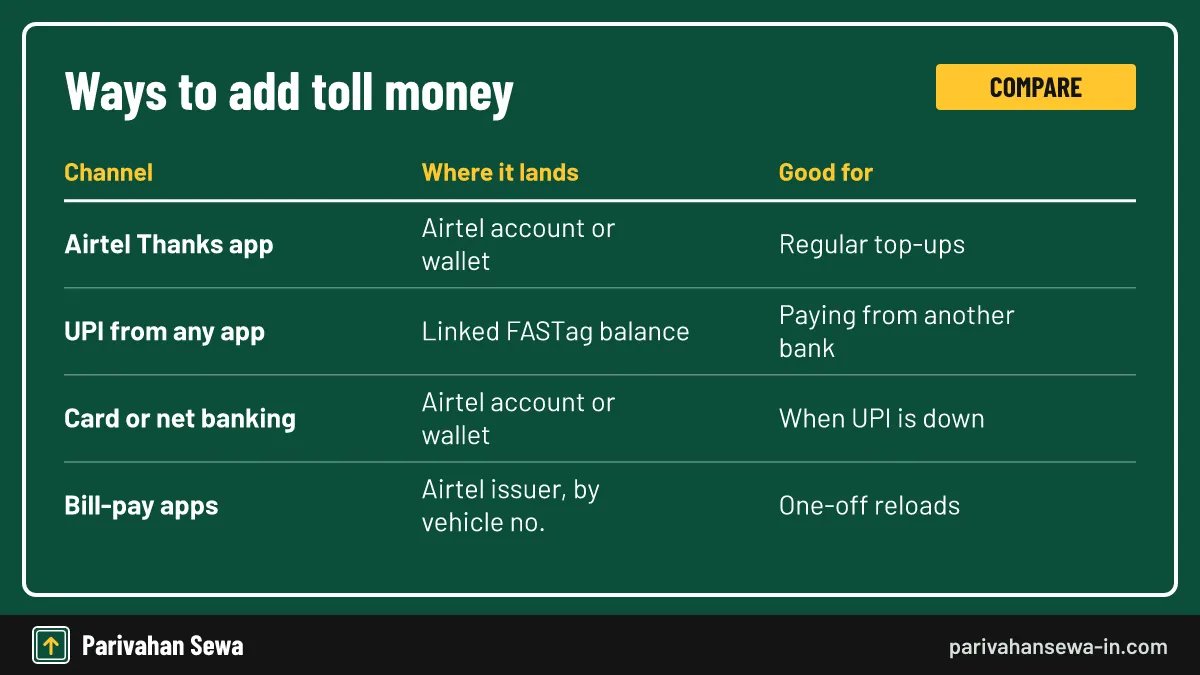
An Airtel FASTag recharge means adding money to the Airtel Payments Bank account or wallet that the tag is linked to. Airtel’s FAQ lists the Airtel app, internet banking, debit card, credit card and UPI as ways to load money. Whichever route you pick, the money ends up in the balance that pays your tolls.
How much to add
There is no fixed pack. Keep enough for a round trip plus the ₹150 minimum, and top up the night before a long drive.
How fast it shows
Top-ups usually reflect within minutes, but a blacklisted tag can take longer to clear on the national list.
Airtel payment bank FASTag recharge: adding money to the wallet
For an Airtel payment bank FASTag recharge from inside the app, you add money to your Airtel Payments Bank account or wallet. Airtel’s own blog describes the path: open the Banking tab, link an active bank account, then tap Add Money and move the amount you want from that bank into your Airtel balance.
Step by step in the Airtel Thanks app
- Open Banking. In the Airtel Thanks app, tap the Banking or Bank tab at the bottom of the screen.
- Tap Add Money. Choose the option to load money into your Airtel Payments Bank account or wallet.
- Pick the source. Pay from a linked bank account by UPI, or use a debit card, credit card or net banking.
- Confirm the amount. Enter the amount, approve the payment and wait for the success message.
Auto top-up
Airtel’s FAQ does not describe automatic FASTag recharge. If your app version offers one, read its terms first.
Airtel FASTag recharge online with UPI
You can do an Airtel FASTag recharge online from any UPI app, even one linked to a different bank. NETC FASTags use a UPI ID in the format netc.vehicle number@issuer handle, and paying that ID credits the tag holder’s balance. Many UPI apps also list FASTag under bill payments, where you choose Airtel Payments Bank and type the vehicle number.
Verify before you pay
Sources disagree on the exact handle Airtel Payments Bank uses after the @ sign, so we do not print one here. Type the ID your Airtel app shows, or use the bill-payment route, and check that the payee name your UPI app displays matches the tag owner before entering your PIN.
Paying from someone else’s phone
A relative can top up your tag the same way with your vehicle number; the money lands in your Airtel balance.
Can you top up an Airtel tag from other apps?
Yes. The bill-payment sections of many bank and wallet apps list Airtel Payments Bank as a FASTag issuer. You pick it, enter the registration number, and the app shows the account name before you pay, which suits people whose main money sits in another bank.
Fees and limits
Third-party apps may add a convenience fee for card payments, so read the final amount before confirming.
Which vehicle number to enter
Type the number exactly as on the RC. A wrong digit can credit someone else’s tag.
What if an Airtel FASTag recharge online fails?
If an Airtel FASTag recharge online fails but money leaves your bank, do not pay again straight away. Check the transaction list in the Airtel app and your bank statement. Failed UPI payments are usually reversed to the source account automatically; if not, raise a complaint with the reference number.
What to note down
Save the UPI reference number (UTR), the date, amount and vehicle number you entered.
Who to contact
If the debit happened at your bank but the Airtel balance did not rise, start with the app you paid from. If the money reached Airtel but is missing from the balance, call 8800-688-006.
What is the Airtel FASTag minimum balance?
Airtel’s FAQ sets the minimum balance at ₹150. It is held on the FASTag account and steps in to pay tolls when your linked balance runs out. If the total drops below this level, Airtel says the tag is blacklisted at the NPCI end, and plazas will not accept it until you add money.
Why blacklisting matters
A blacklisted tag in a FASTag lane is treated like no tag at all, which means paying double the toll. Low balance is the most common cause; our page on FASTag blacklist rules covers the other reasons a tag gets blocked.

Avoiding it
Top up as soon as a debit SMS shows a low balance, and keep a cushion above ₹150.
How do you check the Airtel FASTag balance and toll history?
Because the tag uses your Airtel Payments Bank balance, the figure on the app’s Banking screen is the money available for tolls. Airtel also sends an SMS for every toll deduction with the amount taken. The transaction list in the app gives the fuller history, including recharges.
Without opening the app
The debit SMS is the quickest check on the road. Airtel’s helpline, 400 from an Airtel number, can also help if the app will not load.
Spotting odd charges
Two debits at one plaza within minutes, or a plaza you never passed, are grounds for a dispute.
How do you call Airtel about a FASTag problem?
IHMCL’s issuer list gives Airtel Payments Bank’s FASTag helpline as 400/8800-688-006. Dial 400 from an Airtel mobile, or 8800-688-006 from any network. Use it for a lost tag, a missing recharge or a wrong deduction. For a plaza that will not read a valid tag on a national highway, call 1033.
Before you call
Have the vehicle number, registered mobile and the SMS or transaction entry in question ready. Our FASTag customer care number page lists the helplines of other issuers.
How to report a wrong toll deduction on an Airtel tag?
Report a wrong or double debit to Airtel within 40 days of the transaction, the window IHMCL sets for disputes. The bank raises a chargeback with the plaza’s bank, which normally takes 20-30 working days. If it is accepted, the money comes back to your Airtel balance.
Evidence that helps
Quote the debit SMS, plaza and time; a fuel bill from elsewhere at that hour helps.
What if your Airtel tag is lost or damaged?
Airtel’s FAQ says to call 400 or 8800-688-006 to get a replacement tag, and the balance moves to the new one. If the vehicle itself is stolen, call the same numbers to block the account so no one else can run up tolls on it.
A tag that stops reading
A peeling or cracked sticker is treated as damaged. Do not tape it back on; ask for a replacement, then fix the new tag carefully.
How to close an Airtel FASTag and get the deposit back?
Airtel says the security deposit can be claimed when you submit a deactivation request. Contact the helpline or the app’s help section to ask for deactivation, clear any negative balance, and the deposit is refunded once the tag is closed. Our guide on how to deactivate FASTag explains the general process.

What you do not get back
The ₹100 tag cost is not refunded. Remove the old sticker from the windscreen once closure is confirmed.
What happens to the Airtel tag when you sell the car?
The seller closes the Airtel FASTag before handing over the car, because the tag stays linked to the seller’s Airtel account. The buyer then gets a new tag in their own name. Leaving the old tag active means the buyer’s tolls keep coming out of your balance.
When you switch banks
The same applies if you move to another issuer: activate the new tag, then deactivate the Airtel one, since only one tag per vehicle stays active.
Does the annual pass work on an Airtel FASTag?
Yes. The FASTag Annual Pass costs ₹3,075 for FY 2026-27 and is loaded onto an existing active FASTag for a private car, jeep or van, whichever bank issued it. You buy it on the Rajmargyatra app or NHAI website, not in the Airtel app. See our FASTag annual pass page for eligibility.
Where it does not apply
The pass covers national highway and national expressway plazas only. At state-run plazas, tolls come out of your Airtel balance as usual.
Airtel FASTag compared with other issuer banks
The main difference is how money is held. An Airtel FASTag draws from your Airtel Payments Bank balance, while many banks give the tag its own wallet. App ordering suits Airtel users, but it covers only cars, jeeps and vans.
| Point | Airtel Payments Bank | Typical large bank |
|---|---|---|
| Where you order | Airtel Thanks app | Branch, agent, portal or app |
| Vehicle classes online | Class 4 only | Usually all classes |
| Toll money held in | Airtel account or wallet balance | Separate FASTag wallet |
| Tag cost cap | ₹100 | ₹100 |
| Helpline | 400 / 8800-688-006 | Bank’s own number |
Comparing with SBI
An SBI FASTag is managed on SBI’s own customer portal with a separate wallet, which some drivers prefer for keeping toll money apart from daily spending.
Official links
Airtel FASTag FAQPrice, delivery and helpline ↗Airtel Payments Bank FASTag pageairtelpayments.bank.in ↗IHMCL FASTag user informationihmcl.co.in ↗NPCI NETC FASTagnpci.org.in ↗Airtel FASTag questions
Is Airtel FASTag accepted at all toll plazas?
Yes. It is a NETC FASTag, so any plaza on the national electronic toll network that reads FASTags can debit it, the same as tags from other banks.
Can I buy an Airtel FASTag for a truck or bus?
Not through the app. Airtel's FAQ says app orders are only for vehicle class 4, which covers cars, jeeps and vans. Owners of commercial vehicles should ask Airtel's helpline or pick another issuer.
Do I need an Airtel SIM to use Airtel FASTag?
You need an Airtel Payments Bank account or wallet, which is opened with a mobile number. The helpline short code 400 works from Airtel numbers; from any other network call 8800-688-006.
Is the Airtel FASTag security deposit refundable?
Yes. Airtel says the security deposit can be claimed when you submit a deactivation request. The tag cost itself is not returned.
Why was money taken from my Airtel wallet at a toll?
Because the Airtel FASTag uses your Airtel Payments Bank account or wallet balance to pay tolls. The SMS after each deduction names the plaza and amount.
What happens if my Airtel balance drops below ₹150?
Airtel's FAQ says the tag is blacklisted at the NPCI end when the balance falls below the minimum. Add money and the tag is usually whitelisted again after the update reaches the network.
How long is an Airtel FASTag valid?
Airtel states a validity of 5 years for the tag. You keep topping up the balance during that time; after it, you need a new tag.
Can I move my Airtel FASTag to another car?
No. A FASTag is linked to one registration number. Deactivate the Airtel tag for the old car and order a fresh tag for the new one.
Can I use the FASTag Annual Pass with an Airtel tag?
Yes, if the vehicle is a private car, jeep or van and the tag is active. The pass is bought separately on the Rajmargyatra app or NHAI website and works only at national highway and national expressway plazas.
Parivahan Sewa (parivahansewa-in.com) is an independent information website and is not affiliated with MoRTH, Parivahan or any state transport department. Confirm fees and rules on the official portal before you pay or apply.