ICICI online pass and FASTag login: buy a plaza pass and manage your tag
An ICICI online pass is a toll-plaza monthly pass that you add to your ICICI Bank FASTag from the bank's customer portal. Sign in with your username or registered mobile and OTP, open View tag account summary, go to the Vehicle tab and choose Pass. Each pass works at one plaza only. For help, call ICICI FASTag support on 1800-210-0104.
Key takeaways
- The ICICI online pass is a plaza-specific monthly pass bought through the ICICI FASTag customer portal, not a new tag.
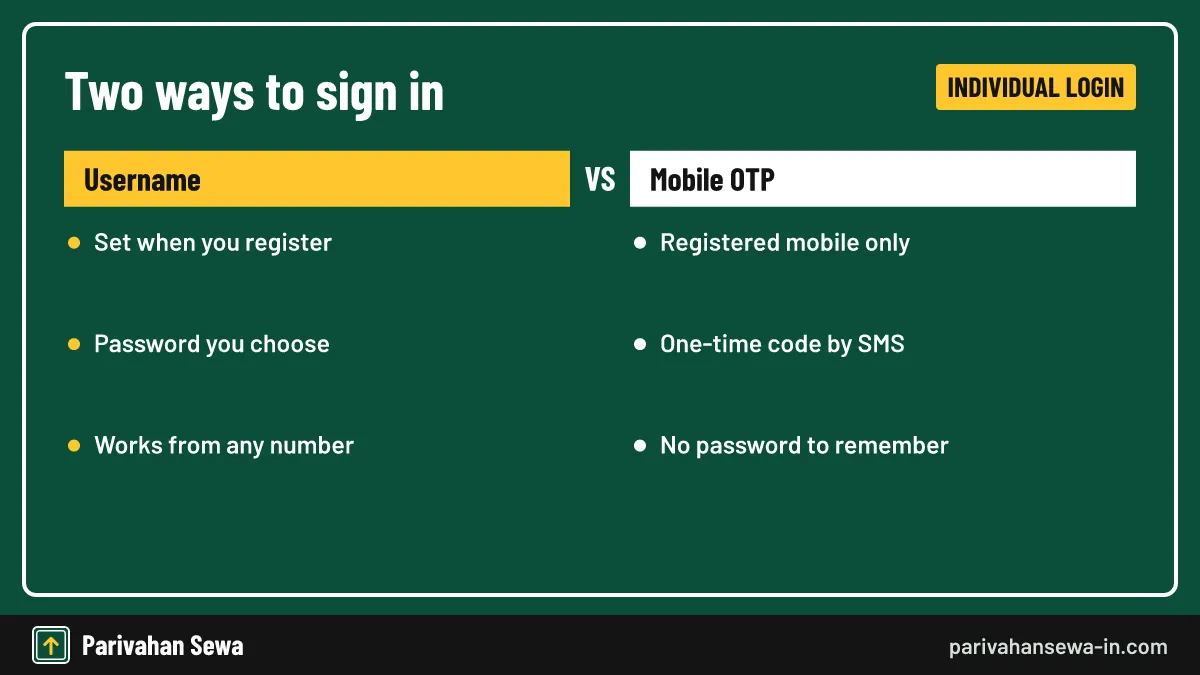
- The portal offers Individual Login by username and password or by registered mobile number and OTP.
- Businesses use the corporate login; registering needs the FASTag Customer ID and the firm's PAN.
- No public agent login is documented; point-of-sale staff work with bank-issued access, so customers should never use an agent's link.
- ICICI's FASTag helpline on the IHMCL bank list is 1800-210-0104; plaza-level problems go to the national 1033 line.
On this page · 24 sections
What is the ICICI online pass for FASTag?
The ICICI online pass is a monthly toll pass for a single plaza that you add to an existing ICICI Bank FASTag from the bank’s customer portal. It suits people who cross the same plaza often, such as daily commuters. The pass sits on your current tag, so no new sticker is needed.

Why people search for “online pass”
Most searches come from drivers who once bought a counter pass at the plaza and now want to do it from home, inside their FASTag account.
What the pass is not
It is not a separate card or a second tag. It is also not the yearly pass that NHAI sells for private cars. It is a plaza-specific discount set by the toll operator and attached to your ICICI tag ID.
How do you buy an ICICI online pass for a toll plaza?
You buy the pass after signing in to the customer portal. ICICI’s own instructions are short: open View tag account summary, go to the Vehicle tab and select Pass. You then pick the plaza and pass type and pay. The pass applies only to the vehicle and plaza you choose.
- Sign in. Open the FASTag section of ICICI Bank’s website and choose Individual Login with your username or registered mobile and OTP.
- Open the summary. Select View tag account summary to list the tags in your wallet.
- Pick the vehicle. Under the Vehicle tab, choose the registration number that crosses the plaza.
- Select Pass. Choose the plaza and the pass type offered for your vehicle class.
- Pay and save. Confirm the amount, pay, and keep the confirmation message or receipt.
Check the amount before paying
Pass prices are set per plaza and vehicle class and change when toll rates are revised. We do not list a price because it differs by plaza; the portal shows it before you confirm.
Buying at the plaza instead
If the portal does not list your plaza, ask at the plaza’s office or point-of-sale counter. IHMCL also explains a route where you choose the plaza on its site and are sent to the issuer bank’s page to enter the tag ID or vehicle number.
Which vehicles and plazas can use an ICICI monthly pass?
A monthly pass is offered only where the plaza operator runs one, and the price depends on the vehicle class on your tag. Cars, jeeps and vans are the usual buyers, but commercial classes can also have passes at some plazas. The pass never moves to another vehicle.
Plaza-specific by design
ICICI states that passes are specific to each toll plaza. If you cross two plazas daily, you need two passes, one for each. At every other plaza the normal toll comes out of your prepaid wallet.
Class on the tag must be right
The plaza reads the class coded on your tag. If the class is wrong, the pass may be refused or the wrong amount charged. Fix the vehicle details first, through the steps on our ICICI FASTag KYC update online page.
Plaza monthly pass or the national yearly pass?
The two products solve different problems. The plaza pass covers one plaza for a month. NHAI’s yearly pass for private cars covers national highway and expressway plazas for a year or 200 crossings, whichever comes first, and its FY 2026-27 fee is ₹3,075.
| Point | Plaza monthly pass | NHAI yearly pass (FY 2026-27) |
|---|---|---|
| Where you buy it | ICICI customer portal or the plaza | Rajmargyatra app or NHAI website |
| Coverage | One plaza only | NH and national expressway plazas |
| Validity | One month | 1 year or 200 crossings |
| Price | Set per plaza and class | ₹3,075 |
| Vehicles | As offered by the plaza | Private car, jeep or van only |
Which one fits you
For one nearby plaza, a plaza pass may cost less; for long highway trips in a private car, the yearly option usually wins. Our FASTag annual pass guide covers it in full.
Can both sit on one tag?
IHMCL’s annual pass FAQ says the yearly pass can run alongside a local or monthly pass, and crossings at the plaza with the other pass are not counted against the 200.
What is the fastag login icici com portal?
People who type fastag login icici com are looking for ICICI Bank’s FASTag customer portal, where you manage tags, recharge the wallet, read statements and add passes. ICICI’s portal guide and application form are hosted under the bank’s myfastag.icicibank.com address, and the login is reached from the FASTag section of icicibank.com.
What the portal is for
Once you are signed in you can see every tag linked to your wallet, the balance, each toll debit and recharge, your profile and KYC status, and service options such as passes and tag blocking.
Always start from the bank’s site
Bank web addresses change. ICICI has been moving its pages to newer domains, so a bookmark that worked last year may now fail. Open icicibank.com, go to FASTag and follow the login button rather than a link in a message.
Where is the fastag icici login home page?
The fastag icici login home page is the first screen of the customer portal, with buttons for Login and Register. Hover over Login to see Individual Login; hover over Register to choose Individual or Corporate. Corporate users have their own sign-in route from the same screen.
What you see on the home screen
If a page asks for card numbers, a UPI PIN or your net banking password on the first screen, close it. The FASTag login asks only for a username or mobile number.
What is fastaglogin icicibank com customer login?
fastaglogin icicibank com customer login is an address some drivers remember from older SMS messages and forum posts, where users signed in with the account ID from their activation SMS. We could not confirm that this address is still live on an official ICICI page, so treat it as an old bookmark.
What to do with an old link
Do not type an old address from memory or click it in a message. Go to ICICI Bank’s main website, open the FASTag section and use the login button there. That route always lands on whatever address the bank uses today.
Spotting a fake portal
Fake FASTag pages copy the bank’s colours. Check that the address is ICICI’s own domain and never enter a debit card PIN on a FASTag login screen. Never share an OTP with a caller, even one claiming to be from ICICI or NHAI.
How do I use ICICI login FASTag with a username?
For an ICICI login FASTag with a username, open the portal, hover over Login, select Individual Login and then Login via Username. Enter the username and password you created when you registered and submit. You land on the dashboard with your tags and wallet balance.
If you forgot the password
Use the forgot-password link on the login box. The portal verifies you through your registered mobile before letting you set a new password. If the mobile has changed, update it with customer care first.
Can I sign in with an OTP instead of a password?
Yes. ICICI’s portal guide lists Login via Mobile Number next to the username option. Enter the mobile number registered with your FASTag, request the one-time password, type it in and sign in. This is the easiest route if you never set a password.
When the OTP route works best
It suits people who bought the tag at a counter and never created a portal account; you only need the registered mobile.
When it will not work
If the tag was bought with a dealer’s or family member’s number, the OTP goes to them. Ask customer care to change the registered mobile after verifying ownership, then try again.
How does ICICI FASTag registration on the portal work?
ICICI FASTag registration on the portal creates a username and password for a tag you already own. Hover over Register, pick Individual or Corporate, and enter the details asked for. ICICI’s guide says corporate users must give their Customer ID and PAN; individuals verify with their tag details and mobile.
Registering a portal account vs buying a tag
Registering on the portal does not buy a new FASTag. To get a tag you apply through ICICI’s FASTag page, the iMobile Pay app, a branch or a point-of-sale counter with your RC and KYC papers. After activation you can then register for portal access.
Information to keep ready
Have the vehicle number, the Customer ID from the activation SMS, the registered mobile and, for a business, the firm’s PAN.
What can you do in the customer portal ICICI FASTag?
The customer portal ICICI FASTag account is where most self-service happens. After signing in you can check balances, recharge, download statements, add passes, update profile details and block a lost tag. It saves a call to support for routine tasks.
| Task | Where to look in the portal | Good to know |
|---|---|---|
| Check balance | Dashboard or tag account summary | Shows wallet and per-tag status |
| Recharge wallet | Recharge option | Net banking, card or UPI |
| Buy a monthly pass | View tag account summary, Vehicle tab, Pass | Plaza-specific |
| Download statement | Statement or transaction history | Pick the date range |
| Update KYC | Profile or KYC section | Needs documents in owner’s name |
| Block a lost tag | Tag management or service request | Call support if urgent |
Several vehicles in one wallet
If you own more than one vehicle, each tag shows separately in the summary but draws on the same wallet. Recharge once and every linked tag can use the balance.
Statements for claims
For reimbursement, download the month’s statement; it lists the plaza, date, time and amount of each debit.
What is the ICICI FASTag corporate login?
The ICICI FASTag corporate login is the sign-in route for businesses, fleet owners and transporters who hold many tags under one company wallet. It is reached from the same portal home page. A corporate user registers with the Customer ID and the firm’s PAN, then manages every vehicle tag from one dashboard.
What fleets use it for
Fleet managers recharge one wallet for all trucks, pull statements per vehicle, add tags as the fleet grows and block tags on vehicles that are sold. ICICI corporate internet banking can fund the wallet.
Who should hold the login
Give the corporate login to a named finance or fleet person, not to drivers; a shared depot password makes disputes hard to trace.
Which documents does a corporate account need?
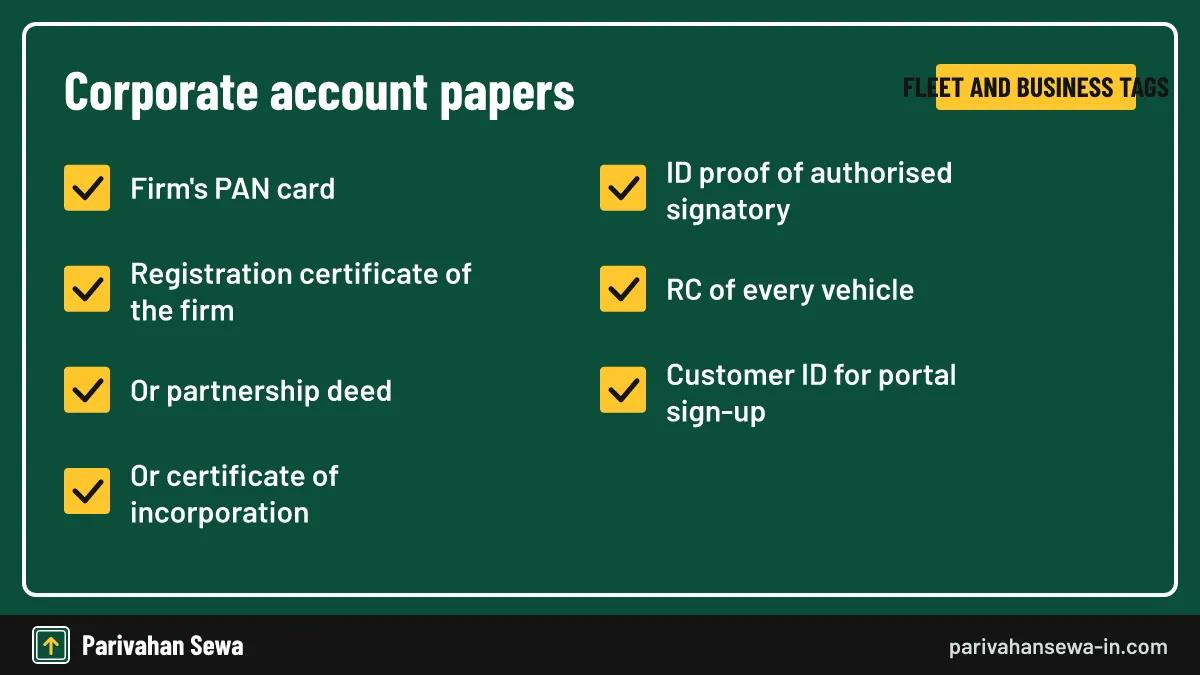
ICICI’s FASTag FAQ lists the firm’s PAN card, a registration certificate, partnership deed or certificate of incorporation, and the ID proof of the authorised signatory. Each vehicle also needs its RC. The company name on the RCs should match the firm’s papers.
Common reasons a corporate file is held
Files stall when the RC shows an old company name, the signatory has changed, or a vehicle is registered to a director personally.
Individuals with a business vehicle
A sole proprietor can buy tags in their own name with personal KYC. A corporate account makes sense once you run several vehicles and need one wallet and one statement.
Is there an ICICI FASTag agent login?
ICICI does not publish a public ICICI FASTag agent login page for customers. Tags sold at toll plazas, fuel stations and dealer counters are issued by point-of-sale (POS) agents working on the bank’s behalf; the application form even has a box for the POS agent’s signature. Agents use access the bank gives them.
How to become a POS agent
To sell ICICI FASTags, ask the bank’s FASTag team or a branch about becoming a point-of-sale partner. We found no public sign-up page, so never pay a third party for one.
What a customer should check at a counter
Make sure the agent enters your mobile number, not theirs, and that you get a receipt.
ICICI Bank FASTag agent login vs customer login
The ICICI Bank FASTag agent login is a staff tool for issuing tags, while the customer login is for managing a tag you own. They are separate. A customer cannot sell tags from their account, and an agent should not hold your password.
| Point | Customer or corporate login | POS agent access |
|---|---|---|
| Who uses it | Tag owner or company | Bank’s point-of-sale partner |
| Main job | Recharge, statements, passes, KYC | Issue and activate new tags |
| How you get it | Register on the portal | Given by ICICI Bank |
| Public page | Yes, from the FASTag section | Not publicly documented |
Red flags
Be wary of websites offering an “agent login” for a fee, or callers who say they can reset your login if you share an OTP. ICICI staff do not need your one-time password.
Is there an ICICI FASTag login app?
There is no separate FASTag-only app from ICICI that we could confirm. Instead, ICICI’s iMobile Pay app has a FASTag option under its bill pay section for recharge and auto-recharge. Portal tasks such as passes and statements are done on the web login. NHAI’s My FASTag app also shows balances for NETC tags.
What the app is good for
Use iMobile Pay to top up quickly, set an auto-recharge from your savings account, and check the balance. You need an ICICI savings account to use the full app.
When to use the web portal instead
For buying a plaza pass, downloading a long statement or managing a corporate fleet, the web portal gives more options than the app.
How do you activate ICICI FASTag?
To activate ICICI FASTag, the bank must link the tag to your vehicle and wallet after verifying your RC and KYC. Tags bought online are usually activated before dispatch; counter tags are activated by the POS agent. You get an activation SMS with your Customer ID once it is live.
- Apply with documents. Submit the RC, ID and address proof, and a photo through the bank’s FASTag page, app, branch or a POS counter.
- Pay the fee and deposit. Pay the issuance fee, refundable deposit and first load.
- Wait for verification. The bank checks that the RC and vehicle details match before activation.
- Read the SMS. The activation message carries your Customer ID; keep it safe.
- Fix the sticker. Stick the tag inside the front windscreen behind the rear-view mirror.
If the tag is not active
If no SMS arrives, call support with the tag ID or check NPCI’s NETC FASTag status page with your vehicle number.
Since February 2026
NHAI ended routine KYV checks for car, jeep and van tags issued from 1 February 2026, and asked issuer banks to validate vehicle details before activation instead.
How much does an ICICI FASTag cost?
You pay a one-time issuance fee, a refundable security deposit that depends on the vehicle class, and the first wallet load. IHMCL caps the issuance fee at ₹100 including GST. Deposits below come from published guides, as ICICI’s fee page did not open for us.
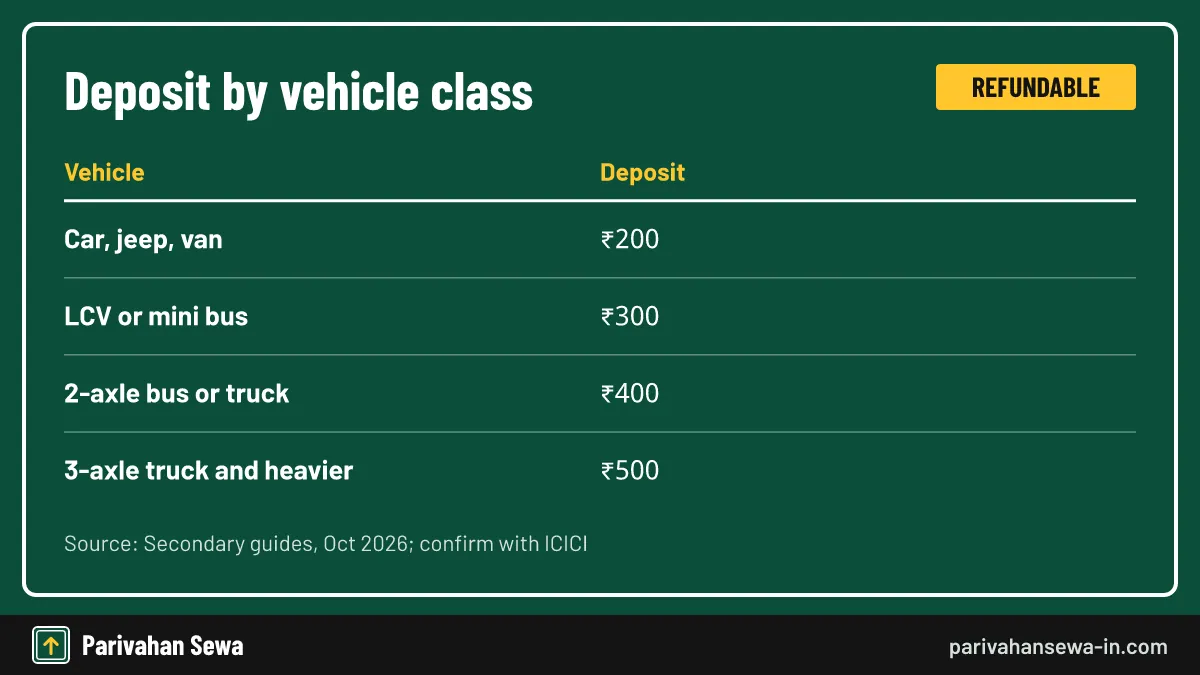
| Vehicle | Refundable deposit |
|---|---|
| Car, jeep or van | ₹200 |
| LCV or mini bus | ₹300 |
| Two-axle bus or truck | ₹400 |
| Three-axle truck and heavier vehicles | ₹500 |
Confirm before you pay
Fees can change; the checkout screen on ICICI’s FASTag page shows the exact amount for your vehicle class.
Getting the deposit back
The deposit is returned when you close the tag, after any negative balance is cleared. Ask support how the refund will be paid.
How do you top up the wallet after logging in?
Once signed in, choose the recharge option, pick the wallet or vehicle, enter the amount and pay by net banking, card or UPI. Without logging in, you can also pay from any UPI app’s FASTag section by choosing ICICI Bank as the issuer and entering the vehicle number.
Auto-recharge
ICICI account holders can set an auto-recharge in iMobile Pay, which tops up the wallet from savings when the balance falls below a level you choose.
Recharge not showing
Wait a short while and refresh the summary. If it still has not reached the wallet, note the payment reference and contact support.
How do you check the balance and statement?
The dashboard shows the wallet balance and each tag’s status as soon as you sign in. For a statement, open the transaction history, choose a date range and download it. Each debit SMS also shows the plaza and amount.
Without the portal
NHAI’s My FASTag app shows the balance for NETC tags, and the UPI bill-pay screen shows it when you fetch your ICICI FASTag before paying.
ICICI Bank FASTag customer care: how to reach support
For ICICI Bank FASTag customer care, call the toll-free line 1800-210-0104 listed for ICICI on IHMCL’s issuer bank list. Keep your vehicle number, tag ID and the date and time of the problem ready. For a plaza that will not read your tag, the national highway helpline 1033 can help. A guide lists [email protected] for email; confirm it on ICICI’s site first.

What to report
Typical calls cover a recharge that did not credit, a double deduction, a blacklisted tag, a lost sticker or a change of mobile number. For other banks’ numbers, see our FASTag customer care number list.
What does fast track ICICI mean?
Fast track ICICI is usually a misspelling of ICICI FASTag; “fast track” sounds like FASTag when spoken. We found no separate ICICI toll product called Fast Track. If you meant the tag or its login, the sections above apply.
If you meant something else
Fastrack is also a watch brand, and banks use “fast track” for quick loan offers. Those are not part of FASTag. Check ICICI’s own site for any banking product with that name.
Why does the ICICI customer FASTag login fail?
An ICICI customer FASTag login usually fails for one of four reasons: an old bookmark, a mobile number that is not the registered one, a username that was never created, or an account locked after wrong passwords. Each has a simple fix.

Browser problems
Clear the cache, turn off ad blockers for the page and try another browser. Some older portals do not load on outdated browsers.
What if the tag is lost or the vehicle is sold?
If the sticker is lost or damaged, block it through the portal or by calling support, then ask for a replacement tag. If you sell the vehicle, close your tag with ICICI so the new owner can buy their own; one vehicle can hold only one active tag.
Moving to another bank
If you prefer another issuer, close the ICICI tag first. Our guides to HDFC FASTag and other banks explain how buying works elsewhere, and the FASTag guide explains how the national system fits together.
Official links
ICICI Bank FASTag pageicicibank.com/fastag ↗ICICI FASTag customer portal guide (PDF)myfastag.icicibank.com ↗IHMCL FASTag user help and bank helplinesihmcl.co.in ↗NPCI NETC FASTag status checknpci.org.in ↗Icici online pass questions
What is the ICICI online pass?
It is a monthly toll pass for one plaza, added to your existing ICICI Bank FASTag through the customer portal. You do not need a new tag; the pass is linked to the tag you already have.
Can I use one ICICI monthly pass at every toll plaza?
No. ICICI says monthly passes are specific to each toll plaza. At other plazas the normal toll is deducted from your wallet as usual.
Is the ICICI online pass the same as the NHAI annual pass?
No. The plaza monthly pass is bought through the bank's portal for one plaza. NHAI's yearly pass for private cars is bought on the Rajmargyatra app or the NHAI website and covers national highway plazas.
How do I log in to the ICICI FASTag portal?
Choose Individual Login and sign in either with the username and password you set at registration or with your registered mobile number and the OTP sent to it.
I never registered. How do I get a username?
Use the Register option on the portal, pick Individual or Corporate, and follow the prompts with the details asked for, such as your FASTag Customer ID. You then set a username and password.
Where do I find my ICICI FASTag Customer ID?
It is sent when the tag is activated, so check the activation SMS first. You can also see it after signing in, or ask customer care to share it after verifying you.
Is there a separate ICICI FASTag agent login for customers?
No public agent login page is documented. Point-of-sale staff issue tags on the bank's behalf with access the bank gives them. Customers should use only the customer or corporate login.
What is the ICICI FASTag customer care number?
The IHMCL issuer list gives 1800-210-0104 for ICICI Bank FASTag. For a reader fault or a dispute at a national highway plaza you can also call the 1033 highway helpline.
Parivahan Sewa (parivahansewa-in.com) is an independent information website and is not affiliated with MoRTH, Parivahan or any state transport department. Confirm fees and rules on the official portal before you pay or apply.