SBI FASTag: how to log in, recharge, update KYC and close your tag
SBI FASTag is the electronic toll tag issued by State Bank of India under the national NETC programme. You manage it on the SBI FASTag customer portal (fastag.sbi.bank.in): log in with your registered mobile, recharge by card, net banking or UPI, download statements, upload KYV photos and surrender the tag. The SBI toll-free FASTag helpline is 1800-110-018.
Key takeaways
- The SBI FASTag customer portal now runs at fastag.sbi.bank.in; the older onlinesbi address may not open.
- You can recharge from the portal, from YONO or from any UPI app using the handle netc.vehicle number@sbi.
- The tag itself is capped at ₹100; SBI adds a refundable deposit and a starting balance that depend on the vehicle class.
- KYC and KYV (vehicle photo) uploads must be approved, or recharges and the tag itself can be stopped.
- Report a wrong toll deduction within 40 days; closing the tag returns the balance to your bank account.
On this page · 42 sections
What is SBI FASTag?
SBI FASTag is a radio-frequency toll sticker issued by State Bank of India, one of the issuer banks in the National Electronic Toll Collection (NETC) system run by NPCI with NHAI’s toll arm, IHMCL. Fixed to the windscreen, it lets the plaza read your vehicle and debit the toll from a prepaid SBI wallet without stopping.

Who issues and runs it
State Bank of India is the issuer bank: it sells the tag, holds your wallet, runs the customer portal and handles complaints. The toll plaza’s own bank, called the acquirer, reads the tag. NPCI routes the money between them, and IHMCL sets programme rules such as KYC and One Vehicle One FASTag.
Why people pick SBI
Many drivers already bank with SBI and like having the tag with the same bank, even though the wallet is separate from the savings account. For a side-by-side look at issuers, see our FASTag online pass guide.
How does SBI bank FASTag work at a toll plaza?
An SBI bank FASTag works the same way as any NETC tag. As your car enters the lane, a reader picks up the tag ID, checks with the national mapper that the tag is active, and the plaza’s bank requests the toll from SBI. SBI debits your wallet and sends an SMS.
What the SMS tells you
Each debit SMS normally shows the plaza name, the amount, the date and time, and the balance left.
When the lane does not open
A boom that stays down usually means a low balance, a blocked tag or a sticker the reader cannot see. A vehicle without a valid FASTag in a FASTag lane pays double the toll. Low balance is also the main reason tags get blacklisted; our page on FASTag blacklist rules explains the causes.
How does the SBI FASTag login work?
The SBI FASTag login opens your tag account on the bank’s customer portal. Your login ID is usually the mobile number you gave when buying the tag, and SBI sends the first password by SMS once the account is created. After logging in you see the wallet balance, tag list and service menu.

What you need to log in
Keep the registered mobile number, the password from the welcome SMS and access to that phone for OTPs. If several vehicles are on one account, they all appear under the same login.
Forgotten password
Use the Forgot Password link on the login page. The portal asks for your login ID or mobile and sends a reset code by SMS. If the mobile number has changed, you cannot reset online; contact SBI’s FASTag helpline or a branch to update it first.
Where is the SBI FASTag customer portal?
The SBI FASTag customer portal is at fastag.sbi.bank.in, with the login page titled “SBI TOLL”. SBI has been shifting its sites to the bank.in domain, which banks regulated by the RBI now use. Reach the portal from SBI’s FASTag page rather than from a search ad.
Spotting the real portal
Look for sbi.bank.in at the end of the address bar, not a look-alike such as sbi-fastag-recharge plus another ending. The real portal never asks for your card PIN or UPI PIN on its login page.
What can you do on the SBI FASTag portal?
The SBI FASTag portal covers almost every service you need after buying the tag. SBI lists balance checks, statement downloads, recharge by net banking, debit card, credit card or UPI, complaint lodging and tag surrender. KYV photo uploads and profile changes sit in their own menus.
Main menu items
| Menu | What it does |
|---|---|
| Dashboard | Shows wallet balance and the tags linked to your account |
| Tag Recharge | Adds money to the wallet by card, net banking or UPI |
| Statement | Lists tolls and recharges for a date range you choose |
| KYV Upload | Lets you upload vehicle photos for Know Your Vehicle checks |
| Complaint | Raises a dispute about a deduction or a recharge |
| Surrender | Starts closure of the tag account |
Menu names change
Banks redesign portals often, so the exact labels may differ. If you cannot find an item, look under Services or My Account. The functions themselves have stayed the same across redesigns.
SBI FASTag customer login for first-time users
Your first SBI FASTag customer login uses the credentials sent by SMS when the tag was issued. Enter them, change the password when prompted, and check that the vehicle number shown matches your RC. If the SMS never came, ask the branch or agent who sold the tag to resend the details.
Set a strong password
Choose a password you do not use for net banking or email. The portal holds your vehicle number, mobile and payment history, so a reused password is a real risk if another site leaks it.
Check the profile
Confirm the name, mobile and email on the profile page. Toll and recharge alerts go to the mobile shown there, and any later reset codes depend on it.
SBI FASTag login portal errors and fixes
Most SBI FASTag login portal problems come from an outdated address, an expired password or a browser blocking the page. Try the bank.in address, reset the password, and allow pop-ups for the site. If the account is locked after wrong attempts, wait for the lock period or call SBI.

Page not loading
Clear the browser cache or open a private window. Old bookmarks to fastag.onlinesbi.com may fail now; replace them with the new address.
Captcha keeps failing
Captcha text is case-sensitive. Refresh it rather than retyping a hard one, and turn off auto-fill tools that may paste stray characters into the field.
Is SBI bank FASTag login different from net banking?
Yes. The SBI bank FASTag login is a separate account on the FASTag portal. Your OnlineSBI net banking user name and password do not open it. You can, however, pay a recharge through net banking once you are inside the FASTag portal, and YONO offers a FASTag bill-pay option.
Why they are separate
The FASTag wallet is a prepaid instrument governed by NETC rules, not a part of your savings account. That is why a tag bought from SBI can be recharged from any bank’s UPI app, and why you do not need an SBI savings account to own one.
How to do SBI FASTag recharge?
An SBI FASTag recharge can be done in four ways: the customer portal’s Tag Recharge menu, YONO’s FASTag bill payment, any UPI app using the handle netc.vehicle number@sbi, or a bill-pay app that lists SBI as the issuer. Each one credits the same wallet linked to your registration number.

Picking a channel
Use UPI for speed, because you do not need the portal password. Use the portal when you also want a statement or need to recharge several vehicles on one account. YONO suits SBI account holders who want everything inside one banking app.
How much to add
Plan for the trip ahead plus a buffer, because a negative balance can be recovered from your deposit and may block the tag. Limited-KYC wallets are capped, so a big top-up may be refused until full KYC is approved.
SBI FASTag recharge online with card, UPI or net banking
To do an SBI FASTag recharge online from the portal, log in, open Tag Recharge, enter the amount, press Pay Now and choose net banking, a debit or credit card, or UPI. The payment page belongs to SBI’s gateway, and a confirmation SMS follows once the wallet is credited.
- Log in to the portal. Open fastag.sbi.bank.in and sign in with your login ID and password.
- Open Tag Recharge. Pick the vehicle if more than one tag is on the account.
- Enter the amount. Type the top-up you want, within your KYC limit.
- Pay. Choose net banking, card or UPI and approve the payment.
- Check the SMS. Confirm the new balance in the alert or on the dashboard.
Recharge channels compared
| Channel | Login needed | Best for |
|---|---|---|
| SBI FASTag portal | Yes, FASTag portal ID | Several tags, statement in the same visit |
| YONO bill payment | Yes, YONO login | SBI account holders |
| UPI handle netc.vehicle number@sbi | No | Fast top-up from any bank |
| Bill-pay apps (Google Pay, PhonePe, Paytm) | App login only | Using a saved card or UPI |
Card charges
Some channels add a convenience fee for credit cards. Check the amount shown on the payment page before you approve it; UPI from a savings account is usually the cheapest option.
Can you do SBI FASTag recharge by Google Pay?
Yes. An SBI FASTag recharge by Google Pay works through the app’s FASTag bill-payment option: choose FASTag recharge, select State Bank of India as the issuer, enter the vehicle registration number, check the name it fetches, then pay. You can also send money to the UPI handle netc.vehicle number@sbi.
Using the UPI handle
Type the handle in lower case without spaces, for example netc. followed by the vehicle number and @sbi. The app should show the owner’s name before you pay. If it shows another name, stop: you may have typed the wrong registration number.
PhonePe, Paytm and others
Most UPI and bill-pay apps follow the same pattern: FASTag recharge, pick SBI, enter the vehicle number. The money goes to SBI, not the app, so complaints about a missing credit go to SBI’s FASTag helpline.
SBI FASTag login recharge from the portal
An SBI FASTag login recharge means topping up after signing in to the portal instead of using an outside app. It is the right choice when you hold several tags on one customer account, because you can pick the exact tag and see the updated balance and statement in one place.
Recharging several tags
Fleet owners can usually choose a tag from a list or recharge the customer wallet that serves all tags, depending on how the account was set up. Check which one your account uses before paying, so money does not sit unused on the wrong vehicle.
Keeping a receipt
After paying, open the statement for today’s date and download it. The line shows the transaction reference, which helps if the bank later asks you to prove a credit.
What if an SBI FASTag login recharge online payment fails?
If an SBI FASTag login recharge online payment fails but money leaves your account, wait a few hours: gateways often reverse or complete the credit on their own. If the wallet still shows no credit by the next day, raise a complaint on the portal or call SBI with the reference number.
Before calling
Note the date, amount, UTR or reference number and the channel you used. With UPI, this is in your app’s history. The helpline can trace a payment far faster with these details than with your name alone.
What is the SBI FASTag customer care number?
The SBI FASTag customer care number is the toll-free line 1800-110-018 (often written 1800 11 0018), as listed in IHMCL’s table of issuer banks. Call it to block a lost tag, query a deduction, check a missing recharge or ask about surrender. For a plaza-side problem on a national highway, NHAI’s 1033 helpline also helps.
Helplines at a glance
| Need | Number | Run by |
|---|---|---|
| SBI FASTag account, recharge, tag block | 1800-110-018 | State Bank of India |
| Problem at a national highway toll plaza | 1033 | NHAI |
| PNB FASTag account | 1800-419-6610 | Punjab National Bank |
Other banks
Every issuer has its own line. For the full bank-by-bank list, see our page on the FASTag customer care number for each issuer.
How to download the SBI FASTag statement?
To get your SBI FASTag statement, log in to the customer portal, open the Statement menu, pick the tag and a date range, and download the file. It lists every toll with the plaza name, plus recharges and refunds.
Reading the statement
Each line shows a date and time, a plaza or recharge description, a debit or credit, and the running balance.
Is there an SBI FASTag app?
There is no separate SBI FASTag app listed on SBI’s FASTag page. Instead, SBI points users to the customer portal, which works in a phone browser, and to YONO for FASTag bill payments. IHMCL’s My FASTag app also supports recharging tags from many banks.
Beware of copycat apps
App stores carry many apps with “SBI FASTag” in the name that belong to third-party recharge sellers. They may work, but they are not SBI. Never type your FASTag portal password or bank PIN into such an app.
Using the portal on a phone
The portal’s mobile view handles login, recharge and statements.
Can you manage SBI FASTag online through YONO?
Partly. SBI FASTag online services in YONO cover recharges: SBI lists the path Bill payments, then Quick Bill Pay, then FASTag. You pick SBI as the issuer, enter the vehicle number and pay from your SBI account. Statements, KYV and surrender still need the FASTag portal or a branch.
When YONO helps most
YONO is handy if your salary or savings account is with SBI, since the money moves within the bank.
When to use the portal instead
Use the portal for anything beyond a top-up: a disputed deduction, downloading a statement, uploading vehicle photos or changing the mobile number on the tag account.
What does fastag onlinesbi com mean now?
Fastag onlinesbi com was the older address of SBI’s FASTag portal, and many guides and bookmarks still use it. From this site’s checks in October 2026 it no longer opened, while SBI’s own pages point to fastag.sbi.bank.in. The services are the same; only the web address changed.
Updating your bookmark
Delete the old bookmark and save the bank.in address. If a link in an old SMS or email takes you to the old domain, do not follow redirects to unknown sites; type the new address yourself.
Is fastag onlinesbi still the right address?
No. Fastag onlinesbi without the .com is a common search, but neither form is the address SBI now publishes. The safe route is to open SBI’s main website and follow its FASTag link.
Why the address moved
Indian banks have been moving their websites to the .bank.in domain to make look-alike scam sites easier to spot. SBI’s FASTag portal is part of that move, which is why older addresses fall away.
Is sbi fastag com an official site?
There is no SBI site at sbi fastag com. Anything sold under that name is a private website, possibly a recharge reseller or a scam. SBI’s FASTag services sit on sbi.bank.in and its subdomain fastag.sbi.bank.in, so check the address bar before entering any detail.
Signs of a fake
A fake page often asks for your card PIN, CVV and UPI PIN together, shows a fixed “processing fee” or pushes you to call a mobile number. SBI does not ask for a PIN on its login page and its helpline is a toll-free 1800 number.
If you already paid
Call your bank to block the card or UPI, then report it at the national cybercrime portal or helpline. Change your FASTag portal password if you typed it on the fake page.
What is SBI FASTag KYC?
SBI FASTag KYC is the identity check every tag owner must pass, plus a vehicle check called KYV (Know Your Vehicle). For KYC, IHMCL accepts a driving licence, PAN, passport or voter ID with a passport-size photo; for KYV, you upload photos of the vehicle and the fixed tag.

Limited and full KYC
A tag can start on limited KYC, which caps the wallet. Third-party guides list a ₹10,000 cap for limited-KYC SBI wallets; full KYC raises the limit. IHMCL warns that a wallet left without a KYC upgrade for two years cannot be recharged at all.
What KYV checks
KYV confirms that the tag is fixed on the vehicle it was issued for. The images usually show the front with the number plate and the tag on the windscreen, and sometimes the side of the vehicle. Mismatched or blurry photos are the commonest reason for rejection.
How to do SBI FASTag KYC update?
For an SBI FASTag KYC update, log in to the customer portal, open KYV Upload, choose Update KYV, add the requested photos and submit. Document-based KYC changes, such as a new address proof, are handled at a branch or with an SBI FASTag agent. SBI says agent-assisted KYV uploads carry no charge.
- Log in. Sign in to fastag.sbi.bank.in with your portal ID.
- Open KYV Upload. Select Update KYV for the tag you want.
- Upload photos. Add clear images of the vehicle front, number plate and tag.
- Submit and track. Check the status in the same menu until it reads approved.
Rejections and retries
SBI’s rules allow up to five re-uploads after a rejection, after which the tag is closed. Read the rejection reason each time instead of sending the same photos again. Daylight images with the full number plate visible usually pass.
How long approval takes
IHMCL says KYC requests are processed within 7 working days at most. SBI also gives a short window from registration to finish KYV, so do it on the day you fix the tag. Rules for NHAI-issued tags differ; see IHMCL FASTag KYC update online for those.
What is the SBI FASTag agent login?
The SBI FASTag agent login is a separate portal for authorised point-of-sale agents, dealers and staff who issue tags, not for vehicle owners. Agents use it to register customers, map a tag to a vehicle, upload KYC and KYV, and print receipts. Owners should use the customer portal instead.
Credentials come from SBI
Agent IDs are created by SBI for each point-of-sale and are not available on request online. If you are an agent who cannot log in, contact the branch or the SBI FASTag team that onboarded you.
How to apply for SBI FASTag?
To apply for SBI FASTag, go to an SBI branch or an authorised point-of-sale agent, or use the online request route on SBI’s FASTag page. You give KYC documents and the vehicle RC, pay the tag fee, deposit and opening balance, and the tag is mapped to your registration number.

Before you apply
Make sure no other active FASTag is linked to the same vehicle. Under One Vehicle One FASTag, only the newest tag stays active, and an old tag with balance may be closed in the process. Our guide on how to change FASTag bank covers moving from another issuer.
Commercial vehicles
Trucks, buses and LCVs follow the same steps, but the vehicle class on the RC sets a higher deposit and opening balance.
SBI FASTag apply online: step by step
The SBI FASTag apply online route lets you start the request from SBI’s FASTag web page. You fill in owner and vehicle details, upload KYC and RC copies, pay the charges and wait for the tag to be posted. Once it arrives, you fix it and finish KYV on the portal.
- Open SBI’s FASTag page. Start from sbi.bank.in and follow the apply or buy link.
- Enter details. Give the owner name, mobile, address and vehicle registration number.
- Upload documents. Add the RC and an accepted ID and address proof.
- Pay. Pay the tag fee, refundable deposit and opening balance online.
- Receive and fix. Stick the tag on the windscreen, then complete KYV.
Delivery time
Third-party guides mention about a week to ten days for delivery after verification, but SBI does not publish a fixed time. If you need a tag before a trip, buying at a branch or PoS gets it to you the same day.
SBI FASTag purchase online or at a branch?
An SBI FASTag purchase online suits people who can wait for delivery and want to avoid a visit. A branch or point-of-sale counter suits anyone who needs the tag immediately, has a commercial vehicle, or wants help with KYC. The price is the same either way.
Online versus counter
| Factor | Online request | Branch or PoS agent |
|---|---|---|
| When you get the tag | After posting | Same visit |
| Who fixes the tag | You | Often the agent |
| KYC and KYV | Uploaded by you | Agent can upload |
| Best for | Private cars, no rush | Urgent need, trucks, buses |
Buying through marketplaces
Some shopping sites sell bank FASTags. Buy only from a listing that says the issuer is SBI and that sends the tag for activation in your name; otherwise you may get a tag mapped to the wrong account.
How to get SBI FASTag?
How to get SBI FASTag comes down to one choice: walk in or order. Walk into an SBI branch or an SBI FASTag point-of-sale at a toll plaza, petrol pump or dealer, or order through SBI’s online channels. Carry the original RC, a photo ID and a passport-size photo either way.
Finding a point of sale
SBI publishes a list of PoS locations on its FASTag pages.
New car buyers
Most dealers fit a FASTag before delivery, and the issuing bank may be whatever the dealer has a tie-up with. Ask for SBI at the time of booking if you prefer it.
What is the SBI FASTag price?
The SBI FASTag price has three parts: the tag cost, which the government caps at ₹100 including GST; a refundable security deposit; and an opening wallet balance. For a car, guides list a ₹200 deposit and ₹100 balance, so the first payment is about ₹400. Confirm the current figures on SBI’s page.

Price by vehicle class
| Vehicle class | Example vehicles | Tag fee | Security deposit | Opening balance |
|---|---|---|---|---|
| Class 4 | Car, jeep, van, Tata Ace-type mini LCV | ₹100 | ₹200 | ₹100 |
| Class 5 | Light commercial vehicle | ₹100 | ₹300 | ₹140 |
| Class 6 and 7 | Three-axle vehicle, bus, truck | ₹100 | ₹400 | ₹300 |
| Class 12 and 15 | 4 to 6 axle, 7 or more axle | ₹100 | ₹400 | ₹300 |
| Class 16 | Heavy construction or earth-moving machine | ₹100 | ₹400 | ₹300 |
The class 4 row is the one every guide agrees on. For classes 5 to 16, guides disagree (one major guide lists ₹300 for both deposit and balance on the heavier classes) and SBI could not be checked on its own site, so treat those rows as guide figures and confirm them on SBI’s page before you pay.
What you get back
The security deposit comes back when you surrender the tag, after any pending tolls or negative balance are adjusted. The tag fee is not refunded. Class-wise deposits above come from published guides; SBI can change them, so check its fees section first.
How to activate SBI FASTag?
To activate SBI FASTag, the bank first maps the tag to your registration number when it is sold; you then fix it inside the windscreen, add balance and finish KYV on the portal. A tag bought at a counter is usually active the same day. An online order activates after verification.
Checking it is live
Log in and confirm the tag status reads active and the vehicle number is right. A recharge SMS showing your balance is another good sign the wallet is working.
Where to stick it
Fix the tag on the inside of the front windscreen, near the rear-view mirror. IHMCL warns that a tag not fixed on the windscreen can lead to blacklisting and double toll.
SBI FASTag replacement for a damaged or lost tag
An SBI FASTag replacement is needed when the sticker is torn, peeled off, unreadable or lost. Call SBI’s helpline to block a lost tag first. The bank then issues a new tag for the same vehicle and, as IHMCL notes, moves the balance across. A small replacement fee may apply.
Damaged tag
A sticker damaged while peeling cannot be reused, since it is built to tear. Visit a branch or PoS with your RC for a new one. See how to get duplicate FASTag for the general process.
New windscreen
If the windscreen is changed, the old tag goes with the glass. Ask for a replacement before your next highway trip.
How to close SBI FASTag?
To close SBI FASTag, use the surrender option on the customer portal or give SBI a written cancellation request with the tag. SBI returns the remaining balance and the security deposit to your bank account, after clearing any negative balance. You stay liable for tolls until surrender is complete.
When you sell the car
Close the tag before handing over the car, or the buyer’s tolls may come out of your wallet. For the wider process across issuers, read how to deactivate FASTag.
Legal heirs
If the owner has died, family members can claim the refund with a death certificate and a cancellation request at a branch.
How to cancel SBI FASTag?
How to cancel SBI FASTag follows the same surrender route as closing, but people often ask it soon after buying, for example after a wrong vehicle mapping or a duplicate purchase. Ask the selling branch or agent first: a fresh tag with wrong details is usually cancelled and reissued quickly.
Cancelling a duplicate
If you bought two tags for one car, only the newer stays active under One Vehicle One FASTag. Cancel the unwanted one so its deposit and balance come back.
Proof to keep
Save the surrender request number and the final statement. They help if a later toll is wrongly charged.
What is the FASTag QR code?
A FASTag QR code is a printed code on some tag stickers or kits that helps link or check the tag, for example to open the issuer’s page or show the tag ID. It is not used to pay tolls; the lane reads the radio chip. No official NPCI or IHMCL page explains the QR’s contents.
Scanning safely
If you scan the QR, check that the page opens on the bank’s own domain. Never pay a stranger who shows a “FASTag QR” at a plaza; tolls are taken from your wallet automatically.
Fake QR scams
Fraudsters print look-alike QR codes on fake recharge leaflets. Recharge only through the channels listed above.
What is inside the FASTag chip?
The FASTag chip is a small passive RFID chip with an antenna inside the sticker. It has no battery and stores a unique tag ID, not money or personal details. The reader powers it with radio waves, reads the ID, and the bank looks up the wallet.

Why the sticker tears
The antenna is printed into the label so the tag breaks if peeled off. This stops one tag being moved between vehicles.
What the chip cannot do
It cannot track your location between plazas, and a phone cannot read it.
How does FASTag technology work?
FASTag technology uses passive RFID conforming to EPC Gen-2 and ISO 18000-6C. An overhead reader sends a radio signal, the tag replies with its ID, and the plaza checks it against the national mapper. The plaza’s bank then requests the toll from your issuer, here SBI, through NPCI’s switch.
Why speed and position matter
The reader needs a clear view of the windscreen. Metallic films, a tag behind a sun visor or a cracked sticker can cause read failures.
Annual pass on the same tag
The NHAI annual pass runs on your existing FASTag. See our FASTag annual pass page for who can buy it.
Where is the RFID number on FASTag?
The RFID number on FASTag, also called the tag ID, is printed on the sticker itself, usually as a long code near the barcode. The same ID appears in the SBI customer portal under your tag details and on the purchase receipt. Note it down before fixing the tag.
When you need it
Support staff ask for the tag ID when a tag is blocked or misread. Monthly passes can also be bought using the tag ID or vehicle number.
What is the FASTag support email id?
The FASTag support email id depends on who issued the tag. For SBI tags, guides list [email protected]; for national programme complaints, guides list IHMCL’s [email protected]. Neither address could be confirmed on an official page from here, so check SBI’s or IHMCL’s contact page first.
What to write
Give the vehicle number, tag ID, date and amount, and attach the SMS or statement line. Phone complaints are usually faster.
How do you raise a FASTag dispute with SBI?
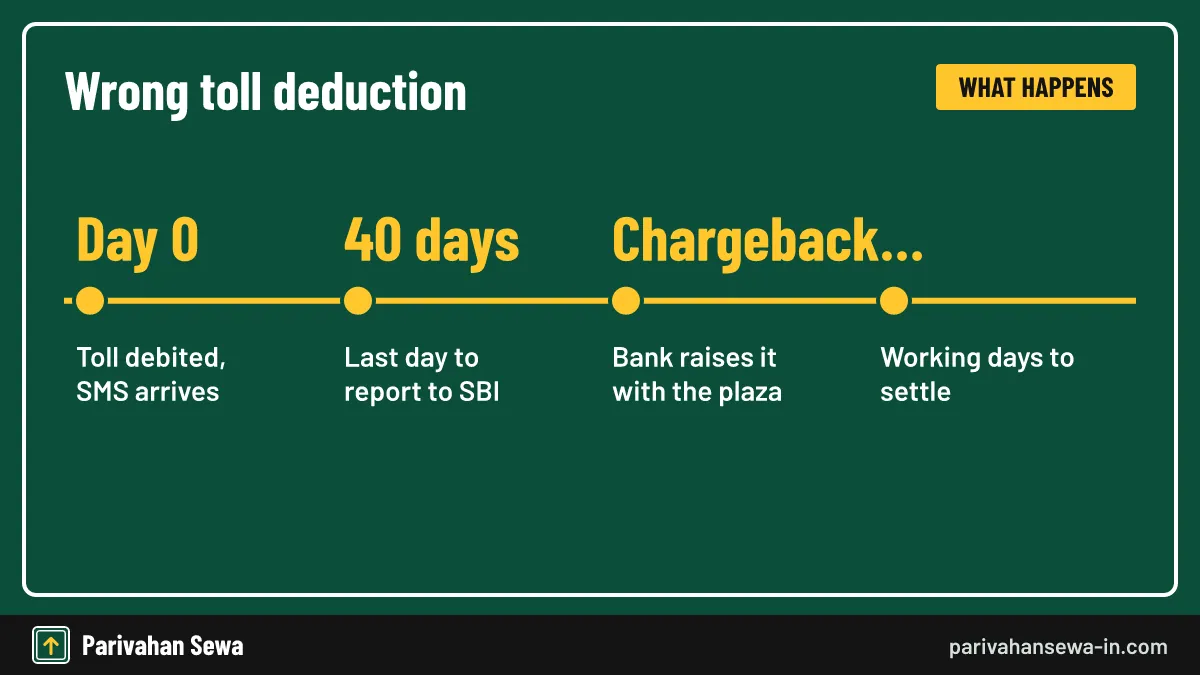
To raise a FASTag dispute with SBI, report the wrong deduction through the portal’s complaint option or the helpline within 40 days of the transaction. If the plaza charged wrongly, SBI raises a chargeback, which IHMCL says normally takes 20 to 30 working days.
Common disputes
Typical cases are a double debit, a toll on a day you did not travel, or the wrong vehicle class. Attach the SMS and statement line.
Escalating
If SBI’s answer is unsatisfactory, use the bank’s grievance channels, and for plaza conduct call 1033.
How does PNB FASTag apply work?
A PNB FASTag apply request works much like SBI’s: Punjab National Bank is also a NETC issuer, so you visit a PNB branch or PoS, give KYC documents and the RC, and pay the tag fee, deposit and opening balance. The tag is then mapped to your vehicle.
Choosing between SBI and PNB
Both tags work at the same plazas. Compare charges and how easily you can reach the bank’s portal and helpline.
PNB FASTag apply online and the PNB FASTag app
For PNB FASTag apply online, start from Punjab National Bank’s official website and follow its FASTag link to the request form and customer portal. PNB’s FASTag services are reached through its own portal and banking channels; check PNB’s site for a current PNB FASTag app before installing one from a store.
Avoid look-alike apps
Search results show many unofficial “PNB FASTag” apps. Install only an app whose developer is Punjab National Bank.
How to reach PNB FASTag customer care?
PNB FASTag customer care is on the toll-free number 1800-419-6610, as listed by IHMCL. Call it for a lost PNB tag, a missing recharge or a wrong deduction. SBI’s helpline cannot handle PNB tags, because each issuer keeps its own wallet records.
Plaza problems
For a national highway plaza that does not read a valid tag, call 1033, whichever bank issued it.
Does the HDFC FASTag app download work for SBI tags?
No. An HDFC FASTag app download gives you HDFC Bank’s FASTag tools, which manage only HDFC-issued tags. An SBI tag is managed through SBI’s portal or YONO, though you can still pay an SBI recharge from HDFC’s UPI using the netc handle. Our HDFC FASTag page covers HDFC tags.
Switching banks
To move from SBI to HDFC, close the SBI tag and buy an HDFC one; the old tag cannot be transferred.
Official links
SBI FASTag customer portalfastag.sbi.bank.in ↗SBI NETC FASTag pagesbi.bank.in ↗IHMCL FASTag user informationihmcl.co.in ↗NPCI NETC FASTagnpci.org.in ↗SBI FASTag questions
Is SBI FASTag accepted at every toll plaza?
Yes. It is a NETC FASTag, so it works at every plaza on the national electronic toll network, including national highway and most state plazas that accept FASTag.
What is the SBI FASTag customer care number?
IHMCL's issuer list gives State Bank of India's FASTag toll-free number as 1800-110-018. For problems at a national highway toll plaza you can also call the NHAI helpline 1033.
Can I recharge SBI FASTag without logging in?
Yes. Use any UPI app with the handle netc.vehicle number@sbi, YONO's FASTag bill payment, or a bill-pay app that lists SBI as the FASTag issuer.
Why does the old fastag.onlinesbi.com address not open?
SBI has been moving its websites to the bank.in domain. Use fastag.sbi.bank.in, and reach it from SBI's own website so you land on the real portal.
How long does an SBI FASTag recharge take to reflect?
UPI and portal recharges usually show within minutes. If the money is debited but the wallet does not update, keep the reference number and contact SBI's FASTag helpline.
Can I have two FASTags on one car?
No. Under the One Vehicle One FASTag rule, only the latest FASTag linked to a vehicle stays active, so close any old tag before buying an SBI one.
Is the SBI FASTag security deposit refundable?
Yes. The deposit is returned when you surrender the tag, after any negative balance or pending toll has been adjusted.
What happens if I do not complete KYV?
SBI's rules allow a set window and a limited number of re-uploads. A tag whose vehicle photos are not approved can be closed, so finish KYV as soon as the tag is issued.
Can I move my SBI FASTag to a new car?
No. A tag is tied to one vehicle's registration number. Close the old tag and buy a new one for the new vehicle.
Does SBI FASTag charge a fee on each toll?
The toll amount is set by the plaza, not the bank. Check the charges section on SBI's FASTag page for any bank fees on recharge channels before you pay.
Can I check my SBI FASTag balance by SMS?
SBI sends an SMS after every toll and recharge showing the balance. For a full history, log in to the customer portal and download the statement.
Who issues an SBI FASTag for a company vehicle?
The same SBI channels issue corporate tags, but KYC then needs the company's documents, such as its PAN and proof of the authorised signatory.
Parivahan Sewa (parivahansewa-in.com) is an independent information website and is not affiliated with MoRTH, Parivahan or any state transport department. Confirm fees and rules on the official portal before you pay or apply.