mParivahan: the official transport app for your RC and licence
mParivahan is the official mobile app of the Ministry of Road Transport & Highways (MoRTH), built by NIC. It lets you keep a virtual RC and virtual driving licence on your phone, search basic vehicle details by number, check e-challans and open Vahan and Sarathi services. The app is free on Android and iOS and signs you in with an OTP.
Key takeaways
- Download only the MoRTH / NIC app from the official Play Store or App Store listing.
- A virtual RC or DL is added with the document number and an OTP to the registered mobile.
- MoRTH has advised officials to accept documents shown in mParivahan and DigiLocker.
- Vehicle search shows masked owner names, so it cannot be used to find a person's address.
- Maharashtra RTO work, such as RC details for MH vehicles, runs on the same Vahan records.
On this page · 38 sections
What is mParivahan?
mParivahan is the Government of India’s mobile app for transport documents and services. It connects to the same national Vahan (vehicle) and Sarathi (licence) databases as the Parivahan website, so the details you see in the app match your RTO records exactly.

What the app is for
It is mainly used to carry a virtual RC and virtual driving licence, look up a vehicle by number, and check challans without opening a browser. For most drivers, that means the app replaces the paper folder of documents that used to sit in the glovebox.
What the app is not
It is not a separate RTO. Applications such as a new licence or RC transfer still run on Sarathi and Vahan; the app links you to them. Fees for those services are paid on the same official gateway, whether you start from the app or the website.
Who makes the mParivahan app?
The mParivahan app is developed by the National Informatics Centre (NIC) for the Ministry of Road Transport & Highways. NIC also runs the Vahan and Sarathi systems, which is how the app reads your documents directly from the source.
Checking the developer
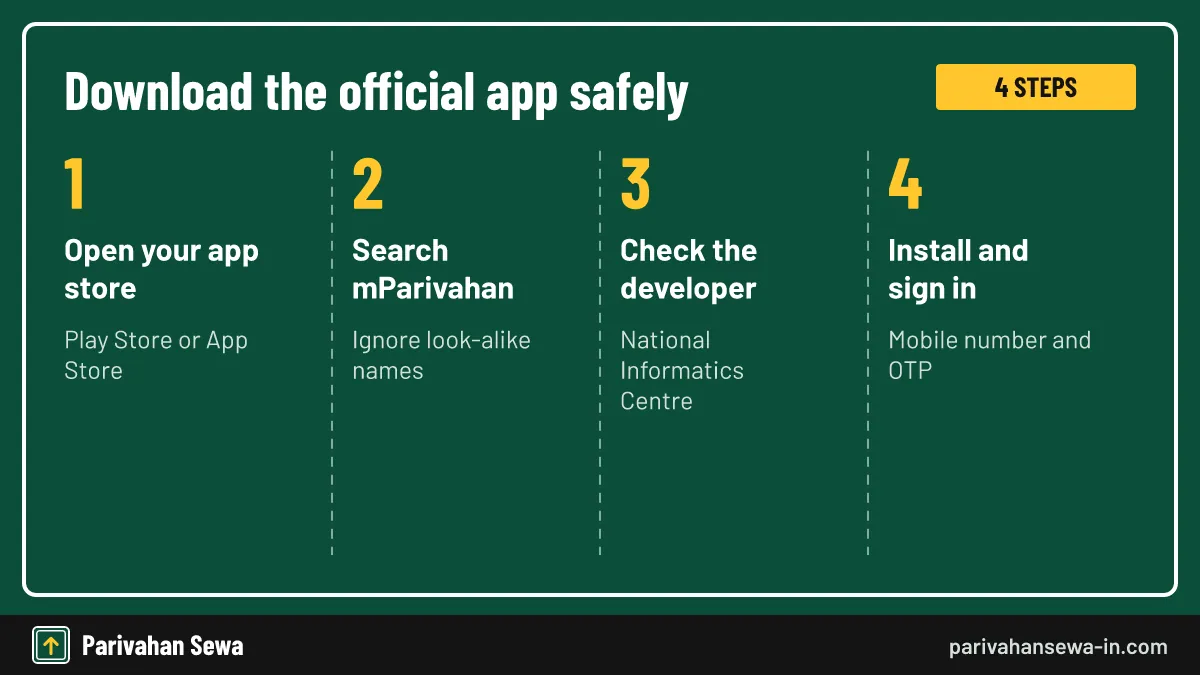
On the store page, the developer should be the National Informatics Centre. Apps by other developers that use “Parivahan” in the name are private. The official listing also shows a large number of downloads and a government contact email, which copycat apps rarely have.
Why the publisher matters
Only the official app can show verified documents with a QR code that officials can scan. Private apps can only display information. If a private app is ever hacked or shut down, your data with it is at risk, while the official app reads directly from government servers.
How does mParivahan app download work safely?
An mParivahan app download takes a minute from the Google Play Store or Apple App Store. Search for the name, check that NIC is the developer, and install. Avoid APK files sent on WhatsApp or posted on websites.
Android
Open the Play Store, search mParivahan, confirm the developer and tap install. Allow only the permissions the app asks for when you use a feature. The app does not need access to your contacts, call logs or messages to work.
iPhone
Open the App Store, search mParivahan and install the NIC app. Sign-in works the same way on both platforms. Your account is tied to your mobile number, so you can switch between Android and iPhone without losing access.
Is the mParivahan mobile app free?
Yes. The mParivahan mobile app is free to download and free to use for documents, vehicle search and challan checks. You pay only when you choose to pay a fine or an application fee through the official gateway.
No subscription
There are no in-app purchases or paid plans. Any app asking for money to “unlock” your RC or licence is not the official one. Report such apps to the store and uninstall them, because they may also be collecting your vehicle details.
Data use
The app uses little mobile data. Documents you have added open quickly once loaded. This makes the app practical even on basic phones and slow connections in rural areas.
How do you sign in to mParivahan?
You sign in to mParivahan with your mobile number and a one-time password. There is no separate password to remember. Use the number you want linked to the app, ideally the same one registered in your RC and licence.
First sign-in
Open the app, choose sign in, enter your mobile number, type the OTP and set your profile name. The profile name is only for the app; it does not change the name printed on your documents.
Changing phones
Install the app on the new phone and sign in with the same number. Your added documents are linked to your account rather than the phone, so they can be restored after you verify again. Add your documents again if they do not appear. Remember to sign out on the old phone, especially if you are selling or giving it away.
How do you create virtual RC in mParivahan?
To create a virtual RC, open the RC section in the app, enter the registration number and verify ownership. The app asks for the last digits of the chassis and engine numbers and sends an OTP to the mobile number registered with the vehicle.
- Install the official app. Check that the developer is the National Informatics Centre.
- Sign in with your mobile. Enter your number and the OTP.
- Add your RC. Enter the registration number and the chassis and engine digits.
- Confirm with OTP. Enter the code sent to the vehicle’s registered mobile.
- Use the virtual RC. It appears in your dashboard with a QR code.

Company vehicles and vehicles on loan
A company car is registered in the company’s name, so the OTP goes to the company’s registered number. Ask the fleet manager to add the RC, or to share a verified copy from DigiLocker. A vehicle bought on a bank loan shows the bank as hypothecation holder in the record, but the owner can still add the virtual RC with the usual digits and OTP.
If the OTP goes to an old number
Update the mobile number in the vehicle record through Vahan first. Our mParivahan RC check guide covers common errors. Changing the number on Vahan usually needs Aadhaar authentication or a visit to the RTO with identity proof.
More than one vehicle
You can add several RCs to one account, as long as you can verify each one. Families often keep every household vehicle in one account, which makes renewals and insurance dates easy to track.
How do you add a virtual licence in mParivahan?
Adding a virtual driving licence in mParivahan works like the RC: enter the licence number and date of birth, then verify with the OTP. The licence appears with its classes, validity dates and a QR code.
Licence details to keep ready
You need the 15-character licence number and your date of birth as recorded by the RTO. If your licence is in an older local format, renew or update it on Sarathi so the number matches the national pattern.
After a renewal
Once Sarathi approves a renewal, the virtual licence shows the new validity. Remove and re-add it if the old date still appears. The same applies after you add a new vehicle class to your licence.
Is a virtual document in mParivahan legally valid?
Documents shown in mParivahan are drawn from the government records, and MoRTH has advised traffic police and transport departments to accept them, as it has for DigiLocker. A virtual RC or licence is therefore accepted at routine checks.
Keep the app ready
Open the document before you reach a checkpoint, especially where the network is weak. Keeping the phone charged matters as much as having the document, so carry a power bank on long trips.
Documents the app cannot replace
The virtual RC and licence cover roadside checks. They do not replace the original smart card when you sell a vehicle, apply for a loan against it or travel abroad with an international driving permit. Some offices, such as passport and bank branches, may also ask to see an original. Keep the cards in a safe place at home and carry the phone copy every day.
Screenshots and photos
A screenshot or photo is not a verified document. Always show it live in the app. Officers may refuse a screenshot because it cannot be verified against the record.
How do police verify mParivahan documents?
Officers scan the QR code on the virtual document, or search the number on their own devices, which read the same national databases. This confirms the document is current and has not been edited.
What the officer sees
The officer sees the live record, including validity and any suspension. That is why an expired document cannot be hidden. If your licence or RC shows a problem, the app tells you before an officer does, giving you time to fix it.
If the scan fails
The officer can search the RC or licence number directly. Keep your phone screen brightness up so the code scans easily. A cracked screen protector over the code can also stop a scan from working.
How do you search a vehicle number in mParivahan?
Type a registration number into the search box in mParivahan to see the vehicle’s model, registration date, fuel type and validity details. This helps before buying a used vehicle. Our RTO vehicle information app guide compares other apps.
What the search shows
You see the RTO, model, registration date, fuel, and the validity of insurance and fitness where recorded. Comparing these with the seller’s papers is a quick way to spot a mismatch before you pay for a used vehicle.
What it does not show
The owner name is masked and no address or phone number is shown, to protect privacy. Sites that claim to show full owner details for a fee are not using an official service.
How do you check challans in mParivahan?
The challan option in mParivahan searches pending e-challans by vehicle number or licence number and lets you pay through the official gateway. It shows the same data as the e-Challan website. See our e-challan guide for court cases.
Paying in the app
Select the pending challan, pay by UPI or card, and save the receipt. The challan status changes to paid once the bank confirms, which can take a few minutes.
Court challans
Challans sent to a virtual court cannot be paid in the app. Use the virtual courts portal instead. The app shows that the challan is in court, so you know where to go next.
Which Sarathi and Vahan services open from mParivahan?
mParivahan links to common Sarathi and Vahan services, such as licence renewal and RC services, but the applications themselves run on those portals. The app is a shortcut rather than a separate application system.
Licence services
Renewal, duplicate licence and address change open Sarathi’s forms for your state. You still upload documents and pay fees on Sarathi, so keep scans ready before you start from the app.
Vehicle services
RC-related services open Vahan’s citizen services. Track them with the application number on the application status page.
Why should you avoid the mParivahan old version?
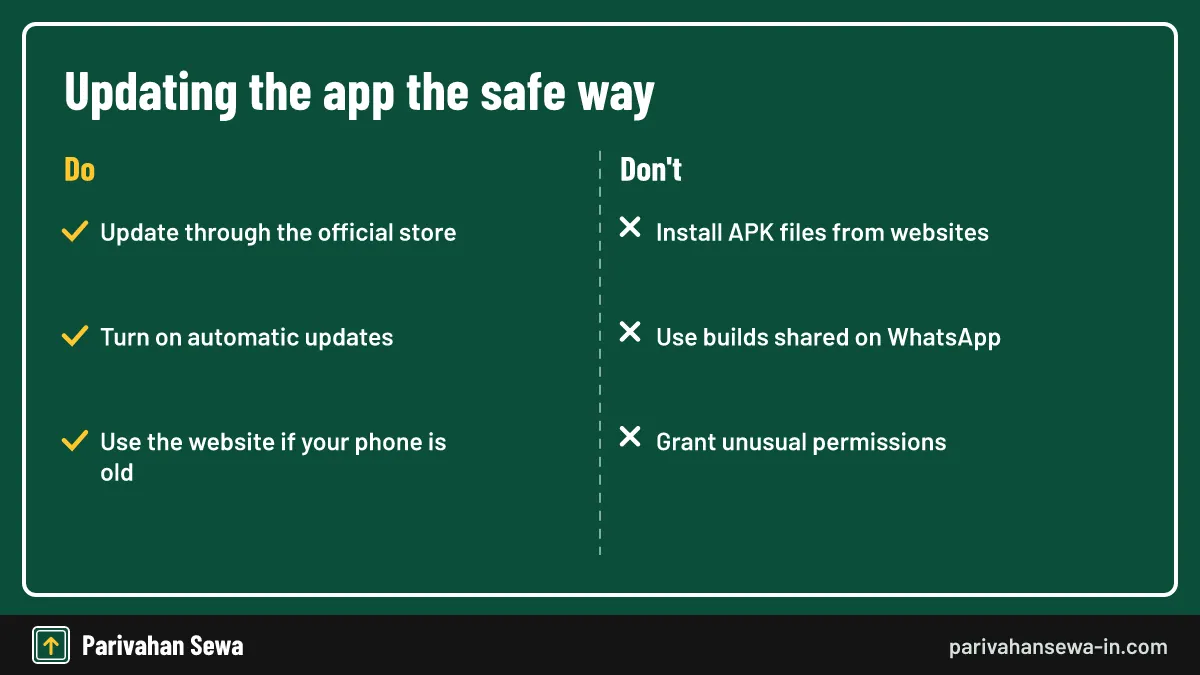
An mParivahan old version downloaded as an APK from a website can be outdated or tampered with. Old builds may fail to sign in, show wrong data or carry malware. Always update through the official store.
Why people look for old versions
Some users prefer an older layout or have phones that do not support the latest version. In that case, use the Parivahan website in a browser instead. The website offers the same services and works on almost any phone browser.
Updating safely
Turn on automatic updates in the store, or check for updates every few months. Updates often add support for new document types and fix sign-in problems.
Is M Parivar app the same as mParivahan?
M Parivar app is a common misspelling of mParivahan, made when typing quickly on a phone. There is no official transport app called “M Parivar”. Similar mix-ups include “m parivahan” with a space and “emparivahan”; all of them mean the same NIC app. Search for mParivahan and check the NIC developer name.
Look-alike names
Apps named “Parivahan” by private developers are not the government app, even if they use similar colours. Check reviews too: complaints about hidden charges are a common sign of a copycat.
What to install
Install only the NIC app, and remove any private app that asks for unusual permissions. If you entered card details in a copycat app, call your bank and the cyber crime helpline 1930.
Which transport papers can you keep as digital copies?
Your RC, driving licence, insurance policy and PUC certificate can all be kept as digital documents, through mParivahan, DigiLocker or the insurer’s app. Our DigiLocker app guide explains how documents are issued there.

Issued documents
Documents fetched from the issuing system, such as the RC from Vahan, are verified copies. They carry a digital signature, so any change to the file would be detected.
Uploaded documents
Files you upload yourself to DigiLocker are only stored copies and carry less weight at a check. Use them for your own reference, and fetch the issued version whenever the department offers it.
How does DigiLocker CBSE login relate to transport papers?
DigiLocker CBSE login is how students fetch CBSE mark sheets and certificates from DigiLocker. It uses the same DigiLocker account that can hold your licence and RC, so one account serves for both school records and transport papers.
One account for everything
Sign in with your mobile number or Aadhaar. CBSE documents and transport documents appear in the same issued-documents list. Students who first used DigiLocker for results can add their learner licence to the same account later.
Proof of age for a licence
A CBSE certificate in DigiLocker can help as proof of age when you apply for a learner licence. Check your state’s accepted document list on Sarathi before relying on it.
How does fancy number parivahan booking work?
Fancy number parivahan booking lets you reserve a special registration number, such as 0001 or 9999, through the fancy number portal. You register, choose your state and RTO, pick an available number, pay the registration amount and take part in the e-auction if others bid.

Amounts and auctions
Base prices and auction rules are set by each state. See our VIP number plate price guide for state amounts with sources. The registration amount is usually forfeited if you do not use the number in time, so read the state rules before bidding.
After you win
The number is allotted to your vehicle when it is registered within the time allowed. Your dealer needs the allotment letter to register the vehicle with that number.
Vahan sewa dashboard: what does it show?
The Vahan sewa dashboard is a public statistics page that shows vehicle registrations across India, by state, RTO, fuel type, vehicle category and maker. It is used by researchers, journalists and the motor industry. Transport planners also use it to track how quickly states are moving to cleaner fuels such as CNG and electric.
Useful filters
You can filter by year, state and fuel type, for example to see how many electric vehicles a state registered. Many news reports on vehicle sales quote figures from this dashboard.
What it does not show
It shows totals only. No vehicle or owner details are visible. For a single vehicle’s details, use the search in mParivahan instead.
What are Vahan paid NR services?
Vahan paid NR services is a label that appears in some state Vahan service menus. We could not confirm a single national definition, so open the service on your state’s Vahan citizen page and read the description shown before paying anything.
Ask before you pay
If the label is unclear, the RTO help desk can tell you which service it covers. Note the application number and receipt for any payment, in case you need a refund or correction later.
Track like any other service
Paid services create an application number that you can track on the status page. Status tracking is free, whatever the service.
What is VM Vahan?
VM Vahan does not match any official service name we could find. Most people searching for it want the Vahan citizen services portal or the mParivahan app. Use those, and avoid sites that use “VM Vahan” as a brand.
Where to go instead
For vehicle services, open vahan.parivahan.gov.in. For documents on your phone, use mParivahan. Both are reached from parivahan.gov.in, so bookmarking one address covers everything.
Stay on official domains
Real transport services use parivahan.gov.in addresses. State transport departments use their own .gov.in or .nic.in addresses for notices.
How do you use Vahan Odisha services?
Vahan Odisha services run on the national Vahan portal with Odisha selected as the state. RC copies, transfers, address changes and tax payments for OD vehicles start there.
Choosing your RTO
Select Odisha and your RTO from the list. Each district office appears separately. Vehicles carry OD codes, while older ones may still show the former OR code on their plates.
Odisha-specific notices
The state transport department publishes fees and notices on its own website.
How do you use TN Vahan services?
TN Vahan means the Vahan portal used with Tamil Nadu selected. Vahan Tamil Nadu services include RC copies, ownership transfer and tax payment for TN vehicles.
Picking the RTO
Choose Tamil Nadu and the RTO that registered your vehicle. Chennai alone has several RTOs, so check the code on your RC before choosing.
Tamil Nadu transport notices
Fees and office details are published by the Tamil Nadu transport department.
How do you use Vahan West Bengal services?
Vahan West Bengal services are used by selecting West Bengal on the Vahan portal. They cover registration services, tax and permits for WB vehicles.

| State | Code | Where to start |
|---|---|---|
| Odisha | OD | Vahan citizen services, state Odisha |
| Tamil Nadu | TN | Vahan citizen services, state Tamil Nadu |
| West Bengal | WB | Vahan citizen services, state West Bengal |
| Maharashtra | MH | Vahan citizen services, state Maharashtra |
Kolkata and districts
Kolkata and each district RTO appear in the list. Choose the office that registered the vehicle. The first four characters of your WB plate identify the office.
West Bengal notices
The state transport department publishes local notices on its website.
RTO Maharashtra: how is it organised?
RTO Maharashtra offices work under the state Motor Vehicles Department. Each office has a code, from MH01 for Mumbai Central onward, and handles registrations and licences for its area.
| Code | RTO office |
|---|---|
| MH01 | Mumbai Central (Tardeo) |
| MH04 | Thane |
| MH05 | Kalyan |
| MH09 | Kolhapur |
| MH12 | Pune |
| MH14 | Pimpri-Chinchwad |
| MH20 | Chhatrapati Sambhajinagar (Aurangabad) |

Mumbai’s four RTOs
Mumbai is split between MH01 (Mumbai Central, Tardeo), MH02 (Mumbai West, Andheri), MH03 (Mumbai East, Wadala) and MH47 (Mumbai North, Borivali). Navi Mumbai (MH43) and Panvel (MH46) are separate offices outside the city limits. Your address decides which one handles your application.
Head office and regional offices
The Transport Commissioner’s office leads the department. Regional and deputy regional offices cover groups of districts. Smaller areas are served by sub-regional offices that report to them.
Finding all codes
Our RTO codes section lists every MH code with its office.
RC details Maharashtra: how do you get them?
RC details Maharashtra owners need come from Vahan. Owners can download an RC copy, and anyone can view basic vehicle details in mParivahan. Our MH transport guide covers each service.
Owner’s RC copy
Choose Maharashtra on Vahan, enter the registration and chassis digits and verify with the OTP. Save the PDF and add the virtual RC to mParivahan at the same time.
Basic vehicle details
Search the number in mParivahan for model, registration date and validity details. It is a quick check before paying a deposit on a used vehicle.
RC details online Maharashtra: which route is fastest?
For RC details online Maharashtra, the fastest route is mParivahan for basic details and Vahan for the full RC copy. Both read the same record. If the two ever show different details, the Vahan record is the one the RTO will use, so raise any correction there.
For buyers
Search the number before buying a used vehicle, and compare the model and registration date with the papers. Also check pending challans on the e-Challan portal, because they stay with the vehicle.
For owners
Add the virtual RC to mParivahan so you always have the details on your phone.
Is there an official Maharashtra RTO app?
There is no separate Maharashtra RTO app for documents. Maharashtra uses mParivahan for virtual documents and Vahan and Sarathi for services. The state transport website lists offices and notices.
Apps with Maharashtra in the name
Private apps may use “Maharashtra RTO” in their names. They are not government services. Some show ads and ask for more personal data than they need.
What to use
Use mParivahan on the phone and the official portals in a browser.
MH RTO online: which services work?
MH RTO online services include RC copies, ownership transfer, address change, licence renewal, learner licence tests and appointment booking. They run on Vahan and Sarathi with Maharashtra selected.
Vehicle services
RC transfer, hypothecation changes and duplicate RC are filed on Vahan. Some of these need a vehicle inspection or original documents at the RTO after you apply.
Licence services
Learner licence, renewal and duplicate licence are filed on Sarathi. Maharashtra lets many applicants take the learner test online after Aadhaar authentication.
How does Maharashtra RTO search work?
A Maharashtra RTO search usually means finding the office for a code, or the code for a city. Use our RTO codes section or the office list on the state transport website.
Search by code
Enter a code such as MH12 to find Pune RTO’s details.
Search by city
Search the city to find the office that covers it, as some cities have more than one RTO.
RTO Kalyan: what does MH05 cover?
RTO Kalyan uses the code MH05 and serves Kalyan and nearby areas in Thane district. Vehicles registered there carry MH05 on their plates.
Services at Kalyan
Licence tests, vehicle inspections and document checks happen at the office. Applications start on Vahan and Sarathi. Arrive early with your appointment slip and original documents.
Booking a slot
Book test and service slots online before visiting.
RTO Aurangabad: where is the official website?
RTO Aurangabad, now Chhatrapati Sambhajinagar, uses code MH20. There is no separate website for the office; the RTO Aurangabad website information is on the Maharashtra transport department site, and services run on Vahan and Sarathi.
The name change
The city was renamed Chhatrapati Sambhajinagar. The RTO code MH20 stays the same. Older documents may still say Aurangabad; both names refer to the same office.
Online services
Choose Maharashtra and the MH20 office when you apply online.
RTO Thane website: which services are online?
The RTO Thane website details sit on the Maharashtra transport department site. Thane uses code MH04. Licence and vehicle services start on Sarathi and Vahan.
Thane area offices
Thane district also has offices at Kalyan (MH05) and Vasai (MH48). Your address decides which one handles your application.
Visiting Thane RTO
Bring your appointment slip and original documents for tests or inspections.
Pimpri Chinchwad RTO website: what can you do?
The Pimpri Chinchwad RTO website information is part of the Maharashtra transport department site. The office uses code MH14 and serves the Pimpri-Chinchwad area near Pune.
Pune or Pimpri-Chinchwad?
Pune city is MH12; Pimpri-Chinchwad is MH14. Choose the office that matches your address. Applying to the wrong office can delay your application.
Online services
Apply on Vahan or Sarathi and select the MH14 office.
RTO Kolhapur official website: how do you use it?
The RTO Kolhapur official website content sits within the Maharashtra transport department site. Kolhapur uses code MH09.
Finding Kolhapur notices
Open the office list on the state site and choose Kolhapur for address and timings.
Applying online
Select the MH09 office when you start a Vahan or Sarathi application.
Maharashtra vehicle: which rules apply to it?
A Maharashtra vehicle follows the central Motor Vehicles Act and the state’s Maharashtra Motor Vehicles Rules, which set local procedures. The state also sets road tax and some fees.
Central and state rules
National rules decide licence classes and penalties. State rules add procedures, tax rates and local fees. When the two differ, the central Act sets the limits within which the state works.
Where to read them
The Maharashtra transport department publishes notifications. Our road tax section covers state tax.
New RTO office: how do you find yours?
States sometimes open a new RTO office to split a busy area. When that happens, vehicles registered later get the new code and your nearest office may change. Check the state transport website for the current list.
Does your RC change?
No. Existing vehicles keep their registration number. Only new registrations get the new code. You may need to use the new office for future services, so check which office covers your address.
Moving to another office’s area
If you move within Maharashtra, update the address on your RC through Vahan and your licence through Sarathi. The registration number stays the same, but future services are handled by the office for your new address. Moving to another state is different: the vehicle needs a NOC from the old RTO and re-registration in the new state after the allowed period.
Which office handles you
Your office is decided by your address. Select it when you apply online.
What should you do if mParivahan is not working?
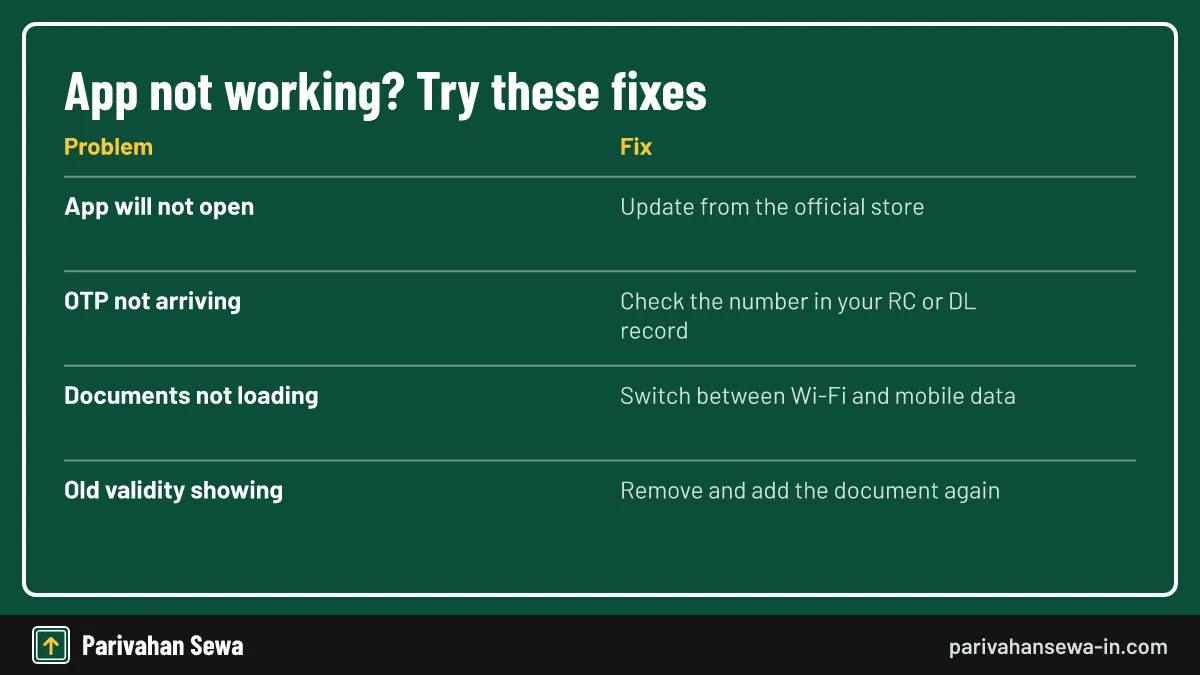
If mParivahan will not open, sign in or load documents, most problems come from an old app version, a wrong mobile number or a network issue. Try the fixes below before reinstalling.
Quick fixes
Update the app, check the date and time on your phone, and switch between mobile data and Wi-Fi. If nothing works, clear the app’s cache in phone settings before reinstalling.
OTP not arriving
The OTP goes to the number registered in the record. If that number has changed, update it through Vahan or Sarathi.
mParivahan vs DigiLocker: which should you use?
Both mParivahan and DigiLocker show verified transport documents. mParivahan is made for transport, with vehicle search and challans. DigiLocker holds documents from many departments, from Aadhaar to marksheets.

| Feature | mParivahan | DigiLocker |
|---|---|---|
| Virtual RC and licence | Yes | Yes |
| Vehicle search | Yes | No |
| Challan check | Yes | No |
| Other documents | No | Yes |
Use both
Many drivers keep documents in both, so one works if the other app has problems. Both are free, so there is no cost to keeping a backup.
Other mParivahan guides
See our PUC certificate guide and pollution check centre finder.
All mParivahan, PUC & apps guides
Official links
Parivahan Sewa (mParivahan details)parivahan.gov.in ↗Vahan citizen servicesvahan.parivahan.gov.in ↗Fancy number bookingfancy.parivahan.gov.in ↗DigiLockerdigilocker.gov.in ↗Maharashtra Motor Vehicles Departmenttransport.maharashtra.gov.in ↗MParivahan questions
Is mParivahan a government app?
Yes. It is published by the National Informatics Centre for MoRTH. Other apps with similar names are private products.
Does mParivahan work without internet?
Documents you have already added can be opened with a weak connection, but adding documents, searching vehicles and checking challans need internet.
Can I add someone else's RC to my mParivahan?
Only if the OTP reaches you. The OTP goes to the mobile number registered with the vehicle, which protects the owner's record.
Why does mParivahan show only part of the owner's name?
Owner details are masked for privacy. Full details are released only to the owner or to authorities.
Can I pay a challan in the mParivahan app?
Yes. The challan option searches your vehicle or licence and opens the official payment gateway for pending challans.
Is a screenshot of mParivahan accepted?
No. Show the live document in the app, with its QR code, so the officer can verify it.
How do I update my mobile number for mParivahan OTPs?
The OTP uses the number in your RC or licence record. Update it through Vahan or Sarathi first, then add the document again.
Does mParivahan replace the RC smart card?
For checks on the road, the virtual RC is accepted. Keep the smart card for sale, transfer and offices that ask for the original.
Can I book a fancy number through mParivahan?
Fancy number booking runs on the Parivahan fancy number portal in a browser. The app links to Vahan services but the auction itself happens on the website.
Is mParivahan available in Hindi?
The app offers language options in settings. Document details appear as recorded by the RTO.
What is the Maharashtra transport department website?
The official site is transport.maharashtra.gov.in. RC and licence services themselves run on Vahan and Sarathi.
Which RTO code is Kalyan?
Kalyan RTO uses the code MH05. Thane is MH04 and Pimpri-Chinchwad is MH14.
Parivahan Sewa (parivahansewa-in.com) is an independent information website and is not affiliated with MoRTH, Parivahan or any state transport department. Confirm fees and rules on the official portal before you pay or apply.