DigiLocker app download: install, sign up and use it safely
A safe DigiLocker app download takes a minute: open the Google Play Store or Apple App Store, search DigiLocker, check that the publisher is a Government of India body under MeitY, and install. The app is free. Sign up with your mobile number, an OTP and a 6-digit PIN, then link Aadhaar to pull verified documents such as your licence and RC.
Key takeaways
- The DigiLocker app download is free on both stores; there is no paid plan and no reason to install an APK file.
- DigiLocker is run by the Ministry of Electronics and IT under Digital India; it went live for the public on 1 July 2015.
- Documents in the Issued Documents section are at par with originals under Rule 9A; your own uploads are not.
- Issued Aadhaar, PAN and driving licence copies were accepted as airport ID by a 2018 civil aviation circular.
- Guides report no self-service delete button; closing an account means a request to DigiLocker support.
On this page · 40 sections
What is digital locker?
A digital locker is a government cloud account that holds verified copies of your certificates, linked to your mobile number and Aadhaar. In India the service is DigiLocker. Departments push documents into it directly, and you can also store your own scans in a small personal space.
Issued documents and your own uploads
DigiLocker keeps two shelves. Issued documents come straight from the issuer, such as a transport department or exam board, and carry its digital signature. Uploaded documents are photos or PDFs you add yourself. Only the first shelf counts as an official copy.
Who finds it most useful
Students fetching mark sheets, drivers carrying a licence and RC, and anyone filling KYC forms use it most. Instead of photocopies, you share a verified copy from your phone, and the receiving office checks it with the issuer.
Is the DigiLocker app Government of India software?
Yes. The DigiLocker app is a Government of India service run by the Ministry of Electronics and Information Technology (MeitY) under the Digital India programme. A beta opened in February 2015 and the public launch followed on 1 July 2015. It is not a private company’s product.
Who builds and runs it
The National e-Governance Division (NeGD) under MeitY publishes the official user manual and manages the platform. By December 2024 the service reported about 43.49 crore users and billions of issued documents, which makes it one of India’s largest e-governance apps.
How to read the store listing
On the store page, the developer line should name a MeitY body such as the National e-Governance Division. If the publisher is a person, a small studio or an unknown company, it is a look-alike and should not be trusted with your Aadhaar.
How does a DigiLocker app download work?
A safe DigiLocker app download comes only from the Google Play Store or the Apple App Store. Search the name, open the government listing, confirm the publisher and tap Install. The whole download and setup takes a few minutes on a normal mobile connection.

- Open the official store. Use the Play Store on Android or the App Store on iPhone.
- Search DigiLocker. Open the listing published by the Government of India.
- Check the publisher. It should be a MeitY body such as the National e-Governance Division.
- Install the app. Tap Install and wait for it to finish.
- Sign up or sign in. Register with your mobile number, an OTP and a 6-digit PIN.
Downloading on an iPhone
The iOS version sits in the App Store under the same name. As of 2025 it needed iOS 13.4 or later. Older iPhones that cannot update should use the DigiLocker website in Safari instead of hunting for a modified copy.
What to do right after installing
Open the app once while you have a steady signal, because the first sign-in sends an OTP. Allow notifications if you want alerts when a department pushes a new document, such as a fresh licence after renewal.
Is the DigiLocker app free download?
Yes. The DigiLocker app free download is the only version there is: the government does not charge for the app, the account or the storage. There is no premium tier, no in-app purchase and no “unlock” fee for any document you are entitled to.
Costs you might still meet
Some services that DigiLocker links to, such as applying for a duplicate certificate with a board or department, may carry that body’s own fee. That fee is paid on the issuer’s portal. DigiLocker itself never bills you.
Why paid versions are a warning sign
If a website asks for money to “activate” DigiLocker, or a caller wants a payment to fix your locker, it is a scam. Report it and do not share any OTP during such a call.
What do you need for a DigiLocker app download for Android free?
For a DigiLocker app download for Android free, you need a phone that runs a recent Android version, some free storage and the Play Store. In April 2025 the Android release (version 9.0.3) was about 53 MB and needed Android 10 or later.
Checking your Android version
Open Settings, then About phone, and read the Android version line. If it shows 9 or lower, the Play Store may hide the app or mark it incompatible. Use the website in Chrome on such phones.
Space and data use
Keep at least a few hundred megabytes free so updates install smoothly. After setup, the app uses little data: it fetches a document once and then opens it quickly, which suits prepaid plans.
Should you install a DigiLocker old version?
No. Installing a DigiLocker old version from an APK site is risky and rarely works, because older builds lose access to the government servers after security updates. The current store version is the one the issuers and requesters test against.
Why APK files are dangerous
An APK from a mirror site can be modified to read SMS messages, including the OTP that opens your locker. You also have to allow “unknown sources”, which weakens your phone’s protection for every later install.
If the new version will not install
Free up storage, update Google Play services and restart the phone. If the phone is simply too old, sign in on digilocker.gov.in from the browser. It shows the same issued documents without any app.
What changed in DigiLocker version 7?
We could not find official release notes that describe DigiLocker version 7, so we will not list features for it. What is documented is that the Android app had reached the 9.x line by April 2025, so a version 7 build is now an old release.
What people searching it usually want
Many searches for version 7 come from users with an older install that stopped working, or from APK sites advertising a numbered build. In both cases the answer is the same: update from the Play Store. Our digital app note on DigiLocker version 7 covers that search term separately.
Finding your installed version
On Android, open Settings, Apps, DigiLocker and look under App details or the bottom of the screen. Compare it with the version shown on the Play Store listing and tap Update if yours is lower.
How to create DigiLocker account?
To create a DigiLocker account, open the app, tap Sign Up, enter your name as on Aadhaar, date of birth, gender, mobile number and email, set a 6-digit security PIN, verify the OTP, and then link Aadhaar with a second OTP.

Details to keep ready
Have your mobile number, Aadhaar number and email at hand. Type your name exactly as it is on Aadhaar, with the same spelling and initials. A mismatch is the most common reason that issued documents later fail to fetch.
Picking a good security PIN
The PIN has six digits and replaces a password in daily use. Avoid your birth year, 123456 or repeated digits. Do not write it on the phone case or share it with anyone offering “help”.
Linking Aadhaar after sign-up
Once registered, the app asks for your Aadhaar number and sends an OTP to the mobile linked with it. After this step the app can match you with documents held by issuers in your name.
How to make DigiLocker account if your number is not linked to Aadhaar?
You can still make a DigiLocker account with any working mobile number, but the Aadhaar link step needs an OTP on the number UIDAI holds. Without it, you can upload your own files, yet most issued documents stay out of reach.
Updating the mobile in Aadhaar
Visit an Aadhaar enrolment or update centre to add your current number. Once the change shows in your Aadhaar record, return to DigiLocker and complete the link with the new OTP.
Biometric option in the manual
The official user manual describes a fingerprint alternative where the Aadhaar-registered mobile is not available. Whether your app version offers it can vary, so check the Aadhaar linking screen and the help section.
How to get DigiLocker ID?
Your DigiLocker ID is the account itself, identified by your registered mobile number, an optional username and your linked Aadhaar. You get it the moment sign-up finishes; there is no separate card or number to apply for.
Where to see your account details
Open the menu and tap Profile. It shows the name, mobile number, email and Aadhaar link status on file. If an issuer asks for your DigiLocker details, these are what they mean.
When an office asks for an ID
Some offices request your account so they can pull a document directly. You approve the request inside the app, which keeps control with you instead of handing over a PIN.
How to make digital locker on a computer?
To make a digital locker on a computer, open digilocker.gov.in in a browser, choose Sign Up and follow the same steps as the app: name, date of birth, gender, mobile, OTP, PIN and email. The account then works on both the website and the phone.
One account across devices
You do not need to create a second account for the app. Install it later and sign in with the same mobile number and PIN; your issued and uploaded documents appear straight away.
Using a shared or office PC
Use a private browser window, never let the browser save your PIN and always sign out when you finish. A locker left open on a cyber café computer exposes your Aadhaar details.
How to get DigiLocker for a family member?
To get DigiLocker for parents or a spouse, create a separate account for each person with their own mobile number and Aadhaar. Accounts are personal; one locker cannot hold another adult’s issued documents.
Helping older relatives
Sit with them, install the app on their phone and let them read out the OTP themselves. Show them where the Issued section is and how to show a document at a counter.
Children and students
Students often need DigiLocker for board results. Where a child has no phone of their own, a parent’s number may be used to register, but check that it is the number linked with the child’s Aadhaar.
How to open DigiLocker after installing it?
To open DigiLocker the first time, tap the app icon, choose Sign In if you already have an account or Sign Up if you do not, and finish the OTP step. Later visits only ask for your 6-digit PIN or a quick OTP.
Main sections on the home screen
You will see Issued Documents, a Search or Browse area for issuers, and Uploads for your own files. The Search box is where you type a document name, such as driving licence, to fetch it.
If the app shows a blank screen
Check your internet connection, then close and reopen the app. If it still stays blank, clear its cache in phone settings or update it from the store.
How to login to DigiLocker?
To login to DigiLocker, enter your registered mobile number, type the OTP sent to it, and then your 6-digit security PIN. You can also sign in with your Aadhaar number, or with your username and PIN if you created one.
| Sign-in option | What you enter | When it helps |
|---|---|---|
| Mobile number | OTP, then the 6-digit PIN | Everyday sign-in |
| Aadhaar number | OTP sent to the Aadhaar-linked mobile | Old number lost or changed |
| Username | Username and PIN | Shared family numbers |
| Forgot PIN | OTP, then a new PIN | PIN forgotten |

Signing in on a new phone
Install the app, choose Sign In and use the same mobile number. Your documents follow the account, not the device, so nothing needs to be copied across.
Session timeouts
DigiLocker signs you out after a period of inactivity as a security step. If you are thrown back to the sign-in screen at a counter, that is normal; sign in again and reopen the document.
DigiLocker sign in password: PIN or password?
For a DigiLocker sign in password, the service uses a 6-digit security PIN rather than a long text password. You set it during sign-up, and it is asked after the OTP or with your username.
Why a PIN and an OTP together
The OTP proves you hold the phone, and the PIN proves you know a secret. Someone who steals your SIM still cannot open the locker without the PIN, which is why you should never share it.
Older accounts with a password
Accounts made years ago may remember a password-style login. If yours no longer works, use Forgot PIN to move to the current PIN system rather than trying old passwords repeatedly.
What does a DigiLocker username example look like?
A DigiLocker username example would be a short handle such as ravi.kumar88 or priya_s2026: letters, numbers and a separator, chosen by you. The username is optional; most people sign in with their mobile number instead.
Choosing one that works
Pick something you will remember but that does not reveal your Aadhaar or full date of birth. If the app says a name is taken, add a number or a separator and try again.
When a username is worth setting
A username helps where two family members share one mobile number, because it tells the system which account you mean. Otherwise, your mobile number does the same job.
Can you change DigiLocker username?
If you want to change your DigiLocker username, look in Profile for an edit option. We could not confirm a documented, always-available rename setting, so if you do not see one, the username is fixed on your version and you can simply sign in by mobile or Aadhaar instead.
Forgotten your username
You do not need it. Use your mobile number or Aadhaar number on the sign-in screen and verify the OTP; the account opens with the username still attached.
Asking support for a change
If a username contains a mistake that matters to you, raise a ticket on the support portal with your registered mobile and the change you want. Never send your PIN in that message.
How does a DigiLocker password reset work?
A DigiLocker password reset is really a PIN reset. On the sign-in screen tap Forgot security PIN, enter your mobile or Aadhaar number, verify the OTP, and set a new 6-digit PIN. It takes under a minute when the OTP arrives.

When the OTP does not arrive
Check signal, wait a minute and tap Resend. Make sure you are typing the number you registered with. If that number is no longer active, switch to the Aadhaar OTP option.
Too many wrong attempts
Repeated wrong PINs can lock sign-in for a while. Wait before trying again, and use the reset rather than guessing, which only extends the lockout.
How does a DigiLocker mobile number change work?
A DigiLocker mobile number change is done inside your account: sign in, open Profile, choose to edit the mobile number, enter the new one and verify it with the OTP sent to that new number.
When the old number is already gone
Choose the option to sign in with Aadhaar OTP. The OTP goes to the number registered with UIDAI. Once inside, update the mobile number in Profile.
Keep Aadhaar in step
If your Aadhaar still lists the old number, update it at an Aadhaar centre too. Otherwise Aadhaar-based OTPs and document matching will keep pointing to a number you no longer use.
DigiLocker sign: how does eSign work?
The DigiLocker sign feature, usually called eSign, lets you digitally sign a document with an Aadhaar-based OTP instead of a pen signature. Look for the Sign option on an uploaded file and follow the OTP prompt.
What an eSign proves
It shows that the person holding your Aadhaar-linked number approved that file at that time. It is useful for forms and declarations that accept electronic signatures under the IT Act.
Where it is not enough
Some documents still need a wet signature, a notary or a stamp. Ask the receiving office whether an eSigned PDF is acceptable before relying on it.
Which digital documents can you keep in DigiLocker?
DigiLocker holds two kinds of digital documents: issued documents pulled from government and other issuers, and files you upload. Common issued items include Aadhaar, PAN, driving licence, vehicle RC, board mark sheets and some insurance and birth records.
| Feature | Issued documents | Uploaded documents |
|---|---|---|
| Who adds it | The issuing body | You |
| Verified by issuer | Yes, digitally signed | No |
| Legal standing | At par with original (Rule 9A) | A copy only |
| Uses your storage | No | Yes, from 1 GB |
| Size and format | Set by the issuer | Up to 10 MB; PDF, JPG, JPEG, PNG, BMP, GIF |
How to fetch an issued document
Tap Search, type the document or issuer name, pick the issuer, fill in the details it asks for, such as a licence number or roll number, and tap Get Document. It appears under Issued.
Good uses for uploads
Use uploads for papers no issuer offers yet, like an old rent agreement or a scanned school leaving certificate. Remember they are your own copies and offices may still ask for the original.

Which transport digital documents sit in DigiLocker?
Your driving licence and vehicle registration certificate are the two main transport digital documents in DigiLocker. Both are fetched from the national Sarathi and Vahan records under the Ministry of Road Transport and Highways.
Driving licence and RC
The licence is fetched with your licence number and date of birth. Our DigiLocker driving licence guide walks through it. For the RC, see the RC download guide, which needs the registration number and chassis digits.
Showing them at a traffic check
Rule 139 of the Central Motor Vehicles Rules, amended in November 2018, allows documents in electronic form. Open the live issued copy in the app. You can also keep them in the government RTO app, NextGen mParivahan.
How do you share digital documents from DigiLocker?
You share digital documents from DigiLocker by opening a file and choosing Share, which creates a time-limited link or sends the file, or by approving an organisation’s request to pull it. The second route keeps the issuer’s verification intact.
Consent requests from banks and apps
Banks, brokers and other requesters can ask for documents through DigiLocker during KYC. You see a consent screen listing what they want and approve or decline. Read it before you tap Allow.
Using WhatsApp for documents
The MyGov Helpdesk on WhatsApp can also send some DigiLocker documents to your chat. Our DigiLocker WhatsApp number page explains how that works.
How do you fetch the DigiLocker Aadhar card?
To get the DigiLocker Aadhar card, link your Aadhaar during or after sign-up with an OTP; the e-Aadhaar then appears in Issued Documents automatically. You can open, download or share it like any other issued file.
What the issued Aadhaar is
It is an electronic copy issued by UIDAI, carrying a digital signature and QR code. Offices that accept e-Aadhaar can check it the same way they check the PDF from the UIDAI site.
If the Aadhaar does not appear
Check that the name, date of birth and gender in DigiLocker match your Aadhaar. Correct any mismatch in Profile, then try the link step again.
How to update Aadhaar in DigiLocker?
To update Aadhaar in DigiLocker, first change the detail with UIDAI, through an Aadhaar centre or the myAadhaar service, and wait until the update is approved. DigiLocker cannot edit Aadhaar data itself; it only shows what UIDAI holds.
Refreshing the copy after an update
Once UIDAI confirms the change, open the Aadhaar document in DigiLocker and look for a refresh or re-fetch option, or search Aadhaar again from the issuer list. The new copy replaces the old one.
Name changes and other documents
If your name changed, issuers such as your board or transport office still hold the old spelling. Each issuer has to correct its own record before the matching document updates.
How to remove Aadhaar card from DigiLocker?
If you want to remove the Aadhaar card from DigiLocker, guides report there is no separate button to unlink or delete it. Aadhaar is the base of the account, so it stays until the whole account is closed through support.
What this does not affect
Keeping or removing the Aadhaar copy in DigiLocker has no effect on your Aadhaar itself. Your Aadhaar number stays active with UIDAI either way.
If privacy is the worry
Check which organisations you have given consent to and revoke any you no longer use. Sign out on shared devices and keep your PIN private, which protects the Aadhaar copy as well.
How to remove Aadhaar from DigiLocker without losing other files?
You cannot remove Aadhaar from DigiLocker while keeping the account, according to reported guidance. What you can do is delete other issued or uploaded documents one by one, leaving Aadhaar in place, or close the account entirely.
Deleting single documents
Open the document, tap the menu or three dots and choose Delete or Remove. Issued documents can be fetched again later from the issuer; uploads are gone unless you saved a copy.
Before closing an account
Download anything you need, such as mark sheets or your licence PDF. Closing the account removes the stored documents along with the Aadhaar record.
Can you get a DigiLocker birth certificate?
Yes, where your birth registrar issues to DigiLocker. A DigiLocker birth certificate is available only if the state or municipal body that registered the birth has joined as an issuer, so availability differs by place.
How to check for your district
Search birth certificate in the app and see which state or civic bodies are listed. Pick yours and enter the registration details it asks for, which are printed on the paper certificate.
If your registrar is not listed
Get the certificate from the municipal office or the state’s birth and death registration portal. You can upload a scan to DigiLocker, but that copy is not an issued document.
Is DigiLocker valid?
Yes. Under Rule 9A of the Digital Locker rules, added by a notification of 8 February 2017, documents issued in DigiLocker are treated as at par with original physical documents. The rule allows offices to accept them; it does not force every office to.

| Where you use it | What is accepted | Basis |
|---|---|---|
| Traffic police check | Issued DL and RC, shown in the app | CMVR Rule 139, amended 2018 |
| Airport entry | Issued Aadhaar, PAN, driving licence | Civil aviation circular, 27 Oct 2018 |
| Universities | Degrees and mark sheets in DigiLocker | UGC letter, January 2022 |
| Railways | Issued Aadhaar and driving licence as ID | Railways decision, 2018 |
| Any office | Issued documents at par with originals | Rule 9A, February 2017 |
Why issued copies carry weight
An issued document is signed by the department that created it, and the receiving office can confirm it online. A photo or a scan you uploaded has no such check, which is why it is treated as a plain copy.
Screenshots do not count
Officers may refuse a screenshot because it cannot be verified. Always open the live document inside the app or website when asked.
Is DigiLocker certificate valid for jobs and offices?
A DigiLocker certificate is valid for most government recruitment and office work when it comes from the Issued section. Several recruiters and departments now ask candidates to share documents through DigiLocker, but each office still decides what it accepts.
Check the notice first
Read the job notice or office instructions. If it says originals must be produced at document verification, carry them, even if the same papers are in your locker.
Private employers
Private firms may accept a shared DigiLocker copy for background checks. Sharing through the app’s consent screen is safer than emailing a downloaded PDF.
Is DigiLocker marksheet valid?
Yes, for most purposes. In January 2022 the UGC asked all academic institutions to accept degrees, mark sheets and other documents in DigiLocker accounts as valid, under the IT Act 2000. So a DigiLocker marksheet is valid proof of your result.
Boards and universities on DigiLocker
CBSE and many state boards push mark sheets and pass certificates straight into DigiLocker, as do universities that use the National Academic Depository. Search your board’s name in the app to fetch them.
When colleges still ask for paper
An admission office may want the original or a migration certificate for its own records. Keep the DigiLocker copy for instant proof and follow the college’s instructions for originals.
Is DigiLocker accepted in airport?
Yes, for issued documents. A Ministry of Civil Aviation circular dated 27 October 2018 allowed Aadhaar, PAN and driving licence held in the DigiLocker Issued Documents section as valid photo ID for entering airport terminals. Scans you uploaded were not included.
How to show it at the gate
Open DigiLocker before you reach the queue, go to Issued Documents and keep the Aadhaar or licence open. Signal at terminal entrances can be weak, so open it while you still have coverage.
Carry a backup ID
Rules and checks can change, and a dead phone leaves you without ID. Carry one physical photo ID as well, and check your airline’s current document page before you fly.
Is DigiLocker valid at airport for every document?
No. DigiLocker is valid at the airport only for the issued ID documents named in the 2018 circular, such as Aadhaar, PAN and driving licence. Uploaded files, screenshots and photos of cards were not covered.
DigiYatra is a separate service
DigiYatra is a different app for face-based boarding at participating airports. It is not part of DigiLocker, though it uses an ID document to set up. Using one does not replace the other.
Foreign nationals
People who are not Indian citizens usually travel on a passport. DigiLocker’s issued documents mainly serve Indian residents.
Is DigiLocker open source?
No public source code was found, so DigiLocker is not open source in the usual sense. It is free to use, which some listings describe as freeware, but its code is not published for anyone to copy or change.
Partner APIs are open to organisations
Departments, banks and other organisations can connect as issuers or requesters through DigiLocker’s partner APIs. That openness is for verified organisations, not a release of the app’s code.
Why it matters to users
You cannot audit the code yourself, so trust rests on the government operator and its security measures, which include 256-bit encryption and an ISO 27001 certified data centre.
Is the DigiLocker app download safe for your documents?
A DigiLocker app download from the official store is safe to use, provided you guard your PIN and OTPs. The service uses 256-bit SSL encryption, mobile authentication at sign-up and automatic logout after inactivity.

Your own habits matter most
Most locker break-ins start with a shared OTP. No DigiLocker staff member will call to ask for one. Hang up and change your PIN if someone tries.
Review connected apps
From time to time, check which organisations you have shared documents with and revoke access you no longer need.
Can I delete my DigiLocker account?
Can I delete my DigiLocker account? Yes, but not with a button, according to reported guides. There is no self-service delete or deactivate setting; you send a request to DigiLocker support, which handles the closure.
What to do before asking
Download every issued and uploaded document you want to keep. Revoke any active consents to banks or apps, and note your registered mobile and email for the request.
Think about what you lose
Your issued documents can be fetched again in a new account later, but uploads are gone for good. Many people only need to delete a few documents, not the whole account.
How to delete a DigiLocker account?
To delete a DigiLocker account, email [email protected] or raise a ticket at support.digilocker.gov.in from your registered details, ask for account deletion and give a short reason. Support may verify you before closing it.
- Download the documents you want to keep.
- Note your registered name, mobile number and email.
- Email support or raise a ticket asking for deletion.
- Reply to any verification step support sends.
- Uninstall the app once support confirms the closure.
What to write in the request
Include your full registered name, registered mobile number, the email on the account and a clear line asking to delete it. Never include your PIN or an OTP.
How long it takes
There is no published timeline. Guides note it can take a while, so follow up on the same ticket rather than opening several new ones.

How to delete DigiLocker account permanently?
To delete a DigiLocker account permanently, make the closure request through support as described above and confirm it in writing. Simply uninstalling the app does not delete anything; the account and documents stay on the server.
What happens to issued documents
Issued documents belong to their issuers, so your licence, RC or mark sheet still exist in the Vahan, Sarathi or board records. Only the copies in your locker go.
Signing up again later
If you return, a new account can fetch issued documents again. Uploads from the old account will not come back, so keep your own backup.
How to deactivate DigiLocker account?
If you want to deactivate a DigiLocker account for a while, there is no pause switch reported. Your options are to sign out and leave it unused, or to request full deletion through support.
| What you want | What to do | Effect |
|---|---|---|
| Stop using on this phone | Sign out, then uninstall | Account stays; sign in later |
| Remove some documents | Delete them one by one | Other files stay |
| Close the account | Request deletion from support | Account and stored copies removed |
| Remove only Aadhaar | Not offered separately | Aadhaar goes only with the account |
Signing out and leaving it idle
An idle account costs nothing and has no expiry reported. You can return any time with your mobile or Aadhaar OTP.
Locking it down instead
If the reason is security, change your PIN, update the mobile number and revoke consents. That protects the account without closing it.
How to remove DigiLocker account from your phone?
To remove a DigiLocker account from a phone, open the menu, tap Sign Out, and then uninstall the app from phone settings. This removes it from the device only; the account and documents remain online.
Selling or giving away a phone
Sign out of DigiLocker, then factory reset the phone. That way nobody can reopen your locker from the old handset.
Other apps that show DigiLocker documents
If you linked DigiLocker inside another app, such as a phone wallet or a challan app like the RTA challan services, sign out or unlink it there too. See the mParivahan guide for the transport app’s own document settings.
Official links
DigiLockerdigilocker.gov.in ↗DigiLocker support portalsupport.digilocker.gov.in ↗Parivahan Sewaparivahan.gov.in ↗Sarathi licence servicessarathi.parivahan.gov.in ↗Vahan citizen servicesvahan.parivahan.gov.in ↗Digilocker app download questions
Is the DigiLocker app free?
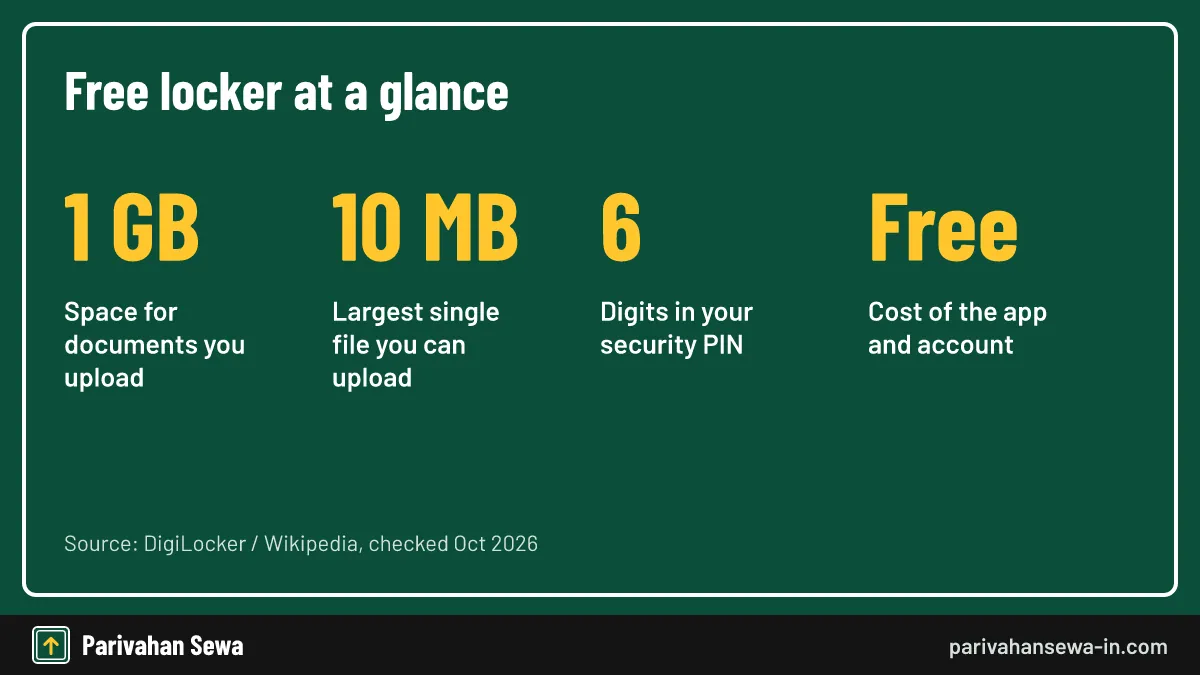
Yes. The app and the account cost nothing, and there is no paid upgrade. You get 1 GB of space for your own uploads.
Who makes the DigiLocker app?
It is a Government of India service run by the Ministry of Electronics and Information Technology under Digital India. The National e-Governance Division publishes its user manual.
Can I use DigiLocker without Aadhaar?
You can sign up with a mobile number, but most issued documents are matched through Aadhaar details, so linking Aadhaar unlocks far more of the app.
Is a DigiLocker driving licence valid at a traffic check?
Yes. Rule 139 of the Central Motor Vehicles Rules lets you produce documents in electronic form. Show the issued copy live in the app, not a screenshot.
Is DigiLocker accepted at the airport?
A 2018 civil aviation circular accepted Aadhaar, PAN and driving licence from the Issued Documents section as entry ID. Uploaded scans were not included.
Are DigiLocker marksheets valid for admission?
The UGC asked institutions in 2022 to accept degrees and mark sheets in DigiLocker as valid. Each university still sets its own admission checks.
How do I reset my DigiLocker PIN?
Tap Forgot PIN on the sign-in screen, verify with an OTP and set a new 6-digit PIN.
Can I change my mobile number in DigiLocker?
Yes. Edit it in Profile. If the old number is gone, sign in with the Aadhaar OTP option first.
Can I delete my DigiLocker account myself?
Guides report no in-app delete option. Send a request to DigiLocker support at [email protected] or the support portal.
Can I remove only my Aadhaar from DigiLocker?
Reported guidance says no. Other documents can be deleted one at a time, but the Aadhaar record goes only when the whole account is closed.
How much can I upload to DigiLocker?
Up to 1 GB in total, with each file up to 10 MB, in PDF, JPG, JPEG, PNG, BMP or GIF format.
Is DigiLocker open source?
No public source code was found. The app is free to use, and partner organisations connect to it through published APIs.
Parivahan Sewa (parivahansewa-in.com) is an independent information website and is not affiliated with MoRTH, Parivahan or any state transport department. Confirm fees and rules on the official portal before you pay or apply.