DigiLocker WhatsApp number: how the MyGov chatbot works
The DigiLocker WhatsApp number is +91 9013151515, the verified MyGov Helpdesk chatbot. Save it, send Hi, pick DigiLocker from the menu and confirm your identity with your Aadhaar number and an OTP. The bot then sends issued documents such as your driving licence, RC or PAN card as a PDF. It is free, and it cannot fix errors inside a document.
Key takeaways
- The DigiLocker WhatsApp number is the MyGov Helpdesk, +91 9013151515; MeitY added DigiLocker to it in May 2022.
- The chat can send PAN, driving licence, RC, two-wheeler insurance and Class X and XII marksheets that are already issued to your locker.
- Verification uses your Aadhaar number and an OTP sent to the Aadhaar-linked mobile.
- We found no verified DigiLocker toll-free number; use the support portal or support email instead.
- Most cases of DigiLocker not working on a device come from developer options, an old OS version or an outdated app.
On this page · 14 sections
The DigiLocker WhatsApp number lets you pull government documents into a chat window without opening the DigiLocker app. This guide covers the number itself, what the chatbot can send, how to reach DigiLocker support, and what to try when the app refuses to run on your phone. For the full list of transport apps, see our mParivahan app guide.
What is the DigiLocker WhatsApp number?
The official DigiLocker WhatsApp number is +91 9013151515. It belongs to the MyGov Helpdesk, a verified government chatbot that started in March 2020 as the MyGov Corona Helpdesk. The Ministry of Electronics and IT (MeitY) added DigiLocker to its menu on 23 May 2022.
Who runs the chatbot
MyGov, the government’s citizen engagement platform, runs the account. DigiLocker itself is a MeitY service, so the chat is a doorway into the same locker you see in the app. Nothing is stored on WhatsApp beyond the files you choose to download.
Is it a separate DigiLocker account?
No. The chat reads the same account that is tied to your Aadhaar. A document you fetched in the app appears in the chat, and a new account made in the chat works in the app later.

Which DigiLocker services on WhatsApp can you use?
DigiLocker services on WhatsApp cover two jobs: creating or verifying a DigiLocker account, and downloading documents that issuers have already pushed into it. MeitY’s announcement listed the PAN card, driving licence, vehicle RC, two-wheeler and other insurance policies, and Class X and XII marksheets.
What the chat cannot do
It cannot upload your own scans, edit a document, change your mobile number or delete the account. Those tasks stay in the app or on the website. It also cannot fetch a document that no issuer has linked to your Aadhaar details yet.
When the chat is the better choice
The chat helps on an old phone with little storage, when the app is misbehaving, or when you need a quick PDF to attach to an email. It saves you a separate app download on a shared or borrowed device.
How do you get documents from DigiLocker on WhatsApp?
You get documents by saving 9013151515, sending a greeting, picking DigiLocker and verifying with your Aadhaar number and an OTP. The whole exchange takes about two minutes when your documents are already issued to the locker.
- Save the number. Add +91 9013151515 to your contacts as MyGov Helpdesk and refresh WhatsApp.
- Start the chat. Send Hi, Namaste or Digilocker.
- Choose DigiLocker. Tap the DigiLocker option in the menu the bot returns.
- Verify with Aadhaar. Confirm you have an account, enter your 12-digit Aadhaar number and type the OTP sent to your Aadhaar-linked mobile.
- Download a document. The bot lists your issued files; reply with the number of the one you want and the PDF arrives.
If the menu looks different
Chatbot menus change over time. If DigiLocker is not shown, type Digilocker again or scroll through the list of services. Never share your OTP with anyone who calls about it.
What do you need before messaging the chatbot?
Before you start, keep your 12-digit Aadhaar number ready and the phone that receives SMS for your Aadhaar-linked mobile number nearby. A WhatsApp account on any number works, but the OTP always goes to the Aadhaar mobile.
If your Aadhaar mobile is out of date
The OTP will not reach you, and the chat cannot change it. Update the mobile number at an Aadhaar centre first, then try again once the update is live.
Fetching documents first
If your locker is empty, the bot has nothing to send. Pull the licence or RC once in the app; our DigiLocker app download guide shows how to install and sign in.

Can you get your licence and RC through the chat?
Yes. The driving licence and the vehicle registration certificate (RC) were both in MeitY’s launch list, along with two-wheeler insurance. They come through only after you have fetched them once using your licence or registration details.
Driving licence
The licence must first be linked using its number and your date of birth. Our guide to the DigiLocker driving licence covers that one-time step.
Registration certificate
For the RC, DigiLocker matches the registration number with the chassis and engine digits. The RC download guide explains the other ways to get a copy as well.
How do you spot a fake WhatsApp number?
The real MyGov Helpdesk shows the business name MyGov HelpDesk with a green verified tick, and its number is +91 9013151515. Any other number that claims to be DigiLocker, or any chat that asks for money, your PIN or bank details, is a scam.
Warning signs in a chat
Be wary of links to download “DigiLocker APK” files, requests to pay a “verification fee”, and messages that arrive first without you writing. The government bot only replies after you message it.
Report and block
Use WhatsApp’s Report option on suspicious numbers. If money was lost, report it on the national cyber crime portal or call the cyber helpline listed there.
What is the DigiLocker contact number?
We could not find a DigiLocker contact number published by MeitY that we could verify. The official channels we did confirm are the WhatsApp chat for documents, the support portal at support.digilocker.gov.in and the email [email protected] for account problems.
Why numbers on other sites differ
Directory sites list several 1800 numbers next to DigiLocker, but they do not tie them to the service clearly. Some belong to other government helplines and some to banks that offer DigiLocker inside their own apps.
Bank helplines are not DigiLocker
If you use DigiLocker through a bank app, the bank’s customer care can help only with its own app. Problems with the locker itself still go to DigiLocker support.
Is there a Digi Locker toll free number?
A dedicated Digi Locker toll free number could not be verified as of October 2026. Check the Contact Us or Help section on digilocker.gov.in for the current list before dialling any number found online.
What to do instead
Raise a ticket on the support portal, which keeps a record you can track. For document downloads, the WhatsApp chat is usually faster than any phone line.
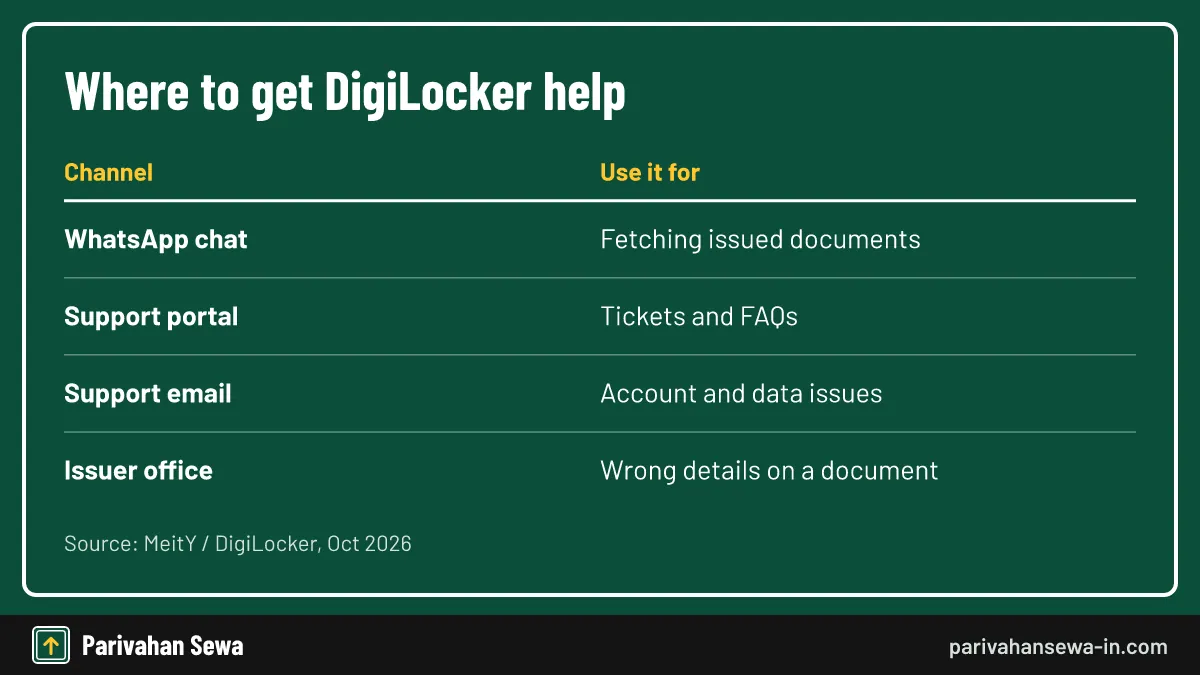
How does DigiLocker support work?
DigiLocker support works mainly through the support portal, where you search the FAQs or raise a ticket, and through email. Problems with the content of a document, such as a wrong name on a licence, are fixed by the issuer, not by DigiLocker.
| Problem | Where to go |
|---|---|
| Cannot fetch a document | DigiLocker support portal |
| Login, PIN or account issue | Support portal or support email |
| Wrong details on a licence or RC | Your RTO or the Parivahan portal |
| Want a quick PDF copy | MyGov Helpdesk on WhatsApp |
Issuer problems
DigiLocker only shows what the issuer sends. If your RC shows an old address, update it through the RTO first; the new copy appears after you fetch it again.
What should a support request include?
A useful support request includes your registered mobile number, the document name, the issuer, the exact error message and a screenshot. Leave out your Aadhaar number in full, your PIN and any OTP; support never needs them.
Tracking your ticket
Note the ticket number the portal gives you and check it before writing again. Duplicate tickets tend to slow down the reply.
Why is DigiLocker not working on my device?
If you are asking why DigiLocker is not working on my device, the usual causes are developer options switched on, Android older than version 10 or iOS older than 13.4, a rooted phone, or an outdated app. Each has a quick check.
Developer options and rooted phones
DigiLocker blocks phones with developer options turned on, as many government and banking apps do. Turn them off in Settings, restart and reopen the app. Rooted or jailbroken phones may stay blocked.
Old operating system
The current app needs Android 10 or iOS 13.4 or later. On an older phone, use the website in a browser or the WhatsApp chat instead.

Outdated app or cache
Update DigiLocker from the official store. On Android, clearing the app cache in Settings often fixes a blank or frozen screen without losing your documents.
How do you fix login and OTP problems?
Most login problems come from a delayed OTP or a forgotten PIN. Wait a minute before tapping resend, check that your SIM has signal, and use Forgot PIN on the sign-in screen if the PIN fails.
OTP not arriving
Make sure SMS from short codes is not blocked and your inbox is not full. If the number has changed, sign in with the Aadhaar OTP option and update it in your profile.
Locked after many attempts
Wrong PIN entries can lock sign-in for a while. Wait before trying again rather than guessing repeatedly.
WhatsApp chatbot or the app: which suits you?
The WhatsApp chatbot suits quick downloads on any phone, while the app suits regular use, showing documents at a check and managing your account. Most people benefit from having both.
| Need | WhatsApp chat | DigiLocker app |
|---|---|---|
| Download an issued PDF | Yes | Yes |
| Fetch a new document | No | Yes |
| Upload your own files | No | Yes |
| Works on older phones | Yes | Needs Android 10 / iOS 13.4 |
Showing documents to police
Rule 139 of the Central Motor Vehicles Rules allows electronic documents. Show the licence or RC live inside DigiLocker or mParivahan rather than a PDF forwarded on WhatsApp.
Is a file received on WhatsApp valid proof?
A PDF from the chat is the same issued file, but offices and police often prefer to verify it inside DigiLocker, where the issuer’s details are visible. Treat the WhatsApp copy as a handy backup, not your main proof.
Keep copies safe
Downloaded PDFs sit in your WhatsApp media folder. Delete them from shared phones and avoid forwarding identity documents to groups.
Official links
DigiLockerdigilocker.gov.in ↗DigiLocker support portalsupport.digilocker.gov.in ↗MyGovmygov.in ↗Parivahan Sewaparivahan.gov.in ↗Digilocker whatsapp number questions
Is the DigiLocker WhatsApp service free?
Yes. MyGov does not charge for the chat or the documents. You only use your normal mobile data.
Can I create a DigiLocker account on WhatsApp?
Yes. When the bot asks whether you have an account, answer no and follow the Aadhaar and OTP prompts to create one.
Why does the WhatsApp bot not show my RC?
The bot only lists documents already issued into your locker. Fetch the RC once in the DigiLocker app or website, then try the chat again.
Does DigiLocker have a customer care phone number?
We could not verify one. DigiLocker lists its support portal, support.digilocker.gov.in, and the email [email protected] for help.
Is a PDF from the WhatsApp chat valid at a traffic check?
Police usually check the live copy in DigiLocker or mParivahan. Keep the app installed and show the document inside it rather than a forwarded PDF.
Why is DigiLocker not working on my phone?
The usual causes are developer options being switched on, Android older than version 10 or iOS older than 13.4, a rooted phone or an outdated app version.
Parivahan Sewa (parivahansewa-in.com) is an independent information website and is not affiliated with MoRTH, Parivahan or any state transport department. Confirm fees and rules on the official portal before you pay or apply.