How to do UP tax online pay on Vahan and keep a valid receipt
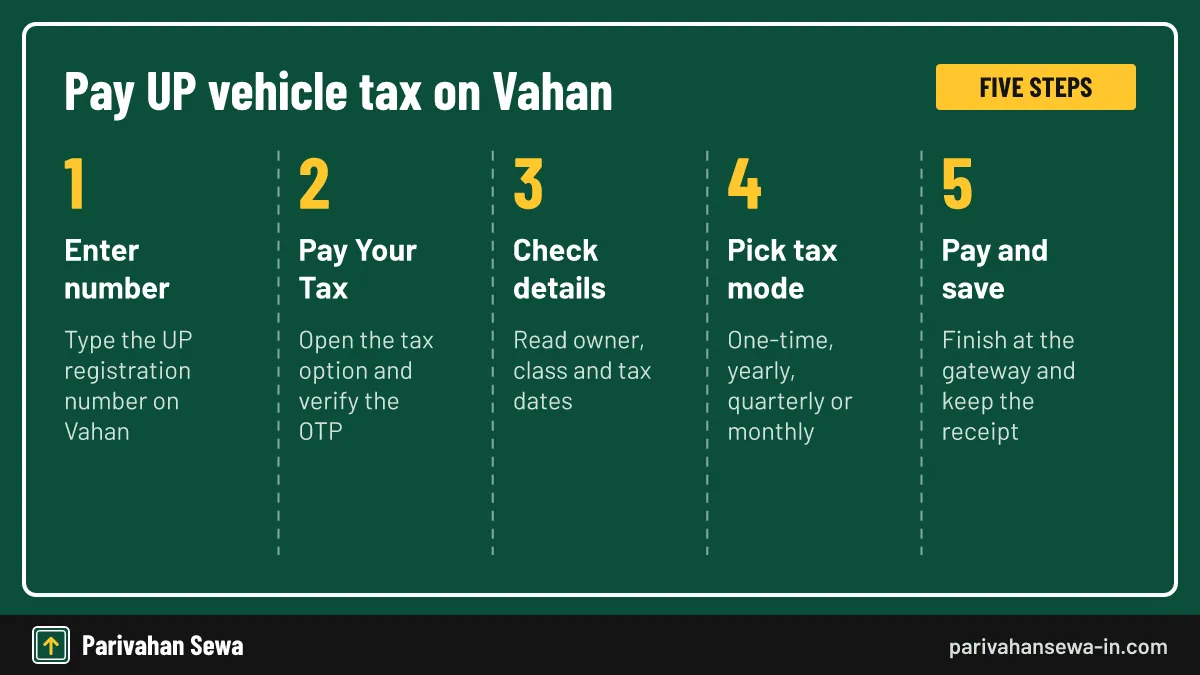
UP tax online pay happens on the national Vahan portal. Enter the Uttar Pradesh registration number, open Pay Your Tax, verify the OTP sent to the mobile on the RC, check the vehicle and tax details, choose the tax mode, then pay through the gateway and save the receipt. If the online service refuses the vehicle, pay at your UP RTO counter.
Key takeaways
- UP tax online pay runs on Vahan, the national vehicle registration system, not on a separate UP payment site.
- The OTP goes to the mobile number on the RC, so update an old number before you try to pay.
- The tax screen shows the amount and the allowed tax modes for your vehicle class before you pay anything.
- A failed or stuck payment may stay pending for 1-2 hours; check it under Status before paying again.
- Keep the Vahan receipt PDF; it can be reprinted later by registration, receipt or transaction number.
- This is an independent guide. Confirm the amount on Vahan or with your UP RTO before paying.
On this page · 25 sections
What does UP tax online pay cover?
UP tax online pay means clearing the motor vehicle tax that Uttar Pradesh charges under the UP Motor Vehicles Taxation Act, 1997, through the internet instead of a counter. The payment runs on Vahan, the national registration database built by NIC, which UP uses for every vehicle on its roads.
What you can pay this way
Yearly or quarterly tax on goods vehicles, autos, taxis and buses, balance tax after a change of use, and tax on vehicles coming in from another state. Private cars usually paid once at registration, so their owners use this service less often.
What it does not cover
It is not GST, income tax or a traffic fine. E-challans have their own payment route, and the rates themselves are explained on our UP road tax page.
Which UP vehicles can pay their tax online?
Any vehicle whose record sits on the UP Vahan database can use the online tax service, provided the RTO has switched the service on and the record has no block. In practice that covers transport vehicles with periodic tax and private vehicles with a balance due.
Transport vehicles
Trucks, pickups, autos, e-rickshaws, taxis, school vans and buses pay tax by period. Their owners are the main users of online payment, because the due date comes back every year or quarter.
Private vehicles with dues
A private car or bike may still owe tax after a conversion, a late registration, a re-registration from another state or a renewal after fifteen years. In those cases the tax screen shows the balance.
What should you keep ready before paying?
Five details make the payment go through in one sitting: the registration number, the last five characters of the chassis number, a phone with the mobile number linked to the RC, valid insurance details, and a working bank or card. Transport vehicles also need their permit details at hand.

Why insurance matters
Vahan reads the insurance record before it lets you pay. If the policy shown has expired, the screen may ask you to enter new policy details first, so keep the renewed policy number nearby.
The chassis characters
The last five chassis characters are printed on the RC. They act as a second check that you own or manage the vehicle, alongside the OTP.
How do you complete UP tax online pay step by step?
The full process takes about five minutes when the record is clean. You work through the vehicle number, the Pay Your Tax option, an OTP check, a details screen and the gateway. Follow the steps below in order and keep the browser tab open until the receipt appears.
- Open Vahan and enter the number. Go to Vahan citizen services and type the UP registration number of the vehicle.
- Choose Pay Your Tax. Open the tax payment option, enter the last chassis characters and generate the OTP.
- Verify the OTP. Enter the OTP sent to the mobile number on the RC and press Show Details.
- Check details and pick a mode. Read the owner, class and tax dates, then select the tax mode the screen allows.
- Pay and save the receipt. Choose the gateway and bank, finish payment and download or print the receipt.
If the menu label looks different
Some Vahan versions call the option Pay Vehicle Tax and others Pay Your Tax, sometimes under Online Services. The order of screens is the same.
Do not refresh during payment
Pressing back or refresh while the bank page loads is the most common cause of a stuck transaction. Let the gateway return you to Vahan.
Which tax mode should you pick on the payment screen?
The tax mode decides how long the payment covers. Vahan lists only the modes your vehicle class and permit allow, such as one-time, yearly, quarterly or monthly. Pick the period that matches your permit and cash flow, and check the new paid-till date before you confirm.

| Vehicle type in UP | Tax mode usually offered | What decides the amount |
|---|---|---|
| Private car or two-wheeler | One-time at registration | Cost of the vehicle |
| Goods vehicle | Yearly | Loading capacity in tonnes |
| Auto or e-rickshaw (passenger) | Yearly or optional one-time | Number of seats |
| Taxi, bus or tourist vehicle | Period linked to permit | Seats and permit type |
| Vehicle from another state | Daily, monthly or quarterly | Vehicle class |
Shorter periods cost more effort
Quarterly payment spreads the cost, but you repeat the process four times a year. Each missed quarter starts its own penalty clock.
Longer periods and resale
A truck sold mid-year carries its paid tax with it. Ask the buyer to settle the share privately, because Vahan does not split refunds between owners.
Which payment options does the gateway show?
After you confirm the tax mode, Vahan hands you to a payment gateway. The page lists the banks and methods that gateway supports at that moment, commonly net banking and cards. The exact list depends on the gateway the state has linked, so read it on screen rather than relying on a guide.
Choosing a bank
If one bank page fails, wait for Vahan to mark the transaction failed before trying another bank. Two live attempts can lead to a double debit.
Charges by the bank
Some cards or banks add a small convenience charge shown on the gateway page. That is a bank charge, not part of the UP tax.
What does know your MV tax mean?
Know your MV tax is how many owners search for the amount of motor vehicle tax their vehicle owes and the date up to which it is paid. No separate tool with that exact name was confirmed on Vahan; the answer sits on the tax screen and in the vehicle record.
Where the amount appears
Once you verify the OTP on the payment flow, the screen lists tax due, any penalty and the period it covers. You can stop there without paying if you only want the figure.
MV tax versus road tax
MV tax and road tax mean the same state levy. The term MV tax comes from the Act’s name, Motor Vehicles Taxation, and appears on many receipts.
How is the amount on the tax screen worked out?
Vahan calculates the figure from the rate notified by the UP government for your vehicle class, its cost, weight or seats, and the period you choose. Any late penalty is added on top. You cannot type in your own amount; the system fills it from the record.
When the class is wrong
If the record lists the wrong body type or seating, the tax will be wrong too. Get the record corrected at the RTO before paying.
Rates and worked examples
For the full rate table and examples for cars, bikes and trucks, see our guide to road tax across states and the UP rate page linked above.
How can you check tax online for a UP vehicle?
You can check tax online in two ways. Start the Pay Your Tax flow and stop at the details screen, or use Know Your Vehicle Details under Informational Services on Vahan, which needs a mobile OTP and is free. Both show whether tax is current.
Checking before buying used
Before paying for a second-hand vehicle, look up the paid-till date. Unpaid periodic tax stays with the vehicle and becomes the new owner’s problem at transfer.
Using your own RC record
Your RC and its digital copy carry the tax details from registration. For a private car with one-time tax, that date usually runs for the first registration period.
What does the tax-paid-till date tell you?
The paid-till date on the vehicle record marks the last day covered by tax already paid. For a transport vehicle it moves forward each time you pay. If today’s date is past it, tax is overdue and Vahan will add penalty when you open the payment screen.
For private vehicles
A car that paid one-time tax normally shows a long date. A balance only appears after an event such as conversion or renewal.
When the date did not update
If you paid but the date did not move, check the receipt status first. A payment still pending at the bank will not update the record.
What is a Vahan receipt and what does it show?
A Vahan receipt is the official proof that the tax reached the state. It carries the registration number, receipt number, bank transaction number, amount, tax mode and the period covered. Officers at check posts and RTOs accept the printed or digital copy.
What to check on it
Match the registration number, the amount debited and the period. A mismatch means you should raise it with the RTO before the old period runs out.
How long to keep it
Keep every tax receipt for as long as you own the vehicle. Fitness, permit renewal, transfer and NOC requests can all ask for proof of paid tax.
How do you get a Vahan receipt again later?
If you closed the page or lost the PDF, open Vahan and use the Status menu, then Reprint Receipt. Search by application number, receipt number, bank transaction number or registration number, and the receipt opens again to print or save.
Keep the transaction number
The bank’s SMS or email carries a transaction reference. Save it, because it is the quickest way to find the receipt again.
When the reprint shows nothing
If the search returns nothing, the payment may never have completed. Check the pending transaction status before assuming the receipt is lost.
What if money was debited but no receipt appeared?
A failed or unconfirmed payment can sit as pending for around one to two hours, depending on the bank and state. After that, open Status, then Check Pending Transaction, enter the registration number and chassis digits or the transaction number, and click the transaction to re-check it with the bank.

If it shows success
The receipt becomes available and the paid-till date moves. Download it at once.
If it shows failure
The bank reverses the debit under its own rules. Only then start a fresh payment, so you do not pay twice.
Why does the portal say the service is not activated?
The message “This service has not been activated for the concerned State/RTO” means the online tax service is switched off for that office or vehicle class. It is not an error on your side. Pay through the UP Transport Department route or visit the RTO counter instead.
| Message on screen | What it means | What to do |
|---|---|---|
| Service not activated for State/RTO | Online tax is off for that office or class | Pay at the UP RTO counter |
| Vehicle is blacklisted | A department has blocked the record | Clear the case with that office |
| Transaction pending | Bank has not confirmed yet | Wait, then Check Pending Transaction |
| Insurance not valid | Policy on record has lapsed | Enter renewed policy details |
Classes that often need the counter
Vehicles with special permits or unusual records sometimes cannot be handled online. The RTO can process them by hand.
Try again later
Activation can change. If the message appears once, it may still be worth checking a few weeks later.
What does a blacklisted vehicle message mean?
A blacklisted vehicle is one that a department has flagged, for example over unpaid dues, a theft report, a court order or a pending challan case. Vahan blocks payment until that office lifts the flag, so the tax cannot be paid online until then.
Finding out who flagged it
The RTO can tell you which office placed the block and why. Bring the RC and your ID when you ask.
After the block is lifted
Once cleared, the online tax flow should open normally. Penalty for the blocked period may still apply.
What if the OTP goes to a number you no longer use?
Vahan sends the OTP only to the mobile number on the vehicle record. If that number is old or belongs to a previous owner, you cannot finish payment. Our guide on how to update mobile number in vehicle registration explains the fix.
Fleet and company vehicles
Fleet owners often register one office number for many vehicles. Make sure the person paying tax can get that OTP.
Second-hand vehicles
After a transfer, the new owner’s number should replace the seller’s. Check this before the first tax due date.
How do UP commercial vehicles pay periodic tax online?
Goods and passenger transport vehicles pay UP tax by year, quarter or month, so their owners come back to Vahan regularly. Goods vehicles are taxed by loading capacity, passenger vehicles by seats. The flow is the same as for any payment; only the tax mode list is longer.
Plan around the due date
Pay a few days before the period ends. Gateway outages and bank delays happen, and late tax adds penalty.
Permit and fitness link
A permit renewal or fitness certificate can be refused if tax is not current. Clear tax first, then book the other services.
How do autos and e-rickshaws pay per seat?
Three-wheelers and e-rickshaws in UP pay tax per seat for passenger use or per tonne for goods, with a yearly option and an optional one-time choice. The Vahan screen offers both where the rules allow, so owners can compare before paying.
| Three-wheeler type in UP | Yearly tax | Optional one-time tax |
|---|---|---|
| Passenger, under 12 seats | ₹600 per seat | ₹5,400 per seat |
| Goods carrier | ₹850 per tonne or part | ₹7,600 per tonne or part |
Is one-time worth it?
The one-time figure equals nine years of yearly tax for passenger seats. It suits an owner who plans to keep the vehicle that long.
EV autos and e-rickshaws
Electric three-wheelers made, sold and registered in UP were reported as tax-exempt until 13 October 2027. Check your vehicle’s status on the tax screen.
Can a new vehicle buyer pay the tax online?
For a new private car or bike, the dealer collects the one-time tax and enters it while registering the vehicle on Vahan. The buyer does not normally run the tax flow. The tax amount appears on the invoice breakup and in the registration papers.
Check the dealer’s figure
Ask for the Vahan tax receipt with your papers. It should match the tax line on the on-road price.
Temporary registration cases
If a vehicle is bought outside UP or registered late, the owner may need to pay tax at the RTO or online when the record opens.
How do outside vehicles pay tax to enter UP?
Transport vehicles from other states pay UP entry tax on the Vahan checkpost service, not the regular tax page. Choose Border Tax Payment, then Tax Payment, select Uttar Pradesh, enter the vehicle number, calculate the tax, pay and print the receipt. Our border tax guide covers this in detail.
Reported daily rates
Guides report daily rates for outside goods vehicles of ₹50, ₹75 or ₹100 by size, and ₹20 or ₹30 for public service vehicles. Confirm the figure on the checkpost screen.
Carry the receipt
Keep the checkpost receipt in the cab for the whole trip. The dates on it must cover the days inside UP.
Can you still pay at a UP RTO counter?
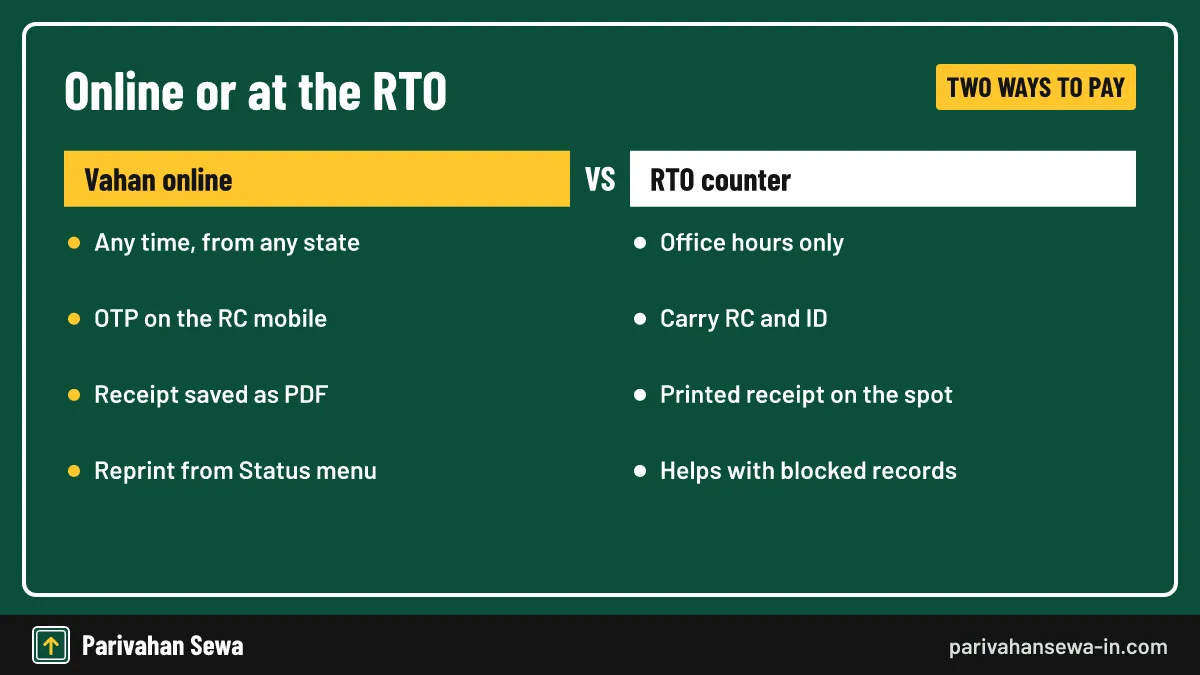
Yes. Offline payment at UP RTO offices remains available for every vehicle, and it is the main fallback when the online service is not active or the record is blocked. The clerk calculates the amount on Vahan and hands you a printed receipt.
What to take
Carry the RC, your ID, insurance and permit papers for a transport vehicle. A cheque or card may be accepted; ask your office first.
Office details
Addresses and timings change, so look up your RTO on the UP Transport Department site before going.
What happens if UP tax is paid late?
Late tax attracts a monthly penalty on the amount due, with a cap set by the Act. Insurer guides quote 4% a month, while a CAG audit cites 5% a month for some cases. Vahan adds the binding amount automatically when you open the tax screen.
Stop the penalty growing
Pay as soon as you notice the date has passed. Each extra month adds another slice of penalty.
Seizure risk
Enforcement officers can stop and detain a vehicle running without paid tax. The receipt in the vehicle avoids that.
Can other UP state dues be paid online the same way?
Only vehicle-linked tax goes through Vahan. If you want to pay state taxes online of other kinds, such as GST or stamp duty in UP, each department runs its own system. We have not verified those portal addresses here, so open them from the department’s official site. Our online payment guide explains vehicle-related dues across states.
Vehicle fees versus taxes
Registration, transfer and permit fees are paid on Vahan too, through their own application flows, not the tax screen.
Keep receipts apart
Each payment gives its own receipt. File vehicle tax receipts separately from other government payments.
Which fake sites and agents should you avoid?
Pay only on parivahan.gov.in addresses or at the RTO. Fake sites copy the Vahan look, buy search ads and send payment links on WhatsApp. If you lose money, call the National Cyber Crime Helpline 1930 or report on cybercrime.gov.in.

Never share the OTP
The OTP is for you alone. Anyone asking for it on a call is not from the transport department.
Agents at the office
Agents near RTOs may charge extra for a payment you can do yourself in minutes. If you use one, ask for the official receipt.
Is UP tax online pay different on mParivahan?
The mParivahan app is mainly for viewing RC and licence records and paying e-challans. Vehicle tax payment itself is done on the Vahan website, so open it in a phone browser if you want to pay on mobile. The steps above work the same on a phone.
Viewing the receipt on mobile
Download the receipt PDF to your phone and keep a copy in cloud storage too.
Where the UP figures come from
Steps and figures on this page come from Vahan help pages, LocoNav, Acko and NIC district guidance, checked in October 2026.
Official links
Vahan citizen services (Pay Your Tax)vahan.parivahan.gov.in ↗Uttar Pradesh Transport Departmentuptransport.upsdc.gov.in ↗Vahan checkpost tax paymentvahan.parivahan.gov.in ↗National Cyber Crime Reporting Portalcybercrime.gov.in ↗UP tax online pay questions
Is UP tax online pay done on a UP government website?
The payment itself runs on Vahan at vahan.parivahan.gov.in, the national system that UP uses for vehicle records. The UP Transport Department site links to it.
Can I pay UP vehicle tax online if I now live in another state?
Yes. Vahan works from anywhere. Choose Uttar Pradesh or enter the UP number and the screen loads UP rules and the amount due.
What does know your MV tax mean?
It means finding how much motor vehicle tax your vehicle owes and until when it is paid. The Vahan tax screen shows the amount before payment and the vehicle record shows the paid-till date.
Where do I get my Vahan receipt after paying?
The receipt appears right after a successful payment. Save it as PDF. If you closed the page, use Status, then Reprint Receipt, and search by registration or transaction number.
My bank debited the money but Vahan shows no receipt. What now?
Wait about 1-2 hours, then use Status, Check Pending Transaction. If the bank confirms failure, the debit is reversed by the bank and you pay again.
Why is the OTP not reaching my phone?
The OTP goes only to the mobile number stored on the vehicle record. If that number is old, update it on Vahan or at the RTO before paying.
Does a new car buyer in UP pay road tax online personally?
Usually not. The dealer collects the one-time tax and enters it while registering the car on Vahan. You get the tax details in your registration papers.
Can I pay UP vehicle tax in the mParivahan app?
mParivahan is mainly for viewing RC and DL records and paying e-challans. Vehicle tax payment is done on the Vahan website.
Is this website the UP Transport Department?
No. Parivahan Sewa is an independent guide. Pay only on Vahan, the UP Transport Department site or at an RTO counter.
Parivahan Sewa (parivahansewa-in.com) is an independent information website and is not affiliated with MoRTH, Parivahan or any state transport department. Confirm fees and rules on the official portal before you pay or apply.