Bike insurance check: how to verify any vehicle's insurance online
A bike insurance check takes about a minute: open Vahan's Know Your Vehicle Details, type the registration number without spaces, enter the captcha and read the insurer name and the valid-up-to date. The same search works for cars, trucks and taxis. For a policy number, use your insurer's app or the IIB V-Seva search, which is meant mainly for accident cases.
Key takeaways
- A bike insurance check on Vahan shows the insurer and the date your cover ends, using data the insurer uploads.
- Third-party insurance is compulsory under section 146 of the Motor Vehicles Act, 1988, for every vehicle on a public road.
- New bikes sold since 1 September 2018 carry five-year third-party cover, and new cars three years, so the two parts of a policy can expire on different dates.
- A blank or old result usually means the renewal has not synced yet; your own policy schedule is the final word.
- When you buy a used bike, apply to the insurer within 14 days so the policy is endorsed in your name.
On this page · 43 sections
What is a bike insurance check?
A bike insurance check is a look-up that tells you whether a two-wheeler has live motor cover, which company insures it and when that cover ends. You run it with the registration number on the government Vahan database or the mParivahan app, and it takes about a minute.

Why riders run the check
Most people check before a renewal, after a renewal to see that it has synced, before buying a used bike, or after a traffic stop where an officer said the cover had lapsed. It is also a quick way to read an expiry date when the paper policy is lost.
What the check cannot tell you
The government record shows who insures the bike and until when. It does not show your premium, your add-ons, your no-claim bonus or whether you hold third-party or comprehensive cover. Those details sit only in your own policy schedule.
How to check vehicle insurance?
To check vehicle insurance, use the registration number on Vahan’s Know Your Vehicle Details, on the mParivahan app, or on your insurer’s website. Vahan and the app show the insurer and expiry date. Your insurer shows the full policy, and the IIB search covers accident cases.
The fastest route
For your own vehicle, the insurer’s app is often fastest because it opens the full policy. For any other vehicle, the Vahan search is the usual starting point because it needs nothing more than the plate number.
What to keep ready
Keep the registration number exactly as it appears on the plate. For an IIB search, also keep the chassis or engine number, your name, mobile number and email, because the form asks for them.
Bike insurance check online: which routes work?
A bike insurance check online works through four routes: the Vahan portal, the mParivahan app, the IIB V-Seva search and the insurer’s own site. All four read records that insurers upload, so they usually agree. When they do not, the insurer’s record is the one that counts.

| Route | What it shows | What you need | Best use |
|---|---|---|---|
| Vahan Know Your Vehicle Details | Insurer name, insurance valid-up-to date | Registration number, captcha, sometimes OTP | Quick status of any vehicle |
| mParivahan app | Insurance expiry on the vehicle record and virtual RC | Mobile sign-in, registration number | Checks on the road |
| IIB V-Seva search | Insurer, policy number and dates, if found | Registration or chassis number, owner and contact details | Accident and claim cases |
| Insurer website or app | Full policy schedule and PDF | Registration or policy number, OTP | Renewal, copy, claims |
Which one to start with
Start with Vahan for a yes-or-no answer. Move to the insurer when you need the policy itself, and to IIB only when the vehicle was involved in an accident and you cannot reach its owner.
Why paid lookup sites are unnecessary
Every official route is free. Third-party sites that charge for “insurance reports” simply repackage the same records and may store your number for marketing calls.
Insurance check by vehicle number: how does it work?
An insurance check by vehicle number works because insurers send every motor policy to the national records, tagged with the registration, engine and chassis numbers. When you search the plate number, Vahan matches it to the latest policy uploaded and shows the insurer and end date.
Where the data comes from
The RTO does not issue insurance. Each insurer reports its policies, and the Insurance Information Bureau of India (IIB), set up by IRDAI, keeps a motor insurance repository. Vahan reads the same insurer uploads alongside the registration record.
Why timing matters
A record is only as fresh as the last upload. Guides report delays from a few days to several weeks after a renewal, so a fresh policy may not show at once.
Bike insurance check by vehicle number: what do you need?
For a bike insurance check by vehicle number you need only the plate number written without spaces, such as KA01AB1234, and a phone for the captcha or OTP. The search works for scooters, motorcycles and electric two-wheelers registered on Vahan.
Writing the number correctly
Type the state code, RTO code, series and number in one string. Leading zeros matter: “KA01” and “KA1” are not the same. A BH-series number is typed as printed, starting with the year.
When the bike is very new
If the RTO has not finished registration, the plate number may not exist in the record yet. Check the policy the dealer gave you, or use a chassis-number search on IIB.
Vahan insurance check: what does the portal show?
A Vahan insurance check shows the vehicle’s registration date, maker and model, fuel, vehicle class, a partly masked owner name, the insurer’s name and the insurance valid-up-to date. Some screens also show the policy number, but most guides agree only the insurer and expiry date appear reliably.
Reading the insurance line
If the valid-up-to date is in the future, the vehicle has cover on record. A past date means the record shows lapsed cover. A blank field means no policy has been matched, which is often a data gap.
Other details on the same screen
The same result often shows PUC validity and fitness or tax validity for commercial vehicles. For more on the owner name and other vehicle fields, see our vehicle information guide.
Where is the Vahan e service insurance status?
The Vahan e service insurance status sits inside the vehicle search, not in a separate menu. On vahan.parivahan.gov.in, open the citizen services area and choose Know Your Vehicle Details; the insurance line appears in the search result. Menu names change from time to time.
If you cannot find the option
Use the search box on the citizen services page and type “vehicle details”. Some state landing pages hide the link under information services. The result is the same in every state.
Signing in
The portal may ask you to sign in with a mobile number and OTP before showing details. This is a general sign-in; it does not need to be the mobile number in the vehicle record.
What is V Seva and how does it work?
V Seva (written V-Seva) is the vehicle insurance search link on the Insurance Information Bureau of India website. It opens a form where you enter the registration number, or the engine or chassis number, plus your own details. If a policy is found, it shows the insurer, policy number and dates.
Who it is for
IIB built the search mainly for accident victims and people who need to trace the insurer of another vehicle. Guides report that only a few searches are allowed per email and mobile number, so it is not meant for routine checks.
Limits of the IIB data
IIB holds electronic records only for vehicles insured from 1 April 2010. For the full form and what each field means, see our Insurance Information Bureau guide.
How to check bike insurance validity?
To check bike insurance validity, read the insurance valid-up-to date on the Vahan search result or the mParivahan vehicle record, then compare it with today’s date. For a complete answer, open your policy schedule, because it gives separate dates for third-party and own-damage cover.
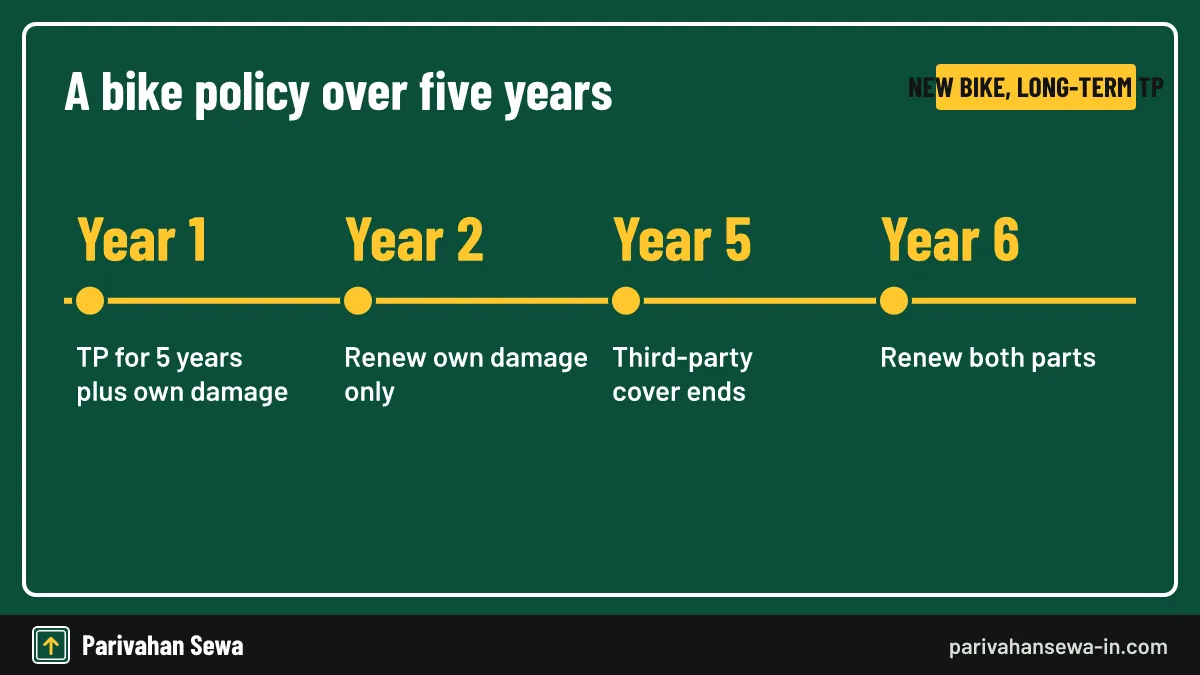
Two dates on one policy
Bikes bought new since 1 September 2018 come with five years of third-party cover. Own-damage cover may be for one year or five. That means the third-party part can be valid while the own-damage part has already lapsed.
Which date the portal shows
The government record usually shows one date. If you renewed only own damage, check which part that date refers to by matching it with your schedule.
How to check bike insurance validity online?
To check bike insurance validity online, sign in to your insurer’s website or app with your registration or policy number and OTP. The policy page lists the start and end date of each cover. The Vahan search gives a quicker, less detailed answer from public records.
Insurer portals
Every general insurer runs a “my policies” or “retrieve policy” page. Enter the registration number and the OTP that goes to the mobile number on your policy, then open the schedule.
If you bought through a broker
Online brokers keep your policies in their account pages too. The validity still comes from the insurer, so if the two differ, call the insurer.
How to check my bike insurance expiry date?
To check your bike insurance expiry date, look at the period of insurance on your policy schedule, the expiry line in your insurer’s app, or the valid-up-to field on Vahan. Insurers also send renewal reminders by SMS and email in the weeks before the date.
Expiry time of day
A policy usually ends at midnight on the expiry date printed. Renewing a day early avoids the gap that comes with a lapsed policy and a fresh inspection.
Setting a reminder
Add the date to your phone calendar with an alert a month before. The mParivahan app also shows the date each time you open your vehicle.
How to check bike insurance details?
To check bike insurance details such as cover type, add-ons, insured declared value and nominee, open the policy schedule from your insurer. The public records do not carry those fields. Sign in with your registration or policy number to view or download the schedule.
Details worth reading
Check the insured declared value, the add-ons you paid for, the no-claim bonus percentage and the nominee. Wrong engine or chassis numbers can cause claim trouble, so correct them early.
Getting a copy
For saving the schedule as a PDF, see our guide to download insurance policy by vehicle number.
Check bike insurance status online: what do the results mean?
When you check bike insurance status online, the result is one of four things: a future date (active cover), a past date (lapsed cover), a blank field (no matched record) or an old insurer’s name (renewal not yet synced). Each needs a different next step.
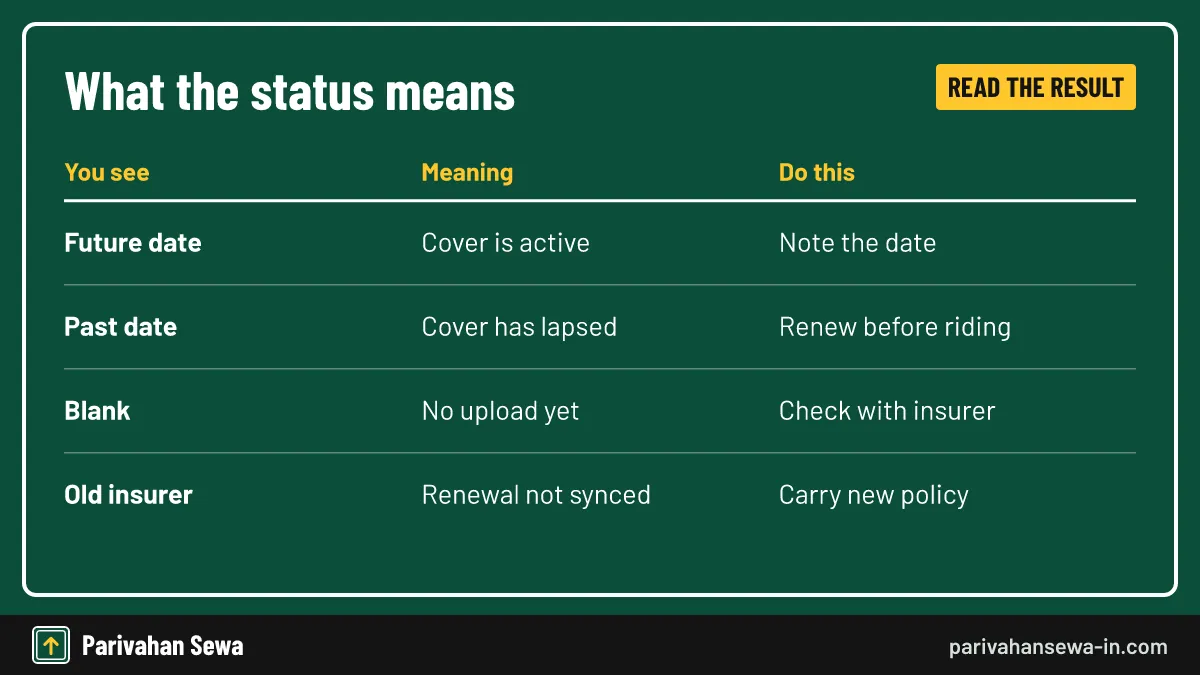
| What you see | What it means | What to do |
|---|---|---|
| Valid-up-to date in the future | Cover is active on record | Note the date and set a reminder |
| Valid-up-to date in the past | Record shows lapsed cover | Renew before riding again |
| Insurance field blank | No policy matched to the number | Check the policy and contact the insurer |
| Previous insurer shown | Renewal with a new insurer not synced | Carry the new policy; ask the insurer to upload |
Acting on a lapsed result
If the record and your policy both show a past date, the bike is uninsured. Do not ride it until you renew. For the penalty, see our page on the fine for driving without insurance.
Acting on a blank result
A blank field is not proof that the bike is uninsured. Compare with your schedule first. For Vahan-specific sync problems, see check bike insurance status online on Vahan.
How to check insurance status of bike in the app?
To check the insurance status of a bike in mParivahan, sign in with your mobile number, search the registration number, and scroll to the insurance line on the vehicle record. If you add your own RC to the dashboard, the expiry date shows every time you open it.

Searching versus adding the RC
Searching any number shows a short summary. Adding your own RC as a virtual RC needs chassis and engine digits plus an OTP to the registered mobile.
When the app and portal differ
Both read the same national record, so they should match. If they do not, refresh the app or wait a few hours. For app errors, see our mParivahan RC check guide.
Check car insurance online: is the method the same?
Yes. To check car insurance online you use exactly the same Vahan search, mParivahan app or insurer portal as for a bike. Only the vehicle class in the result changes. The one practical difference is the long-term third-party term: three years for new cars against five for new bikes.
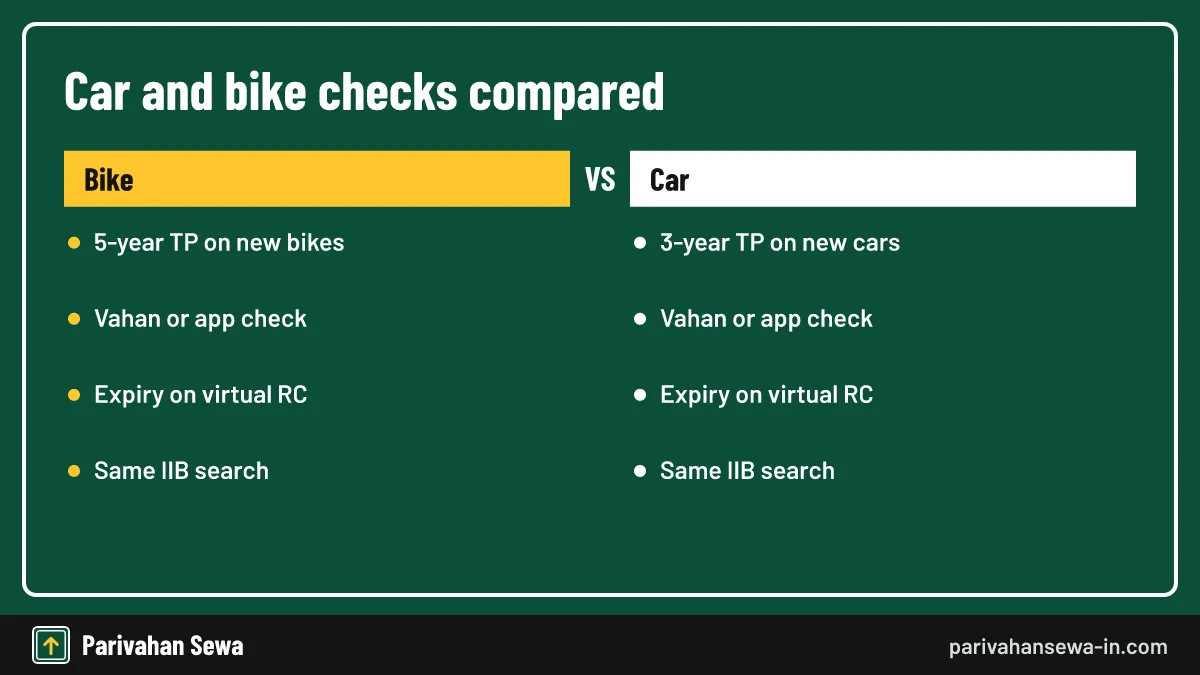
| Point | Bike | Car |
|---|---|---|
| Third-party term on a new vehicle (from 1 September 2018) | 5 years | 3 years |
| Own-damage term choices | 1 year or long term | 1 year or long term |
| Government check | Vahan, mParivahan | Vahan, mParivahan |
| Accident trace | IIB V-Seva | IIB V-Seva |
Check car insurance for a company car
For a company or leased car, the insurer may send OTPs to the fleet manager. The Vahan search still works with just the plate number.
Financed cars
A financed car’s policy names the bank as an interested party. That does not change the check, but the lender may ask for each renewal copy.
How to check car insurance validity?
To check car insurance validity, read the valid-up-to date on Vahan or mParivahan, then confirm it against the period of insurance on your schedule. If you hold a three-year third-party bundle with yearly own damage, note both end dates, because they rarely fall on the same day.
Bundled policies
Many car buyers since 2018 hold a “1 + 3” bundle: one year of own damage and three of third-party. In the second year, you renew only own damage, which some owners forget.
Comprehensive renewals
A yearly comprehensive renewal resets both parts together, so one date covers everything.
How to check car insurance expiry date?
To check car insurance expiry date, look for “period of insurance” on the schedule, the expiry date in your insurer’s app, or valid-up-to on the Vahan search. To check car insurance status quickly before a trip, the app is fastest because it opens without a browser.
Renewal grace
There is no automatic grace period for legal cover. Once the date passes, the car is uninsured on public roads until you renew.
Lapsed car insurance
After a break, insurers may ask for an inspection before restoring own-damage cover, and the no-claim bonus may be lost if the break is long.
How to find car insurance details?
To find car insurance details beyond the date, such as cover type, add-ons and the insured declared value, sign in to your insurer’s portal. To check car insurance details of another car, you can see only the insurer and expiry on Vahan; the owner holds the rest.
Car insurance information you can see publicly
Public car insurance information is limited on purpose: insurer name and validity. Premiums, claims and personal data are private.
Car insurance details for a used car purchase
Ask the seller for the current schedule and check that the chassis number on it matches the car. Then confirm the date on Vahan.
How to check my car insurance policy?
To check your car insurance policy, sign in to the insurer’s app with your policy or registration number, open the policy, and download the schedule. Read the period of insurance, the vehicle details, the add-ons and the nominee. If you lost the login, the insurer can resend it to your registered mobile.
Check car insurance status after renewal
A week after renewal, run the Vahan search again. Once the new date appears, the government record and your policy agree.
Correcting errors
If the policy shows a wrong engine number, name or address, ask the insurer for an endorsement. Most insurers do this online with a copy of the RC.
Car insurance status: what do active and expired mean?
Car insurance status is “active” when the end date on record is in the future, and “expired” when it has passed. Some insurer apps also show “renewal due” in the last weeks. A status read from Vahan reflects the last upload; your insurer’s status is the live one.
Vehicle insurance status check online: step by step
A vehicle insurance status check online follows the same four steps for any vehicle class: open Vahan, type the number, pass the captcha, and read the insurance lines. Follow the steps below on a phone or computer.
- Open Vahan. Go to vahan.parivahan.gov.in and choose Know Your Vehicle Details.
- Enter the registration number. Type it exactly as on the plate, with no spaces or dashes.
- Complete the captcha. Sign in with your mobile number and OTP if the screen asks.
- Read the insurance lines. Note the insurer name and the insurance valid-up-to date.
Check vehicle insurance status on a phone
The portal works in a phone browser. Turn the screen sideways if the result table looks cramped, or use the mParivahan app instead.
Vehicle insurance check online for a fleet
Owners with several vehicles can save time by adding each RC to the app dashboard. Each card then shows its own expiry.
How to check vehicle insurance validity?
To check vehicle insurance validity, compare the end date in the record or schedule with today. The vehicle insurance status is valid if the date is ahead and the policy covers the right vehicle class and registration number. A date alone is not enough if the policy was issued for the wrong vehicle.
How to check vehicle insurance validity online
Use the insurer’s app for your own vehicle and Vahan for any other. Both take a minute, and neither charges a fee.
Matching the policy to the vehicle
The engine and chassis numbers on the policy must match the RC. A mismatch can lead to a claim being rejected even when the date is valid.
How to check vehicle insurance expiry date?
To check vehicle insurance expiry date, read the valid-up-to field on Vahan or the period of insurance on your policy. For an insurance expiry date check on several vehicles, the mParivahan dashboard shows each date side by side once the RCs are added.
Expiry dates for long-term policies
A five-year bike policy or three-year car policy shows the final end date. If own damage is yearly, look for the shorter date on the schedule.
How to check vehicle insurance details?
To check vehicle insurance details, start with the policy schedule from your insurer, which lists every term of the cover. Vehicle insurance details in public records stop at the insurer and expiry date. For a vehicle you do not own, that public summary is all you are entitled to see outside an accident case.

Vehicle insurance info on the schedule
The schedule shows the policy number, insurer, insured’s name, registration, engine and chassis numbers, period of cover, insured declared value, premium breakdown and add-ons.
Keeping details current
Change of address, mobile number or nominee is done by endorsement from your insurer, not at the RTO.
How to know vehicle insurance details from public records?
To know vehicle insurance details from public records, use the Vahan search or the mParivahan summary. Both show the insurer name and validity for most registered vehicles. How to find vehicle insurance details beyond that? Only the owner, the insurer, or IIB in accident cases can see more.
Why the public view is limited
Insurance records include personal and financial information. The government shows just enough for a buyer or victim to know whether cover exists and who to contact.
Using the result
The insurer name is often all you need: contact that insurer’s claims desk with the registration number if you were in an accident.
How to get vehicle insurance details from your insurer?
To get vehicle insurance details from your insurer, sign in to its website or app with your registration or policy number and an OTP, or call its helpline with the chassis number. The insurer can resend the policy by email or SMS. Branch offices also print schedules on request.
Vehicle insurance details when the policy holder has changed
If you bought the vehicle used and the policy is still in the seller’s name, the insurer may share details only after the policy is transferred to you.
How to find insurance policy number by vehicle number?
To find the insurance policy number by vehicle number, use your insurer’s retrieve-policy page, which looks up the registration number and sends an OTP. The IIB search may also show the number. Vahan sometimes shows it but often lists only the insurer and expiry date.

When you do not know the insurer
Run the Vahan search first to learn the insurer’s name, then contact that insurer with the registration or chassis number.
Two-wheeler policy numbers
For two-wheeler-specific help, see our guide to bike insurance copy PDF download by vehicle number.
How to check insurance policy number on your documents?
To check insurance policy number details on paper, look at the top of the policy schedule or certificate of insurance, where it is printed beside the insurer’s name. It is also in the renewal SMS, the payment receipt email and the insurer’s app. Policy numbers are long strings of digits and sometimes letters.
Certificate versus schedule
The certificate of insurance is the short legal proof; the schedule lists the details. Both carry the same policy number.
Insurance policy check by vehicle number: who can do it?
Anyone can run a public insurance policy check by vehicle number on Vahan and see the insurer and expiry. Full policy details are open to the policyholder, the insurer and, through IIB, to people dealing with an accident. Using the IIB search for unrelated curiosity is outside its purpose.
Insurance details by vehicle number for accident victims
A victim can learn the other vehicle’s insurer and policy number through IIB, then file a claim with that insurer or before the Motor Accident Claims Tribunal.
Check insurance details by vehicle number before buying
A buyer may see only the insurer and date. Ask the seller to show the schedule for the rest.
How to check motor insurance online?
To check motor insurance online, use the insurer’s portal for full details or Vahan for a quick public status. Motor insurance covers every vehicle class, from scooters to trucks, and the online check is the same for all: registration number in, insurer and validity out.
How to check vehicle insurance details for a two-wheeler and a car together
Add both RCs to the mParivahan dashboard. Each card then shows its own insurance expiry.
Motor insurance and PUC
Some insurers ask for a valid PUC at renewal. The Vahan search shows PUC validity on the same screen, which helps you renew both together.
Insurance validity check: why do dates differ?
An insurance validity check can show different dates on Vahan, the app and the policy because each reads the record at a different time. The insurer uploads after issuing a policy, and the portals refresh later. The policy schedule from your insurer always takes priority.
Most common reasons
A renewal still in transit, a policy bought from a new insurer, a standalone own-damage policy, or a typing error in the registration number on the policy. Each fix starts with the insurer.
Getting the record fixed
Email the insurer your policy copy and RC, and ask them to correct and re-upload the record. Neither the RTO nor Vahan support can change insurance data.
What do vahan bima and gadi insurance check mean?
Vahan bima is Hindi for vehicle insurance (vahan means vehicle and bima means insurance), and gadi insurance check is the everyday term for checking a vehicle’s insurance by its number. Both mean the same look-up described on this page, on the same government records.
Vahan insurance in Hindi searches
When people search “vahan insurance”, they usually want the Vahan portal’s insurance line. The steps are the same in Hindi or English; the portal offers both languages.
Vehicle insurance check Kerala: is the portal different?
No. A vehicle insurance check Kerala owners run uses the same national Vahan search and mParivahan app as every other state. Kerala registrations, starting with KL, appear on Know Your Vehicle Details with the insurer and validity. The Kerala Motor Vehicles Department uses Vahan for registration services.
Kerala-specific tips
Type the number with the full RTO code, such as KL07, and no spaces. Older Kerala records that were never moved to Vahan may need an RTO update before they appear.
Truck insurance check: how does it work for goods vehicles?
A truck insurance check uses the same Vahan search: enter the truck’s registration number and read the insurer and valid-up-to date. For a goods vehicle, also confirm that the policy is for a goods carrying vehicle of the right class, because a private-vehicle policy will not cover commercial use.

Before hiring a truck
Ask for the RC, policy, permit and fitness certificate. Match the registration number on each. The Vahan result also shows tax and fitness validity for transport vehicles.
Loads and third-party liability
Third-party cover pays for others’ injury or property damage. Goods in transit need separate cargo cover, which a Vahan search will not show.
Commercial vehicle insurance check for taxis and buses
A commercial vehicle insurance check for a taxi, auto or bus works like any other: plate number on Vahan, insurer and date in the result. For passenger vehicles, the policy should cover passenger liability, so ask the operator for the schedule rather than relying on the date alone.
Cab and ride-hailing vehicles
Yellow or black plates mean a transport vehicle. Its policy must match that class. A cab on a private policy is a red flag.
School buses and vans
Parents can run the same check on a school vehicle’s number and ask the school for the current policy, permit and fitness certificate.
Buying a used bike: which papers move the insurance across?
When you buy a used bike, the insurance moves to you with the vehicle under section 157 of the Motor Vehicles Act, but you must apply to the insurer within 14 days to record the change. You will need Form 29 and Form 30, the RC, the policy, PUC and ID proof.

The transfer papers
The seller signs Form 29 (notice of transfer) and both sign Form 30 (application for transfer). Add the RC, current policy, PUC certificate, address proof and PAN or Form 60. Many RTOs also want a pencil print of the chassis number. The full RTO process is on our vehicle ownership transfer online page.
Endorsing the policy
Insurers say only third-party cover moves automatically. Own-damage cover applies to you once the insurer endorses the policy in your name, so send the new RC or transfer receipt to the insurer promptly.
Bike transfer charges in Bihar: what will you pay?
Bike transfer charges in Bihar are paid online on Vahan when you apply for transfer of ownership at a Bihar RTO, and the exact amount appears on the payment screen before you pay. We do not print a figure because the sources we checked disagree, and the government schedule could not be confirmed.
What the charge usually includes
Expect the transfer fee itself, a smart card fee if a new card is printed, and a service or postal charge. A late transfer can also attract a penalty.
Where to confirm
See our RC transfer fees guide, the Vahan fee screen for your Bihar RTO, or the RTO counter. Pay only through the portal or the RTO.
Bike ownership transfer cost in West Bengal
The bike ownership transfer cost in West Bengal is shown on Vahan when you apply for transfer at a West Bengal RTO, such as those in Kolkata. Published estimates vary widely, so we do not list one. The total usually includes the transfer fee, a smart card charge and any late penalty.
Steps in West Bengal
The process is the same as elsewhere: apply on Vahan, upload Forms 29 and 30, pay the fee shown, book the RTO slot if asked, and collect or receive the new RC.
Keeping insurance in line
Once the RC is in your name, send it to the insurer so the policy name matches. A mismatch can slow a claim.
Kolkata bike case: what does this search mean?
A search for Kolkata bike case usually comes from riders who received a notice about a traffic case on their bike from Kolkata Traffic Police and want to see it. That is a traffic case, not an insurance matter. Riding without valid insurance can, however, be one of the offences booked.
Checking a Kolkata traffic case
Kolkata Traffic Police cases can be looked up and paid on its website and on the national e-Challan portal. Our Kolkata traffic case page walks through the lookup.
If the case is about insurance
Renew the policy first, then settle the case. Keep the new policy copy, as the court or officer may ask for it.
Insurance check online: what are the common errors?
The common errors in an insurance check online are “record not found”, an old expiry date, the wrong insurer, an OTP that never arrives, and new vehicles missing from the search. Most come from a typing slip or a slow insurer upload, and are fixed in minutes.

| Problem | Likely cause | Fix |
|---|---|---|
| Record not found | Spaces, dashes or a missing zero | Type the plate as one string, e.g. MH12AB0123 |
| Old expiry date | Renewal not uploaded yet | Wait a few days; carry the new policy |
| Wrong insurer shown | Switched insurer at renewal | Ask the new insurer to upload the record |
| OTP not received | Old number on the sign-in or RC | Use your current mobile; update the RC number |
| New vehicle missing | Registration not complete | Search by chassis number on IIB or with the insurer |
What if an insurance check shows expired cover?
If an insurance check shows expired cover and your policy agrees, renew before using the vehicle again. Riding without at least third-party insurance breaks section 146 of the Motor Vehicles Act and can lead to a fine, a challan and personal liability for any accident.
Renewing after a lapse
Most insurers renew online. After a lapse, own-damage cover may need a vehicle inspection, and the no-claim bonus may be at risk if the break is long.
If the record is wrong
If your policy is valid but the check says expired, carry the policy and ask the insurer to correct the upload. Officers can verify a valid policy with the insurer.
Check insurance status: how often should you do it?
Check insurance status at three points: a week after every renewal, about a month before expiry, and before any sale or purchase. That habit catches sync errors early, gives time to compare quotes, and protects both buyer and seller in a transfer.
Insurance status for long-term policies
Even with a five-year policy, check yearly if your own-damage part is annual. The government record may show only the longer third-party date.
Insurance details: which documents carry them?
Your insurance details appear on the certificate of insurance, the policy schedule, the renewal notice and the payment receipt. DigiLocker can also hold a copy issued by participating insurers. Keep at least one copy on your phone and one with your vehicle papers at home.
Where to go next
For every other vehicle record service, from RC to ownership, see our vehicle information hub.
Official links
Vahan citizen servicesKnow Your Vehicle Details ↗Parivahan Sewaparivahan.gov.in ↗Insurance Information Bureau of IndiaV-Seva link ↗DigiLockerdigilocker.gov.in ↗Motor Vehicles Act, 1988 (India Code)indiacode.nic.in ↗Bike insurance check questions
Is a bike insurance check free?
Yes. Vahan, the mParivahan app and the IIB search do not charge anything. Avoid paid websites that ask for money to show the same government data.
Can I check insurance of any vehicle by its number?
Vahan shows the insurer and expiry date for most registered vehicles. Full policy details, including the policy number, are meant for the owner or for accident cases through IIB.
Why does Vahan show my old expiry date after renewal?
The new policy has not been uploaded to the record yet. Uploads can take days or weeks. Carry the renewed policy copy until the date changes.
Does the insurance check show third-party or comprehensive cover?
Vahan usually shows only one validity date. Your policy schedule tells you whether you have third-party only or comprehensive cover, and the end date of each part.
How do I check insurance for a brand-new bike?
A new bike may not appear by registration number until the RTO record is complete. Search by chassis number on IIB, or check the policy the dealer gave you.
Is a digital copy of insurance valid at a traffic check?
A policy shown in DigiLocker or the insurance status on mParivahan is generally accepted. Keep the insurer's PDF on your phone as a backup.
Can I find my policy number from the vehicle number?
Yes, through your insurer's website or app, which looks up policies by registration number, or through the IIB search, which may show the policy number.
What if the insurance check shows the wrong insurer?
Send your current policy copy to the insurer and ask them to re-upload the record. The RTO does not edit insurance data.
Can I check insurance by chassis number?
Vahan searches by registration number. IIB and insurers can trace a policy by engine or chassis number, which helps for new or unregistered vehicles.
Does selling my bike cancel the insurance?
No. The policy moves with the vehicle under section 157, but the buyer must apply to the insurer within 14 days to have it endorsed in their name.
Parivahan Sewa (parivahansewa-in.com) is an independent information website and is not affiliated with MoRTH, Parivahan or any state transport department. Confirm fees and rules on the official portal before you pay or apply.