Form 35 guide: clear a closed vehicle loan from your RC
Form 35 is the notice that ends a hire-purchase, lease or hypothecation agreement on your vehicle's registration. Once the loan is repaid, the lender signs it and gives you a NOC. You file both with the RTO, online through Vahan or at the counter, and the RTO reissues the RC without the bank's name. Fees are small and set by each state.
Key takeaways
- Form 35 removes a closed loan (hypothecation) from the RC; Form 34 is the opposite, adding one.
- The registered owner and the financier both sign it, and the bank usually adds its seal.
- Most states let you file it online under Hypothecation Termination on Vahan, with an OTP to the registered mobile.
- Many lenders keep the NOC valid for about 90 days, so apply soon after it arrives.
- There is no separate central fee for cancelling the entry; states set their own small charges.
- After the new RC arrives, send it to your insurer so the financier is removed from the policy.
On this page · 41 sections
What is Form 35 and when do you need it?
Form 35 is the notice of termination of a hire-purchase, lease or hypothecation agreement. You need it once your vehicle loan is fully repaid, because the lender’s name stays printed on the RC until the RTO is told the agreement has ended. Form 35 is that formal notice.

The trigger: your last EMI
When a vehicle is bought on a loan, the RTO records the bank as the financier on the registration. Paying the final EMI does not change that record by itself. The owner has to send Form 35 with the lender’s consent.
Why the entry matters later
A lender’s name on the RC blocks a smooth sale, a transfer to another state and a duplicate RC without the bank’s say. It also tells your insurer to pay claims to the bank. Clearing it keeps the vehicle fully in your hands.
What does hypothecation termination mean?
Hypothecation termination means ending the lender’s charge on your vehicle in the registration records. The loan agreement gave the bank a claim over the vehicle until repayment. Termination, filed on Form 35, removes that claim from Vahan and from the RC.
Termination versus loan closure
Loan closure happens in the bank’s books. Termination happens in the RTO’s register. You can have a closed loan and still show a financier on the RC for years if you never file the termination.
What the RTO records
The registering authority makes an entry that the agreement has ended and issues an RC showing only the owner. Every later service, from transfer to renewal, then runs without the lender’s consent.
What is vehicle hypothecation?
Vehicle hypothecation is a loan arrangement where the vehicle is security for the loan but stays with you. You drive it, insure it and pay its tax, while the lender holds a charge on it. If you default, the lender can recover the vehicle.
How it shows on the RC
The RC carries a line such as “Hypothecated to” or “Financier” with the lender’s name. On Vahan the same detail appears in the vehicle record, so any RTO can see the charge.
Hypothecation, lease and hire-purchase
Hire-purchase and lease agreements work in a similar way for registration purposes. Form 35 covers all three, which is why its title names hire-purchase, lease and hypothecation together.
What does form 35 hypothecation cover in the rules?
Form 35 hypothecation paperwork comes from the Central Motor Vehicles Rules, 1989. Rule 60 deals with endorsing a hire-purchase, lease or hypothecation agreement on the RC, and Rule 61 with ending it. Section 51 of the Motor Vehicles Act, 1988 holds the special provisions for such vehicles.
Why it is a central form
Because the CMVR prescribes it, Form 35 has the same fields in every state. A state transport site may add its own logo or header, but the RTO in Kerala and the RTO in Punjab ask for the same notice.
What the lender’s consent proves
The rules are built so the RTO never removes a financier on the owner’s word alone. The lender’s signature and NOC prove that the dues are settled and that the bank no longer claims the vehicle.
How to remove hypothecation from RC?
To learn how to remove hypothecation from RC, think of three stages. First, close the loan and collect the NOC and signed Form 35. Second, apply to the RTO that holds your registration, online or offline. Third, pay the state fee and collect the reissued RC.
Stage one: papers from the bank
Ask the lender for the NOC, the loan closure letter and Form 35 signed with its seal. Check that the registration, chassis and engine numbers on each paper match your RC exactly.
Stage two and three: RTO and new RC
Apply on Vahan or at the counter, then follow the application until the RC is reprinted. The sections below cover the online route, the counter route, the fees and the status checks in turn.
How to remove hypothecation from RC online?
How to remove hypothecation from RC online is a common question because most states now offer it on Vahan. You verify the vehicle with an OTP, choose the termination service, upload papers if asked and pay. The six steps below follow the order the portal uses.

- Close the loan. Pay the last EMI and collect the NOC, loan closure letter and Form 35 signed by the lender.
- Open Vahan services. Go to the Vahan vehicle related services page and choose your state and RTO.
- Verify the vehicle. Enter the registration and chassis details and confirm the OTP sent to the registered mobile.
- Choose Hypothecation Termination. Pick the service and check the lender details shown on screen.
- Upload and pay. Upload the RC, NOC and Form 35 if asked, update insurance details and pay the state fee.
- Track the RC. Save the receipt, follow the application status and collect the reissued RC.
Before you start
Keep scans of the papers ready as clear PDFs or photos, and make sure the mobile number on the RC still works. The OTP goes only to the number in the vehicle record.
After you pay
Download the receipt and note the application number. Some RTOs then ask you to book a slot or hand in the signed originals.
How to terminate hypothecation of vehicle online?
How to terminate hypothecation of vehicle online depends on what your state’s Vahan screen asks for. The core is the same everywhere: identify the vehicle, select Hypothecation Termination, confirm the financier and pay. States differ on uploads and on whether a paper drop-off follows.
Screens you will see
After the OTP, the portal shows the vehicle details with the current financier. You confirm the lender, enter or update insurance details, and move to document upload, which states call the DMS step.
When the screen will not open
If Vahan says the service is not available for your RTO, the office may still be handling termination at the counter. Use the counter route described below rather than paying an agent to try again.
Who can use hypothecation removal online?
Hypothecation removal online suits the registered owner whose mobile number is linked to the vehicle record and whose RTO has the service switched on. Owners with an unlinked or old mobile number, or an RTO still on paper, will need the counter.
Owner, not the lender
The application is made by the owner. The bank’s part ends when it signs Form 35 and issues the NOC; it does not file on Vahan for you, though a few lenders guide customers through it.
Family members and agents
A relative can help with uploads, but the OTP and the signatures belong to the registered owner. Avoid handing your login or OTP to strangers who offer to file for a fee.
What does hypothecation cancellation online involve?
Hypothecation cancellation online involves three checks by the RTO: that the owner is genuine (OTP and signature), that the lender agrees (NOC and Form 35) and that the vehicle is in order (insurance and PUC valid). If all three pass, the office approves and reprints the RC.
Validity of insurance and PUC
The portal often refuses to move on if the insurance in the record has expired. Renew it first and enter the new policy number. A valid PUC is also commonly asked for.
What the office checks offline
Even on the online route, a dealing clerk reviews the uploads. Blurred scans, missing seals or a mismatched chassis number send the file back for correction.
Hypothecation termination online: what happens after you submit?
After a hypothecation termination online application is paid, it moves through scrutiny, approval and RC printing. You see these stages on the application status page. If the RTO wants originals, the file waits at scrutiny until you deliver them.

Typical stages
Expect labels such as received, under scrutiny, approved and RC printed or dispatched. Exact wording differs by state, but the order is the same.
How long it takes
Timelines are not fixed in the central rules. Fully online, faceless processing is usually faster than files needing a visit. If the status has not moved for a long time, contact the RTO with your application number.
How does hypothecation removal work at the RTO counter?
Hypothecation removal at the counter follows the same logic with paper in place of uploads. You take Form 35, the NOC, the closure letter and the original RC to the RTO where the vehicle is registered, pay the fee and collect or wait for the reissued RC.
| Point | Online on Vahan | RTO counter |
|---|---|---|
| Identity check | OTP on registered mobile | Signature and ID at the desk |
| Papers | Scans uploaded | Originals handed in |
| Fee | Paid online | Paid at the cash counter |
| Visits | Often none | At least one |
| Best for | Linked mobile, service live | Old mobile, office on paper |
Which office to visit
Go to the RTO that holds your current registration, not the one nearest your new home. If you have moved states, the record sits with the RTO that last registered the vehicle.
Keep the acknowledgement
Ask for a stamped receipt or acknowledgement. It is your proof of filing if the RC takes time or the papers go missing.
What is hypothecation cancellation?
Hypothecation cancellation is another name for the same RTO service that terminates the lender’s charge. Banks, dealers and RTO staff use “cancellation”, “termination” and “removal” for one process. All of them are filed with Form 35 and the bank’s NOC.
Why the names differ
The CMVR speaks of termination of the agreement. Banks often say cancellation of hypothecation. Owners search for removal. Whichever word your RTO uses, the form and documents do not change.
What cancellation does not do
It does not change ownership, the registration number or the tax status. It only removes the financier from the registration certificate and the Vahan record.
How to cancel hypothecation in RC book?
How to cancel hypothecation in RC book matters for owners who still hold the older paper RC book. The process is the same Form 35 application, but the RTO usually replaces the book with a smart card RC rather than striking the entry by hand.
Old book, new card
Many RTOs no longer endorse paper books. When the termination is approved, they issue a fresh RC card without the lender’s name. Hand in the old book if the office asks.
Check the details first
Old books sometimes carry handwritten numbers or spelling errors. If any detail differs from Vahan, ask the RTO how to correct it in the same application to avoid a second trip.
What is HP cancellation on an RC?
HP cancellation on an RC means removing the “HP” or hire-purchase entry that sits next to the owner’s name. HP is shorthand used on many registration certificates for a hire-purchase or hypothecation agreement. Cancelling it needs the same Form 35.
Reading the HP line
Your RC may show “HP with” or “HP to” followed by the bank’s name. On a smart card RC the financier field may be printed on the back. Either way, it marks an active charge.
When HP cancellation is urgent
Owners usually rush to cancel HP when selling, moving states or replacing a lost RC. Doing it right after the loan closes avoids that rush.
What is HP termination?
HP termination is the formal end of the hire-purchase entry in the registration register. It is the RTO’s word for the result of a Form 35 application. Once HP termination is recorded, the bank no longer has to consent to any service on the vehicle.
Agreement ends, record follows
The loan contract ends when you repay. The register only follows when the RTO records termination. Until then, Vahan still treats the vehicle as financed.
Proof you will get
You receive a receipt for the application and, at the end, an RC without the financier. Keep both, along with the NOC, for resale.
How does HP termination online work?
HP termination online runs through the same Vahan service as hypothecation termination. On the portal you will see it under that name, not as “HP”. Pick your state and RTO, verify by OTP, select the service and follow the upload and fee steps.
Where to find it
Look under vehicle related or online services on the Vahan citizen page after choosing your state. The menu lists Hypothecation Termination among services such as duplicate RC and transfer of ownership.
Combining it with other services
Some states let you add a related service, such as change of address, in the same application. Check the options screen before paying so you are not charged twice for separate files.
HP removal from RC: what changes on the card?
After HP removal from RC, the financier line is gone and the card shows only the registered owner. The registration number, chassis number, engine number, tax and fitness details stay as they were. Only the lender’s charge is removed.

Smart card and digital copies
The RTO reprints the RC as a smart card. Your digital RC in DigiLocker and mParivahan also updates once Vahan has the change. For a fresh copy, see our RC download guide.
What to do with the old card
Some offices collect the old RC when they issue the new one. If you keep it, mark it clearly as superseded so it is never shown by mistake.
What is the form 35 NOC?
The form 35 NOC is the bank’s No Objection Certificate that goes with Form 35. It states that the loan is fully paid and the lender has no objection to the RTO removing its name. The RTO wants both papers, because Form 35 is the notice and the NOC is the proof.
What the NOC should say
It should name the owner, the registration number, the chassis and engine numbers, the loan account and the date of closure, and it should carry the lender’s seal and an authorised signature.
Banking side of the NOC
What a lender’s NOC means in banking terms, and how to request one, is explained in our NOC full form guide. Here we cover only how it is used with Form 35.
How long does the Form 35 NOC stay usable?
Many lenders issue the Form 35 NOC with a validity of about 90 days. If you apply after it has lapsed, the RTO may refuse it. The safe approach is to file within a few weeks of receiving the papers from the bank.
If the NOC has expired
Ask the lender for a fresh or duplicate NOC and a new signed Form 35. Some lenders charge a small fee for reissuing them, so check before you request.
Dates the RTO looks at
The clerk checks the NOC’s issue date against the application date. A NOC dated after the application or long before it raises questions, so keep the dates close.
Where can you get the form 35 PDF?
You can get the form 35 PDF in two ways. Most lenders send a filled and signed copy with the NOC. If yours does not, download the blank form from the Download Forms section of Parivahan or your state transport site, print it and take it to the bank to sign.
Lender’s copy versus blank form
A lender’s copy usually has its details pre-filled and its seal in place. A blank PDF needs both the owner’s and the lender’s signatures added by hand.
Printing tips
Print on clean A4 paper and check that every field is legible. Avoid shrinking it to fit, because tiny print makes the RTO’s scrutiny harder.
Where do you download Form 35 for free?
Form 35 is free on the Parivahan website. Open parivahan.gov.in, find Download Forms under information services, and save the termination form. State transport sites host the same central form, which helps when the national site is slow.
Beware of paid downloads
No official site charges for the form. Pages asking for payment or personal details before a download are not government sites. For the other RTO forms in the same list, see our form 29 30 guide.
Keep a spare copy
Save the PDF on your phone. If a field is spoilt during signing, a clean reprint is quicker than correcting the old one.
How do you fill Form 35 correctly?
Filling Form 35 takes a few minutes if you copy from the RC. Write the owner’s name, address and registration number, the chassis and engine numbers, and the lender’s name. The owner signs, and the lender signs and stamps its part.

Common slips
Do not mix up chassis and engine numbers, and do not use abbreviations the RC does not use. Overwriting any number is a frequent reason for return.
Signing as on the record
Sign exactly as you signed when the vehicle was registered. If your signature has changed a lot, carry ID so the clerk can match you in person.
What is the 35 number form?
The 35 number form is simply Form 35 said the way counter staff and agents often say it. You may also hear “HP termination form” or “loan removal form”. All of them mean the same CMVR notice of termination of the hire-purchase, lease or hypothecation agreement.
Not a serial number
First-time owners sometimes think “35 number” is a reference number on a receipt. It is the form’s number in the CMVR list, next to Form 34 and Form 36.
A related page
If you are looking at the wider list of numbered transport forms, our form no 35 page covers that list. This page stays with the loan-removal process.
What is a hypothecation cancellation form?
A hypothecation cancellation form is the paper you file to remove a lender from the RC. In the central rules that is Form 35. Some banks also attach their own covering letter, but the RTO works from Form 35 and the NOC.
Bank letter versus Form 35
The bank’s letter tells the RTO that the loan is closed. Form 35 is the statutory notice. If you only have the bank letter, ask the lender to sign Form 35 too.
When a state adds an annexure
Some states ask for an extra declaration or a fee form. These sit alongside Form 35; they do not replace it.
Is the HP cancellation form the same everywhere?
Yes. The HP cancellation form is Form 35 in every state, because it is a central CMVR form. What varies is the covering paperwork, the fee and whether the RTO wants originals after an online filing.
State headers and languages
A state may print Form 35 with its own header or in its official language alongside English. The fields remain the same.
What to ask your RTO
Ask whether you need extra copies, a chassis pencil print or a signature verification. These are local practices that are not part of the form itself.
What is a hypothecation form, and how does it differ from Form 35?
A hypothecation form usually means the form that records a loan on the RC. When a loan is added after registration, the owner and lender file Form 34. Form 35 does the reverse. One puts the lender on the RC, the other takes it off.

When Form 34 is used
If a vehicle is bought on a loan, the dealer usually records the lender at first registration. Form 34 is for loans taken later, such as a loan against a vehicle you already own.
Why owners confuse them
Both forms carry the lender’s signature and look similar. Check the title before you sign; Form 35 speaks of termination.
Who signs hypothecation cancellation form 35?
The hypothecation cancellation form 35 is signed by the registered owner and the financier. The lender’s signature should come from an authorised officer and is usually backed by the bank’s seal and address.
If there are joint owners
Where the RC shows more than one owner, ask the RTO whether all of them must sign. Practice varies, and it is easier to collect signatures at once.
Signatures you should not give
Never sign a blank Form 35 that someone else will fill later. Fill the numbers first, check them against the RC, then sign.
What is form 35 for a car loan?
Form 35 for a car loan is the same termination notice used for any vehicle. When the last EMI is paid, the car lender sends the NOC and signed Form 35. Car owners usually also need valid insurance and PUC before the RTO accepts the application.
Dealer-arranged loans
Many car loans are arranged through the dealer but issued by a bank or NBFC. The NOC comes from that lender, not the dealer, so contact the lender directly if papers are slow.
Selling soon after closure
If you plan to sell the car, file Form 35 first. Buyers and their lenders will want an RC without the old lender’s name.
What is RTA form 35?
RTA form 35 is Form 35 as named in states such as Telangana and Andhra Pradesh, where the transport office is called the Road Transport Authority (RTA). The form and its purpose are the same central notice. Only the office’s name differs.
Filing with an RTA
The documents are the same: Form 35, the NOC, the loan closure letter, the RC, insurance and PUC. Follow your state’s portal for the online route.
Where to confirm local rules
Check the state transport department’s website for any local fee or appointment rule before you visit an RTA office.
How does form 35 Vahan filing work?
Form 35 Vahan filing means uploading the signed form and the NOC inside the Hypothecation Termination service. The portal reads the lender from the vehicle record, so you confirm it rather than type it. You then pay the fee and keep the receipt.
Upload format
Scan each page in good light and upload as asked, usually PDF or image. Make sure the seal and both signatures are readable.
When papers are not uploaded
Some states do not ask for uploads online and instead want the originals at the RTO. The receipt then tells you where to submit them. Some offices still want physical papers even after online filing.
Which documents required for hypothecation termination?
The documents required for hypothecation termination are Form 35, the lender’s NOC and loan closure letter, the original RC, valid insurance and PUC, address proof and PAN or Form 60. Some states also want a chassis pencil print or signature check.
| Document | Who provides it | Why it is needed |
|---|---|---|
| Form 35 | Lender and owner | Formal notice of termination |
| Bank NOC | Lender | Proof that dues are cleared |
| Loan closure letter | Lender | Confirms the account is closed |
| Original RC | Owner | Record to be updated |
| Insurance and PUC | Owner | Vehicle must be in order |
| Address proof, PAN or Form 60 | Owner | Identity and records |
Copies to carry
Carry a self-attested photocopy of each document as well as the originals. Counters often keep the copies and return the originals.
Extra papers in some states
A chassis pencil print and a signature check are asked for in some states. Ask the RTO or read its checklist before you go.
What are the hypothecation removal from RC fees?
The hypothecation removal from RC fees are small. The central schedule lists no separate fee for cancelling a closed loan entry. States set their own termination fee, and service, postal or RC card charges may be added. The Vahan fee screen shows your exact total.

| Item | Amount | Notes |
|---|---|---|
| Cancelling the loan entry (central schedule) | No separate fee | Application is Form 35 |
| State termination fee | Set by each state | Shown on the Vahan fee screen |
| Smart card RC (Form 23A) | ₹200 | Reported as waived for the RC issued after loan closure |
| Adding a loan with Form 34 (for comparison) | ₹1,500 | Charged when a new loan is endorsed |
| Service, postal or duplicate NOC charges | Varies | Set by the state or the lender |
Read the fee screen
Before you pay, the portal lists each fee head. If an amount looks wrong, stop and check with the RTO rather than paying and asking for a refund later.
Paying online
Vahan takes cards, net banking and UPI through its gateway. If money is deducted but the receipt does not appear, our online payment guide explains what to do.
What makes up hypothecation removal charges?
Hypothecation removal charges can have up to four parts: the state termination fee, a charge for the reprinted RC card, any service or user charge the state adds, and postal charges if the RC is posted. A duplicate NOC from the lender is a separate bank charge.
Charges you can avoid
Filing quickly avoids paying the lender for a duplicate NOC. Filing yourself online avoids agent fees, which are not government charges at all.
Charges that are not refundable
Once an application is processed, fees are generally not refunded. Choose the correct service on the first attempt.
Are HP cancellation fees the same in every state?
No. HP cancellation fees differ by state and sometimes by vehicle class, because each state sets its own fee and charges on top of the central schedule. A two-wheeler and a car in the same state may also pay different amounts.
How to find your state’s amount
The Vahan fee screen calculates it for your vehicle and RTO before you pay. You can also check the state transport department’s fee notice.
Why online quotes differ
Blogs and agents quote different figures because rates change and vary by state. Treat any number you read as a guide, and trust the portal’s figure.
How to check hypothecation termination status?
The hypothecation termination status is checked with the application number from your receipt. Vahan’s application status page shows each stage. You can also look up the vehicle’s details to see whether the financier still appears.
| Status you see | What it means | What to do |
|---|---|---|
| Application received | Fee paid, file created | Wait or submit papers if asked |
| Under scrutiny | Clerk is checking documents | Answer any query quickly |
| Objection or returned | Something is missing | Fix the paper and resubmit |
| Approved | Termination recorded | Wait for the RC to print |
| RC printed or dispatched | New card is ready | Collect it or track the post |
Where to look
Our know your application status guide walks through the Vahan status page, field by field.
Keep the details handy
You may be asked for the registration number, chassis number and registered mobile number along with the application number.
How to check hypothecation cancellation online?
How to check hypothecation cancellation online has two answers. During the process, track the application status. After approval, view your vehicle’s record or digital RC and confirm that the financier field is blank or shows no lender.
Checking the vehicle record
Vahan’s vehicle search, mParivahan and DigiLocker all read from the same register. Our RC status guide explains which details each one shows.
If the lender still appears
If the RC is approved but the lender still shows, give the database a few days to refresh. If it persists, contact the RTO with your receipt.
How does vehicle hypothecation termination differ for bikes and commercial vehicles?
Vehicle hypothecation termination follows the same Form 35 process for bikes, cars and commercial vehicles. What changes is the paperwork around it. Commercial vehicles often need valid permits, tax and fitness in order, while two-wheelers usually have the simplest file.
Two-wheelers
Bike loans close quickly and the NOC often arrives by email. Print it clearly and check that the chassis number matches; bike numbers are long and easy to mistype.
Commercial vehicles
For trucks, taxis and buses, clear any pending tax and make sure fitness and permit are valid. A file with dues pending may be held until they are paid.
Why does hypothecation termination get rejected?
Hypothecation termination is usually rejected for paperwork reasons: a lapsed NOC, a Form 35 without the bank’s seal, expired insurance, mismatched numbers or an unclear scan. The loan itself is rarely the problem. Fixing the paper and resubmitting is normally enough.
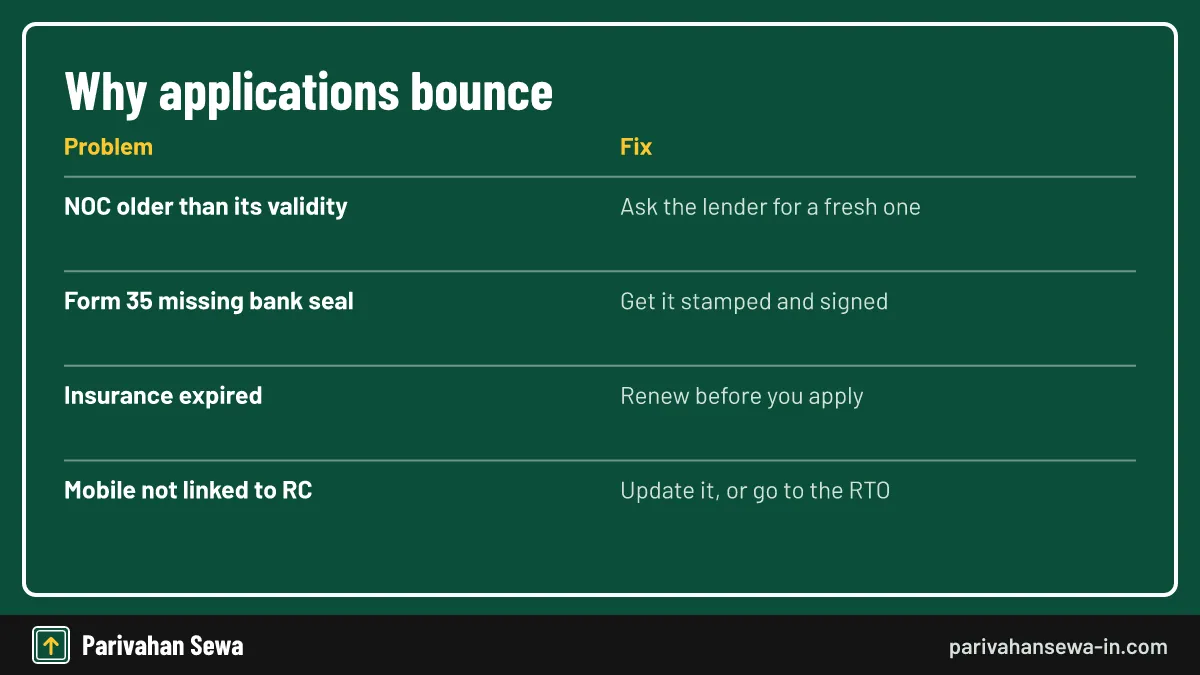
Mismatched details
A single wrong digit in the chassis or engine number on the NOC is enough for a return. Ask the lender to correct it before you file.
Mobile number problems
If the OTP goes to an old number, update the mobile number in the vehicle record first, or use the counter route.
Should you tell your insurer after hypothecation removal?
Yes. After hypothecation removal, send the updated RC or the NOC to your insurer so the financier’s name comes off the policy. Otherwise a claim payout may still be routed to the bank, which slows settlement.

When to do it
You can request the change at renewal or straight away. Doing it right after the new RC arrives keeps the policy and RC in line.
Papers to keep
Keep the updated RC, Form 35, NOC, loan closure letter, fee receipt and acknowledgement together. A future buyer or their lender may ask for them.
What if the lender refuses or delays Form 35?
If the lender delays Form 35 after full repayment, write to its customer care and grievance team with your loan account number and closure proof. Keep copies of every email. Most delays are resolved once the request reaches the right desk.
Escalating with the lender
Use the lender’s formal grievance route and keep a dated record. Ask for a written reason if it says dues are still pending, such as a final charge or a missed EMI.
Where the law fits
Section 51 of the Motor Vehicles Act, 1988 covers vehicles under hire-purchase, lease or hypothecation. If a lender will not cooperate, ask your RTO how it handles the case under that section before taking further steps.
Form 35 vs Form 34 vs the transfer forms: which applies?
Form 35 is for removing a closed loan. Form 34 adds a loan after registration. Form 29 and Form 30 move the vehicle to a new owner, and Form 26 replaces a lost RC. Use this table to pick the right one.
| Your situation | Form | Lender’s role |
|---|---|---|
| Loan fully repaid | Form 35 | Signs and gives NOC |
| New loan on a vehicle you own | Form 34 | Signs with the owner |
| Selling the vehicle | Form 29 and Form 30 | Consent needed if the loan is still open |
| Lost or damaged RC | Form 26 | Endorsement needed if financed |
Selling a financed vehicle
If the loan is still open, the transfer needs the lender’s consent. If it is closed, file Form 35 first. Our vehicle ownership transfer online guide covers the sale itself.
Moving to another state
A move needs the NOC process from the old RTO, and a financed vehicle needs the lender’s say for that too. Clearing hypothecation first keeps the move simple. More services are listed on the Vahan hub and the home page.
Official links
Vahan citizen servicesvahan.parivahan.gov.in ↗Parivahan Sewa (Download Forms)parivahan.gov.in ↗Motor Vehicles Act, 1988 (India Code)indiacode.nic.in ↗DigiLockerdigilocker.gov.in ↗Form 35 questions
What is Form 35 used for?
Form 35 tells the RTO that a hire-purchase, lease or hypothecation agreement on a vehicle has ended, so the lender's name can be removed from the registration certificate.
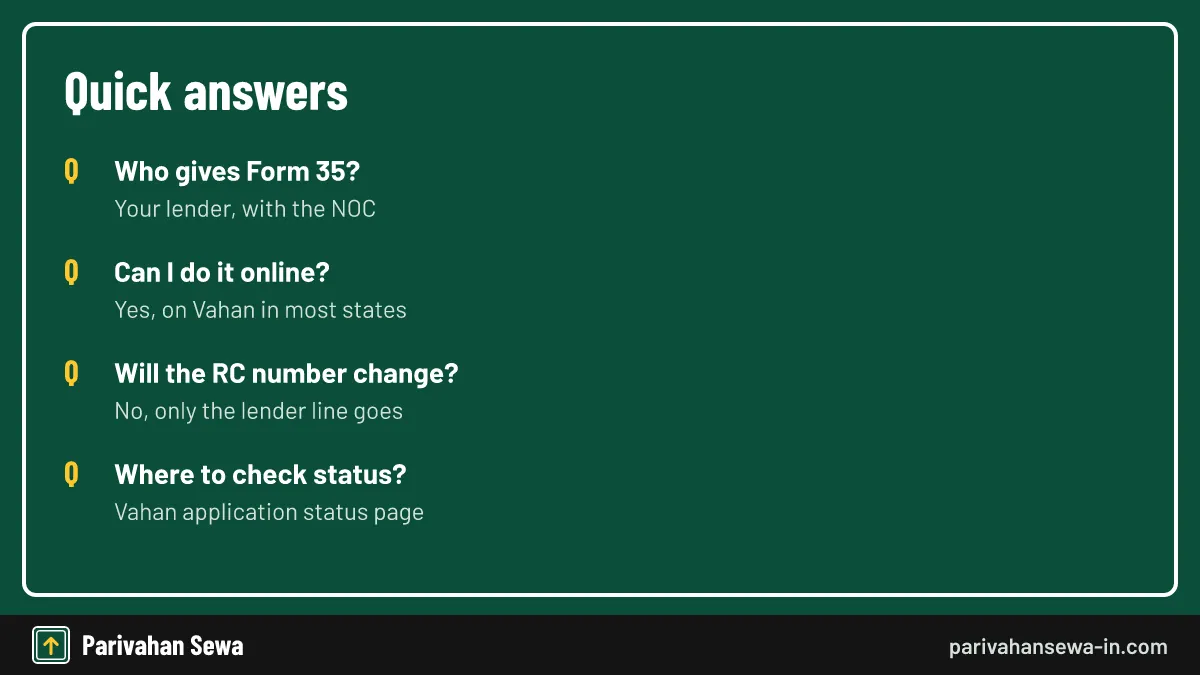
Who gives me Form 35?
Your bank or finance company. It signs Form 35 and sends it with the NOC and a loan closure letter after the last EMI is cleared.
Can I remove hypothecation from RC online?
In most states, yes. Vahan offers a Hypothecation Termination service. Some RTOs still ask you to drop off the signed originals after paying online.
Is there a fee for hypothecation removal?
The central schedule lists no separate fee for cancelling the entry. States add their own small fees and service charges, shown on the Vahan fee screen before you pay.
How long is the bank NOC valid for Form 35?
Many lenders issue the NOC with a validity of about 90 days. If it lapses, ask the lender for a fresh NOC and Form 35.
Does the RC number change after HP termination?
No. The registration number stays the same. Only the financier line on the RC is removed.
How do I check hypothecation cancellation status?
Use the application number from your receipt on the Vahan status page, or view your vehicle details to see whether the financier still appears.
What if I lost the Form 35 the bank gave me?
Ask the lender for a duplicate. Some lenders charge a small fee for reissuing a NOC or Form 35.
Do I need to visit the RTO for hypothecation termination?
Not always. Where the online service is fully live, no visit is needed. Where the RTO asks for physical papers, you or a family member may need to deliver them.
Can I sell my car before removing hypothecation?
The transfer stalls while a lender's name is on the RC. Clear it with Form 35 first, or file the termination together with the transfer if your RTO allows it.
Is Form 35 the same in every state?
Yes. It is a central form under the Central Motor Vehicles Rules, 1989. States may print it with their own header, but the fields are the same.
Should I tell my insurer after removing hypothecation?
Yes. Send the updated RC or NOC to the insurer so the financier's name is removed from the policy and any claim is paid to you.
Parivahan Sewa (parivahansewa-in.com) is an independent information website and is not affiliated with MoRTH, Parivahan or any state transport department. Confirm fees and rules on the official portal before you pay or apply.