Know your application status for RC, transfer and other Vahan services
To know your application status for an RC service, open Vahan citizen services, choose the Status menu, select Know Your Application Status, then enter the application number from your receipt and the captcha. The page shows which RTO desk holds the file, or whether it is approved, returned or dispatched. The check is free and needs no login.
Key takeaways
- The application number on your Vahan receipt is the key for every status check.
- Licence applications are tracked on Sarathi, not on Vahan.
- Once approved, search by vehicle number in mParivahan to confirm the record changed.
- Telangana moved vehicle registration to Vahan in March 2026; older files may sit in the state system.
- Food licence, PCB consent and NFSC card requests are not transport services and have their own portals.
On this page · 41 sections
How do you know your application status on Vahan?
To know your application status on Vahan, open the citizen services page, click Status in the top menu and choose Know Your Application Status. Enter the application number from your receipt and the captcha. The result names the stage your file has reached and the RTO seat currently holding it.

- Open Vahan citizen services. Go to vahan.parivahan.gov.in and open the citizen services page for your state.
- Choose the Status menu. Click Status in the top menu bar.
- Select Know Your Application Status. Pick the application status option from the list.
- Enter the application number. Type it exactly as printed on your receipt, then fill in the captcha.
- Read the result. Note the stage, such as pending at a desk, approved or dispatched.
Where the number comes from
The application number is generated the moment you submit a Vahan service form, before payment. It is printed on the fee receipt and the acknowledgement slip, and it is usually sent by SMS to the mobile number in your vehicle record. Save that SMS until the work is finished.
No login needed
The status tracker is open to anyone holding the number. You do not need a Parivahan account, an OTP or the vehicle’s chassis digits. That makes it quick to check from any phone browser, even one that is not yours, but it also means you should not post the number publicly.
What does application status mean on Parivahan?
Application status on Parivahan is the live record of where a submitted request sits in the RTO’s workflow. Every Vahan service, from an address change to a transfer, moves through set desks: scrutiny, verification, approval and printing. Application status parivahan pages show the current desk.
Why the stages matter
Knowing the desk tells you who to contact. A file pending at “verification” may need you to bring originals, while one pending at “approval” usually needs only time. Without that detail, people often visit the wrong counter and lose a day.
One system for all states
Most states run vehicle services on the national Vahan 4 platform built by NIC, so the status page looks the same in Delhi, Kerala or Haryana. A few states that joined late, such as Telangana, still have some older files in their own system.
Where is the know your application option?
The know your application option sits under the Status menu at the top of the Vahan citizen services page. On a phone the menu folds into a three-line icon; tap it, then Status. Our online application status guide explains the same tracker in more depth.
If the menu looks different
NIC updates the layout from time to time. If the Status label moves, look for “Know Your Application Status” in the same menu as payment verification and receipt printing. The function itself has stayed in place for years.
Mobile browser tips
Turn the phone sideways if the captcha box is cut off. Desktop mode in Chrome also shows the full menu. Clear the browser cache if the page keeps reloading without showing a result.
Which details do you need to check RC application status?
To check RC application status, the application number alone is enough. For related checks, such as confirming the record after approval, keep the vehicle registration number, the last five chassis digits and the mobile number linked to the RC. An application number check fails most often because of a single wrong character.

Reading the number correctly
Vahan application numbers mix a state code with digits. Copy them from the receipt instead of retyping from memory. Confusing the letter O with zero, or I with one, is the usual reason for an “invalid application number” message.
When the receipt is lost
Search your SMS inbox for “Vahan” or your registration number. The payment confirmation email from the gateway also carries the number. As a last resort, the RTO can look up the application from your vehicle number.
How to know RC status with only the vehicle number?
If you only have the registration number, you cannot see desk-level progress, but you can see the current RC status of the vehicle. Search the number in the mParivahan app or the Vahan vehicle search. How to know RC status this way is useful once you expect an approval to be done.
What the vehicle search shows
You see the model, registration date, fuel, insurance and fitness validity, and an owner name that is partly masked. If a transfer or address change has been approved, the record reflects it. Our know your status guide covers this search screen.
When to use which
Use the application number while a request is pending. Use the vehicle number to confirm the final result. Using both gives you the clearest picture of a vehicle RC status.
How to check RC status online on Vahan 4?
For an RC status check online on Vahan 4, open the citizen services page, select your state and use the Status menu. Vahan 4 RC status results load in seconds. To check RC status for a car or a bike, the steps are identical; only the vehicle class differs.

How to check car RC status
How to check car RC status is the same as for any vehicle: enter the application number for a pending request, or search the registration number for the record. Cars on a loan show the bank as financer, which is normal until the loan is closed.
Two-wheelers and commercial vehicles
Bikes, scooters and goods carriers all sit in the same Vahan database. Commercial vehicles also carry permit and fitness details, so their RC status online page has more fields than a private car’s.
What do pending application status messages mean?
A pending application status means an RTO official still has to act on your file. The message usually names the seat, such as dealing assistant, verifying officer or approving authority. A pending application parivahan message is not a rejection; it is a queue position.

| Status shown | What it means | What you do |
|---|---|---|
| Pending at a seat | An official still has to act | Wait, or ask that desk after a reasonable time |
| Approved | The service is complete | Wait for the print or download the record |
| Returned or objection | Something is missing or wrong | Read the SMS, fix it, resubmit or visit |
| Payment pending | The bank has not confirmed the fee | Use payment verification on Vahan |
| Dispatched | The RC card has been posted | Ask the RTO for the postal reference |
When pending lasts too long
If the stage has not moved for several weeks, visit or call the RTO named in the status with the application number. Many states also accept grievances through the Parivahan feedback option.
Returned applications
A return usually needs a document re-upload or an inspection. Fixing it quickly keeps the same application number.
How to check new vehicle registration status?
How to check new vehicle registration status: ask the dealer for the application number generated at the time of sale, then track it on Vahan. New vehicle registration status moves from temporary registration to permanent number allotment, then to RC printing.
Temporary registration first
A temporary registration issued under Section 43 of the Motor Vehicles Act is valid for one month while the permanent number is arranged. Dealers generate it on Vahan, so the application number already exists from day one.
My new number status
People searching my new number status want to know when the permanent number is allotted. The Vahan status page shows the allotment once it happens, and the dealer receives it at the same time for fitting the high security plate.
How to check vehicle transfer status?
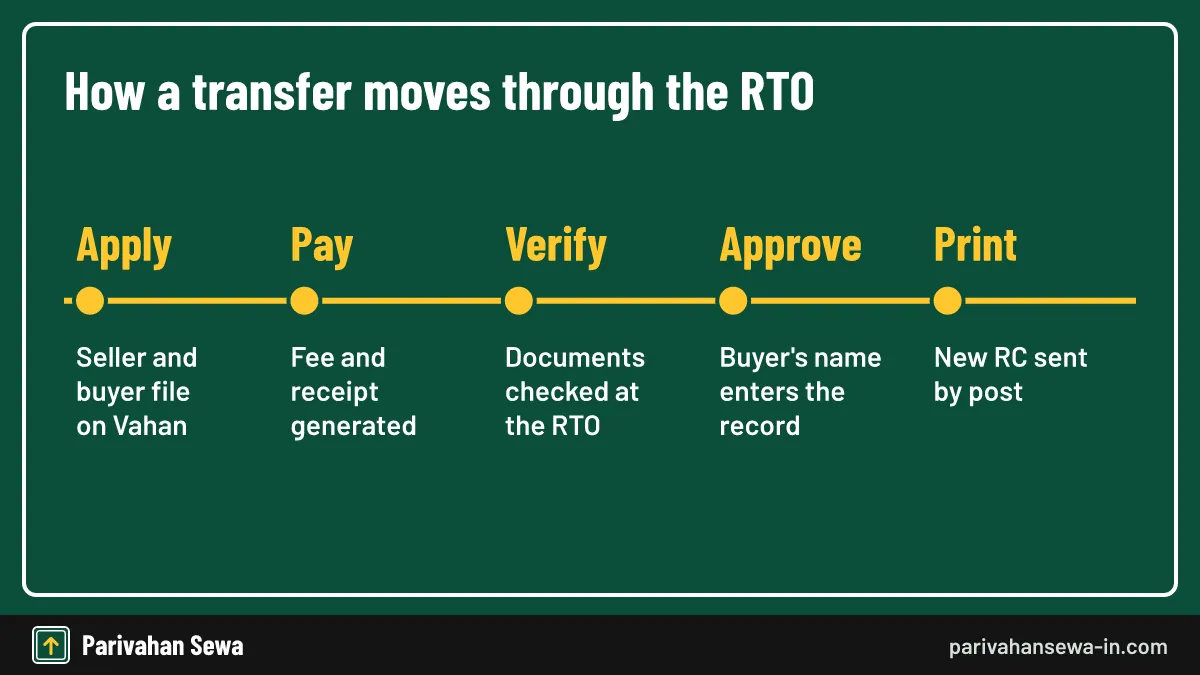
How to check vehicle transfer status: track the application number generated when the transfer was filed. The RC transfer status passes through seller submission, fee payment, document verification and approval. Once approved, the buyer’s name appears in the vehicle search. Transfer fees are set by each state and shown before you pay.
How to check vehicle ownership transfer status as a buyer
How to check vehicle ownership transfer status as the buyer: get the application number from the seller. After approval, search the registration number to see your name. Keep the sale papers until that change shows.
How to check bike transfer status
How to check bike transfer status follows the same path. Two-wheeler transfers often finish faster because inspections are rare. The vehicle transfer status page treats bikes and cars alike.
How to check hypothecation status of vehicle online?
How to check hypothecation status of vehicle online: search the registration number in mParivahan or Vahan and look at the financer field. If a bank name appears, the loan is still recorded. If you filed for removal, track that application number. Our hypothecation meaning guide explains the term.

How to check hypothecation status of vehicle after loan closure
How to check hypothecation status of vehicle after closing a loan: the bank’s NOC alone does not clear the record. You must apply for hypothecation termination on Vahan and the RTO must approve it. Then the financer field becomes blank.
Buying a used vehicle
How to check hypothecation status before you buy: search the number and confirm the financer field is blank, or that the seller has a lender NOC.
How to check RC renewal status?
How to check RC renewal status: renewal of registration is filed on Vahan and creates an application number like any other service. Track it there. Private vehicles usually need an inspection before renewal, so the status often waits at the inspection stage.
What renewal involves
A renewal sets a new registration validity date after the vehicle passes the RTO inspection. The status changes to approved once the inspector clears the vehicle and the fee is confirmed.
After approval
Search the vehicle number to see the new validity date. If it still shows the old date, wait a day for the record to refresh, then ask the RTO.
How to check vehicle FC status?
How to check vehicle FC status: search the registration number in mParivahan or Vahan and read the fitness validity date. For a pending fitness application, track the application number. Transport vehicles need one to stay on the road.
Commercial vehicles
Transport vehicles need regular fitness certificate renewals. An expired FC also affects permits, so check the date well before it runs out.
Inspection booking
Many states require an inspection slot booked on Vahan. The slot booking appears with the application.
How to know Bharat stage of my car?
How to know Bharat stage of my car: look at the RC, where the emission norm is recorded, or open the virtual RC in mParivahan. The manufacturer’s label on the door frame or chassis plate also states compliance. How to check Bharat stage of vehicle matters for city entry rules and PUC.

When the record is blank or wrong
Owners have reported vehicles showing a blank emission norm or an older norm than the car actually meets. If that happens, take the purchase invoice and the manufacturer’s certificate to the RTO and ask for a correction.
Using the registration date
Vehicles sold in India after nationwide BS-VI rollout were sold as BS-VI, but always confirm on the record rather than guess from the date.
How to track my RC book delivery status?
How to track my RC book delivery status: once the status shows the RC is printed or dispatched, ask the RTO for the postal reference. Many states send RC smart cards through India Post. You can also collect it from the RTO in some states.
RC smart card download
An RC smart card download in the strict sense is not possible: the card is a physical item. What you can download is the digital RC, which counts for checks on the road.
If the card does not arrive
Contact the RTO with the application number. Returned post usually goes back to the office.
How to download RC online after approval?
How to download RC online: once the application is approved, the digital RC is available from Vahan, mParivahan and DigiLocker. Our rc download guide gives the full steps. A Vahan RC download needs the registration number and an OTP to the registered mobile.
How to download car RC online
How to download car RC online is the same as for any vehicle. The online RC book download is a signed PDF, and the RC download parivahan option produces the same record.
Vehicle registration certificate download formats
A vehicle registration certificate download gives a PDF with a QR code. Keep it with the virtual RC in mParivahan.
How to check RC book online?
How to check RC book online: open the virtual RC in mParivahan or DigiLocker. How to see RC online without the card is the same. How to get online RC book is answered by adding the RC once in either app. Our mParivahan guide covers the steps.
What the online RC shows
The virtual RC shows owner, model, registration date, fuel, emission norm, financer and validity, all drawn live from Vahan.
Paper RC holders
Older paper RC books are still recorded in Vahan, so the online copy works for them too.
What is RTO application status?
RTO application status is the same as Vahan application status: the RTO works inside Vahan, so its desks appear in the tracker. Vehicle application status and registration application status are other names for it. Only licence work lives on Sarathi.
Offline applications
Applications filed at an RTO counter are also entered into Vahan and get an application number. Ask the clerk for the printout.
Different offices
The tracker shows the office handling the file, which helps if your RTO has sub-offices.
What are Vahan vehicle related services?
Vehicle related services on Vahan include ownership transfer, address change, loan addition and removal, duplicate RC, renewal, NOC, permits and tax payment. Each Vahan e service produces an application number for tracking.

| Service | Where to apply | How to track |
|---|---|---|
| Ownership transfer | Vahan citizen services | Application number on Vahan |
| Address change | Vahan citizen services | Application number on Vahan |
| Hypothecation removal | Vahan citizen services | Application number, then financer field |
| Duplicate RC | Vahan citizen services | Application number on Vahan |
| NOC to another state | Vahan citizen services | Application number on Vahan |
| Driving licence | Sarathi | Application number and date of birth on Sarathi |
Services needing an RTO visit
Inspections, original document checks and biometric steps may need an office visit even when you apply online.
Choosing the right service
Choosing the wrong service creates a fee you may not get back, so read each description.
Vahan 4 beta: is it a separate portal?
Vahan 4 beta was the label shown while NIC tested the newer citizen services interface. It is not a separate database. Vahan beta status and Vahan 4 beta status searches lead to the same tracker. Our vahan beta guide covers the history.
Which address to use
Use vahan.parivahan.gov.in. If a beta link still opens, the records are identical.
Avoid copies
Sites using “beta” in their names are not official. Some of them copy the Vahan layout to collect chassis numbers and mobile numbers, so always check that the address ends in parivahan.gov.in before entering any vehicle detail.
How does Vahan 4 citizen service work?
Vahan 4 citizen service is the public side of Vahan, where owners file and track requests. Vahan 4 citizen pages ask for the registration number and chassis digits, then send an OTP. Each Vahan application gets a number you can follow with Vahan 4 application status.
The usual flow
Choose the service, verify the vehicle, fill details, upload documents, pay, and save the receipt. The status is then tracked as shown above.
When OTP fails
If the OTP goes to an old number, update the mobile number in the vehicle record first. Vahan offers a mobile update service that verifies the owner through Aadhaar or a visit to the RTO; until it is approved, any service that needs an OTP will stall at the first screen.
How to register in Vahan portal?
How to register in Vahan portal: citizens do not need a separate account for most services. Vehicle-based services verify you through the registration number, chassis digits and an OTP. Some services ask for an optional user login with mobile number.
For new owners
A new vehicle is registered in Vahan by the dealer, not the owner. You receive the application number from the dealer.
For businesses
Dealers, financers and check posts get departmental logins from the transport department. These accounts carry legal responsibility for the data entered, which is why they are issued only after the office verifies the business.
What is the Vahan report and Vahan master?
Vahan report usually means either the vehicle details printout or the public statistics on the Vahan dashboard. Vahan master is not a citizen service; the term refers to internal master tables used by RTO staff. Citizens do not need it.
Printable reports
The receipt, acknowledgement and approved RC can all be printed from Vahan. If you lost a receipt, the print receipt option under the same menu regenerates it from the application number or the bank reference.
Statistics
The dashboard shows totals by state, fuel and maker, never individual owners. Journalists and researchers use it; owners rarely need it for their own applications.
How does Vahan dealer login work?
Vahan dealer login is a departmental account given to registered vehicle dealers, who apply to the transport department for a unique ID. Dealers use it to enter sale details, issue temporary registrations and upload photos. Owners do not log in here.
What dealers file
The dealer enters vehicle data; chassis details auto-fill from the manufacturer’s homologation data. This is why a new vehicle’s model, engine and emission norm rarely need typing by hand, and why errors there are fixed by the dealer or the maker.
Trade certificates
Dealers also need a trade certificate to move unregistered vehicles. If you are an owner and your dealer has not shared the application number within a few days of delivery, ask for it in writing.
How do you check a Vahan permit?
Vahan permit services handle permits for transport vehicles, such as goods carriers, taxis and buses. A parivahan permit application also gets an application number, tracked on the same status page. Approved permit details appear in the vehicle record.
Temporary and special permits
Tourist and temporary permits are also filed on Vahan’s permit pages. The permit number appears on the receipt and later in the vehicle record, so operators can confirm it before a trip.
Permit and fitness link
A permit generally depends on valid fitness, insurance and tax, so check those first. A lapsed document is the most common reason a permit application stops at the verification desk.
How do you pay Vahan 4 tax?
Vahan 4 tax payment is filed under online services on Vahan. Choose the tax option, verify the vehicle, select the period and pay. The receipt carries an application number. Rates are set by each state, so check your state’s transport department.
Border tax
Vehicles entering another state on a temporary visit may pay border tax through Vahan’s check post service. Keep the receipt on the phone, because check post staff verify it against the same record.
Failed payment
Use payment verification before paying again, to avoid paying twice. If the bank debited you but Vahan shows nothing, the gateway usually reverses the amount; note the bank reference in case you need to raise a complaint.
How does a Vahan NOC check work?
A Vahan NOC check tracks a no objection certificate for moving a vehicle to another state. Track the application number. See our NOC status guide for the steps.
Before applying
Clear pending challans and loans, since they can block the NOC. A vehicle on a loan needs the lender’s consent before the RTO will release the record to another state.
After issue
The NOC is sent to the new state’s RTO record. You then apply for re-registration in the new state, which starts a fresh application number there.
How to know your vehicle status?
Know your vehicle status searches look for the current record of a vehicle rather than an application. Search the registration number in mParivahan for model, validity and masked owner name.
Status of insurance and PUC
The search shows insurance and PUC validity if recorded. If a valid policy is missing, the insurer may not have uploaded it yet; keep the policy PDF until the record catches up.
Challans
Pending challans are on the e-Challan portal. They stay with the vehicle, so buyers should check them before paying for a used car or bike.
What is TS RC status?
TS RC status and RC status Telangana searches come from Telangana owners. Telangana moved vehicle registration to Vahan, operational from 23 March 2026. New applications are tracked on Vahan; older ones may still be on the state portal. Telangana RTO RC status follows the same split.

RC status check Telangana and RC track Telangana
For an RC status check Telangana owners filed after the switch, use Vahan with Telangana selected. For RC track Telangana on older files, use the transport department website.
Telangana RC card
A Telangana RC card is generated after the dealer fits the HSRP plate and uploads vehicle photos on Vahan. The state code changed from TS to TG in March 2024.
What is TS m wallet?
TS m wallet refers to RTA m-Wallet, the Telangana Transport Department’s app for digital copies of the RC and driving licence. It was launched in 2016 and is on Android and iOS. Since Telangana now uses Vahan and Sarathi, mParivahan and DigiLocker also hold Telangana documents.
Which to use
Keep documents in mParivahan or DigiLocker, which are accepted nationally. That matters when you drive a Telangana vehicle in another state, where officers may not know a state-only app.
Not a payment wallet
Despite the name, it is not a money wallet. You cannot pay challans or tax from stored balance; payments go through the official gateways.
What is a TR licence?
TR licence is a common mix-up for TR, the temporary registration a dealer issues at sale. It is not a driving licence. TR is valid for one month under Section 43 while permanent registration is arranged.
Tracking a TR
The TR application number is the same one used to track the permanent registration. Ask the dealer for it on the day of delivery, along with the TR slip.
Expired TR
Do not drive on an expired TR. Ask the dealer to finish the permanent registration, and check the status page to see which desk is holding it.
Driving licence status Telangana: how do you check it?
For driving licence status Telangana applicants filed after the state joined Sarathi, use the Sarathi application status option with Telangana selected. Telangana license services, driving licence Telangana apply online and Telangana learners license tests also start on Sarathi.
Telangana driving licence download
A Telangana driving licence download or TS driving licence download is available through DigiLocker and mParivahan once the licence is in Sarathi.
Older licences
Licences issued under the old state system may need updating at the RTO. If DigiLocker cannot find your licence, the record may not have moved to the national format yet.
Know your application status AP: where do you check?
Know your application status AP queries: Andhra Pradesh RTA services run on Vahan and Sarathi, so AP application status for vehicles is tracked on Vahan with Andhra Pradesh selected.
Driving licence renewal online in AP
Driving licence renewal online in AP is filed on Sarathi. Track renewals through our driving license renewal application status guide.
Older AP files
Applications from the earlier state portal may need an RTO enquiry. Carry the old receipt, as the number format differs from Vahan’s.
RC application status Kerala: how do you check it?
RC application status Kerala owners filed online is tracked on Vahan with Kerala selected and the application number entered. Kerala Motor Vehicles Department services run on Vahan.
Kerala RTO codes
The KL code and two digits on the plate show the office that registered the vehicle. Pick the same office when you file a service, or the request goes to the wrong desk.
Questions
Ask the RTO named in the status. Kerala offices also respond to queries through the state MVD website.
How does Vahan Haryana work?
Vahan Haryana means Vahan citizen services with Haryana selected. HR vehicles use it for transfers, address changes, tax and NOCs, tracked with the same status page.
Haryana offices
Haryana has registering authorities in each district; choose the one on your RC. Gurugram, Faridabad and other large districts have more than one office, so read the code carefully.
Haryana notices
The state transport department publishes local notices, including office timings and changes to services.
What is e transport?
E transport is a general term for online transport services, including Vahan, Sarathi and state portals. Rajasthan users often mean the state’s transport portal; they reach it from the Rajasthan transport department website, while vehicle and licence work still runs on Vahan and Sarathi.
What it is not
It is not a separate national system and does not have its own application numbers.
Where to go
For India-wide services, start at parivahan.gov.in, which links to every tracker.
How can I check my DL status?
How can I check my DL status: open Sarathi, choose your state, select application status and enter your application number and date of birth. License tracking status shows tests, approval and printing. Our DL status guide covers more.

Forgot my DL number
Forgot my DL number searches: check DigiLocker or mParivahan, or use the Parivahan DL search by name, date of birth and mobile in supported states.
Lost licence
Apply for a duplicate on Sarathi. Some states ask for a police report of the loss, so check your state’s document list first.
Can you apply for a driving licence online in Punjab, Bihar and other states?
Yes. Driving licence apply online Punjab, apply driving licence Bihar and similar requests start on Sarathi. Punjab driving licence apply steps match other states.
| State | Licence service | Where to start |
|---|---|---|
| Punjab | New licence and renewal | Sarathi, state Punjab |
| Bihar | Learner and new licence | Sarathi, state Bihar |
| Rajasthan | Online driving licence renewal | Sarathi, state Rajasthan |
| Assam | Driving licence renewal online | Sarathi, state Assam |
| Gujarat (Surat) | Licence at Surat RTO | Sarathi, state Gujarat |
Online driving licence renewal Rajasthan and Assam
Online driving licence renewal Rajasthan and driving licence renewal online Assam are filed on Sarathi.
Driving licence Surat
Driving licence Surat applicants choose Gujarat and the Surat RTO on Sarathi.
What is food application status?
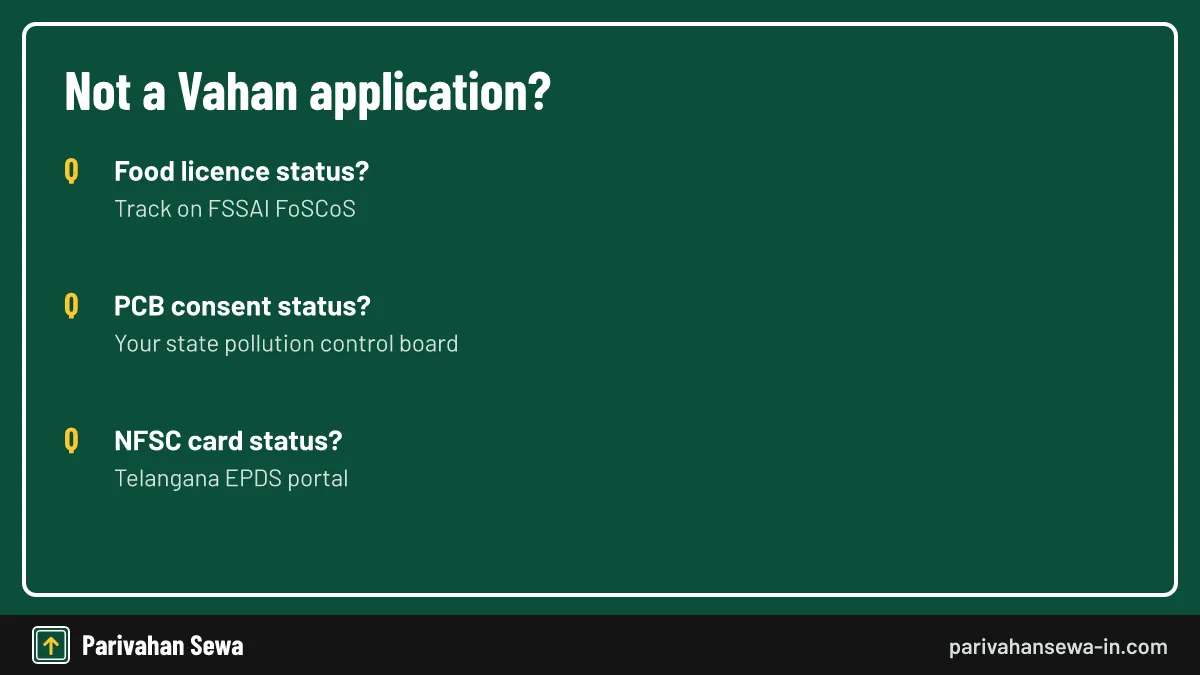
Food application status is not a transport service. It usually means an FSSAI food licence or registration, tracked on FSSAI’s FoSCoS portal with the 17-digit application reference number.
Who handles it
The Food Safety and Standards Authority of India and state food safety departments handle these files. RTOs cannot see or change them.
Ration cards
For ration cards, use your state’s food and civil supplies portal, which has its own search.
What is a PCB application?
A PCB application is a request to a state Pollution Control Board, such as consent to establish or operate a factory. It is not a transport service. See our PCB login guide.
Vehicle pollution
Vehicle emissions are covered by PUC certificates, not PCB consents. A vehicle owner never needs a PCB application.
Tracking
Each board has its own status page, usually reached from the board’s website.
What is NFSC status?
NFSC status usually means a Telangana food security card application. It is not a transport service. Search it on the Telangana EPDS portal using the FSC application search.
Which search
Pending applications appear under the FSC application search; issued cards under FSC search. Using the wrong one shows no result.
Where to apply
Applications go through MeeSeva centres, which give you the receipt number used in the search.
What does know status mean on Parivahan?
Know status on Parivahan is shorthand for the status trackers: Vahan for vehicles, Sarathi for licences, e-Challan for fines. Our vahan status check number guide and the vehicle information hub list the trackers.
One number per request
Every request has its own number, even when you file several services for the same vehicle on one day.
Keep records
Save receipts until the work is done and the record shows the change. They are your proof if anything goes wrong.
Official links
Vahan citizen servicesvahan.parivahan.gov.in ↗Sarathi licence servicessarathi.parivahan.gov.in ↗Parivahan Sewaparivahan.gov.in ↗Telangana Transport Departmenttransport.telangana.gov.in ↗FSSAI FoSCoS (food licence tracking)foscos.fssai.gov.in ↗Telangana EPDS (food security card)epds.telangana.gov.in ↗Know your application status questions
Is it free to check application status on Vahan?
Yes. Tracking an application on Vahan costs nothing and needs no login. Only the service itself, such as a transfer, carries a fee.
I lost my Vahan application number. What can I do?
Look for the SMS sent when you paid, the payment receipt PDF or the bank statement reference. If none is available, the RTO can trace it from the vehicle number.
Why does Vahan say invalid application number?
The number is usually mistyped, has an extra space or belongs to another state's system. Copy it from the receipt and try again on the correct state page.
Can I check RC status without an application number?
You can see the current vehicle record by registration number in mParivahan, but the desk-by-desk progress of a pending application needs the application number.
How long does an RC transfer take to show online?
It depends on the RTO and on whether documents need a physical check. The buyer's name appears in the record once the final approval is done.
Can someone else check my application status?
Anyone with the application number can see the stage, but not your personal documents. Keep the number private if you prefer.
Does the status page show why my application was returned?
It usually shows a returned or objection stage. The exact reason is given in the SMS or at the RTO, so contact the office named in the status.
Where do I check a driving licence application?
Use the Application Status option on Sarathi with your application number and date of birth. Vahan only holds vehicle applications.
My RC is approved but not delivered. Who do I ask?
Ask the RTO that approved it for the dispatch details. Many states send RC cards by post, and the office can tell you the tracking reference.
Is a TS registration number still valid after the TG code change?
Yes. Telangana's code changed from TS to TG in March 2024 for new registrations; vehicles already registered keep their numbers.
Can I check a Vahan application from the mParivahan app?
The app shows the vehicle record and links to Vahan services. For desk-level progress, the Vahan status page in a browser is clearer.
What does payment pending mean if money left my account?
The bank has not yet confirmed the payment to Vahan. Use the payment verification option on Vahan, or wait for the auto-refund if the transaction failed.
Parivahan Sewa (parivahansewa-in.com) is an independent information website and is not affiliated with MoRTH, Parivahan or any state transport department. Confirm fees and rules on the official portal before you pay or apply.