Know your status: registration, fitness and application checks on Vahan
To know your status for a vehicle, use the free Vahan search. Open Know Your Vehicle Details under informational services, type the plate number and captcha, and the record shows the registration date, RTO, class, fuel, and fitness and insurance dates. To follow a pending RTO request instead, enter the application number from your receipt in the Vahan application status tracker.
Key takeaways
- Know your status on Parivahan covers two different checks: the vehicle record and a pending application.
- A registration number status search needs only the plate number and is free on Vahan.
- The Fitness Upto and Insurance Upto fields show recorded dates, so confirm with the actual papers.
- Transport vehicles must keep a valid fitness certificate; private vehicles are tested when registration is renewed.
- Application tracking uses the number printed on the RTO fee receipt, not the bank reference.
On this page · 12 sections
What does know your status mean on Parivahan?
On Parivahan, know your status is shorthand for two separate checks. One reads the vehicle record held in the national Vahan register: dates, class and validity. The other follows an RTO application you have already paid for, such as a transfer or renewal. Pick the one that matches what you need.
The vehicle record check
This answers the question “what does the government hold about this vehicle today?” It works with only the plate number, so owners, buyers and insurers all use it before a deal or a claim.
The application check
This answers “where is my request?” It needs the application number issued when you paid the RTO fee, and it shows the stage the file has reached, from fee received to approval.
Which statuses can a vehicle owner look up?
Most owners need one of four lookups, and each lives in a different part of the government portals. The table below maps each need to the right screen, so you do not waste time on a search that cannot answer your question.
| What you want to know | Where to look | What you type |
|---|---|---|
| Registration details and validity | Vahan, Know Your Vehicle Details | Plate number, captcha |
| Fitness certificate date | Same vehicle record (Fitness Upto) | Plate number |
| Insurance date on record | Same vehicle record (Insurance Upto) | Plate number |
| A pending RTO request | Vahan status menu, application tracker | Application number |
Statuses this page does not cover
Driving licence progress runs on Sarathi, not Vahan, and pending traffic fines sit in the e-challan system. Both need their own numbers and cannot be read from the vehicle record.
Check registration status on Vahan: step by step
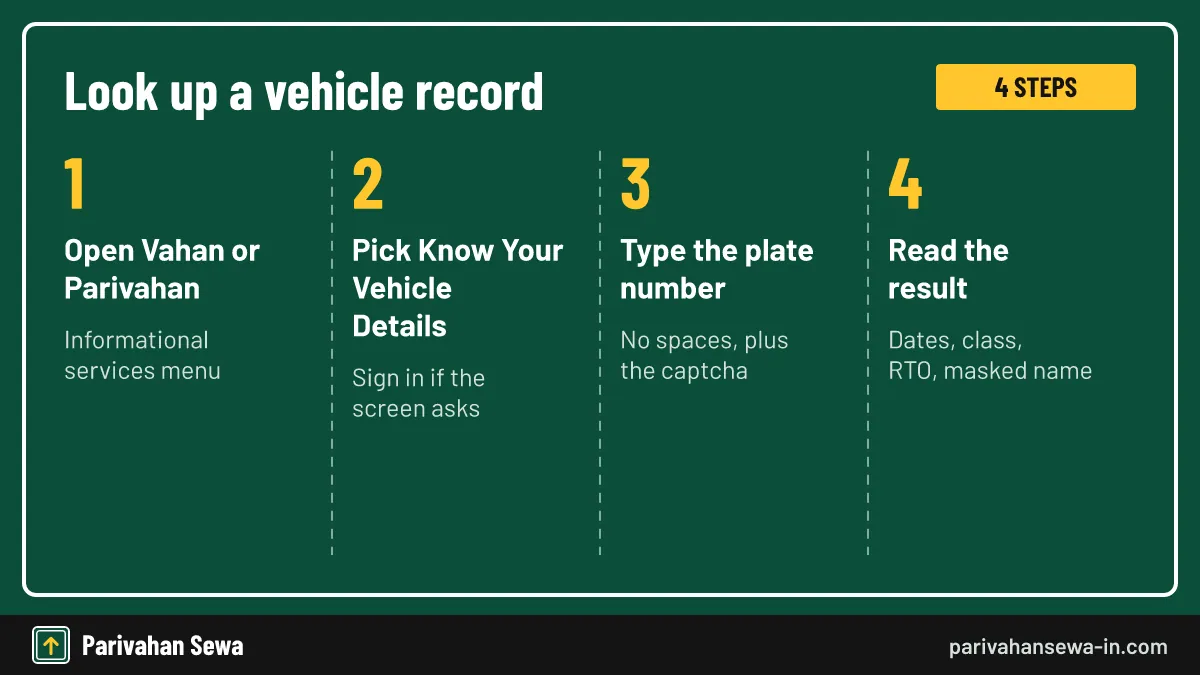
To check registration status, open the Vahan or Parivahan site, go to informational services and pick Know Your Vehicle Details. Type the plate number exactly, solve the captcha, and press search. The record loads on the same page within a few seconds when the servers are not busy.
- Open the vehicle search. Go to vahan.parivahan.gov.in or parivahan.gov.in and open Know Your Vehicle Details under informational services.
- Sign in if asked. Some versions of the screen ask for a mobile number and OTP before showing results.
- Enter the plate number. Type the full registration number without spaces or dashes, then fill the captcha.
- Read the record. Check the registration date, RTO, class, fuel, and the fitness and insurance dates.
Typing the number correctly
Write the state letters, district digits, series and number as one string, as printed on the RC. A zero typed as the letter O is the most common reason a valid vehicle is reported as not found.
What does registration number status show?
A registration number status result is a short summary of the register entry. It confirms that the plate belongs to a real, registered vehicle and lists its key details. It is not a full RC copy, and it never shows the owner’s address or phone number.

Fields you will usually see
Expect the registration date, the issuing RTO, vehicle class, fuel type, maker and model, the owner name with letters hidden, and the Fitness Upto and Insurance Upto dates.
Why the owner name is masked
Vahan hides part of the owner name in public searches to protect privacy. Full owner records are available only to authorised users or through a written request at the RTO, so any site that promises the complete name and mobile number is not official.
How do you read the dates and flags on the record?
Read each date as what the register holds, not as live proof. An Insurance Upto date in the past may mean the cover lapsed, or simply that a renewal was never pushed to Vahan. Compare every date with the certificate or policy in your hand before you rely on it.
When a date looks wrong
If you renewed insurance and the old date still shows, ask the insurer to confirm that it uploaded the policy. For a wrong registration detail, such as a misspelt name, the correction has to be requested at the RTO.
Flags worth noticing
Where the record or the RC names a financier, the vehicle is hypothecated to a lender. Buyers should treat that, and any expired fitness date, as a reason to pause until the seller clears it.
How to check fitness certificate status?
To see your fitness certificate status, run the same plate-number search and read the Fitness Upto field. That date is the last day the current certificate is valid. To get the certificate itself, use the print fitness option under download documents on Vahan; the label can differ between states.

Transport vehicles
Under CMVR rule 62, a transport vehicle gets a fitness certificate valid for two years while it is up to eight years old, and one year after that. Renewal can be requested up to sixty days before the expiry date.
Private cars and bikes
A non-transport vehicle is not tested every year. It is checked when the registration is renewed after 15 years, and again at each five-year renewal, so a blank or far-off fitness date on a newer private car is normal.
What should you do if fitness has expired?
An expired Fitness Upto date on a commercial vehicle is serious: without a valid certificate it is not treated as validly registered, so it should not be driven on hire. Book a fitness test, keep the papers ready, and check the record again once the new certificate is issued.
Booking the test
Apply through Vahan vehicle services, pay the fee shown on screen, and take the vehicle to the slot you pick. Many states now route heavy and medium vehicles to an automated testing station. For the documents, fees and test steps, see our guide to the vehicle fitness certificate.
Checking the update
After the test, the new date should appear on the record. If it does not change within a few working days, return to the testing centre or RTO with the receipt.
How does Vahan track application status work?
Vahan track application status follows a request you have already submitted, such as a transfer, address change, duplicate RC or NOC. Open the status menu in Vahan citizen services, enter the application number and captcha, and the page lists each stage the file has passed. No login is needed.
Reading the stages
You will usually see entries for fee received, document scrutiny, verification or inspection, and approval. A stage marked pending means the file is waiting with an RTO desk, not that it has been refused.
Going deeper
Each stage name, and what to do when one stalls, is explained in detail on our page on how to know your application status on Vahan.
Where is the application number printed?
The number appears at the top of the fee receipt generated after online payment, and in the SMS sent to the mobile number you gave. Copy it exactly, because the format differs from state to state.

Lost the receipt?
Vahan citizen services include a reprint option for receipts. If you cannot find it, the RTO can trace the file from the plate number and your ID, so carry both when you visit.
Do not confuse it with the bank reference
The bank or UPI transaction ID proves payment only. The tracker will reject it, so always copy the RTO application number instead.
Why does the status page show no record?
A “no record found” message usually has a simple cause: a typing slip, a vehicle registered so recently that the RTO has not approved it, or a very old record that was never moved to the national database. Retry carefully once, and if the portal is slow, try again later rather than on an unofficial site.
Old records
Some vehicles registered before a state joined Vahan were never digitised. The RTO that issued the plate has to enter the record; take the original RC and ask for backlog entry or data updation.
Can you look up the status of a vehicle you do not own?
Yes, for the basic record. Anyone can search a plate on Vahan and see the class, dates and a masked owner name, which is why buyers use it before paying for a used vehicle. Application tracking and document downloads, on the other hand, need details that only the applicant or owner holds.
What buyers should check
Match the maker, model and fuel with the vehicle in front of you, confirm the fitness and insurance dates, and ask the seller for the RC and loan closure papers if a financier is listed.
Where the law stands
Under rule 139 of the Central Motor Vehicles Rules, papers held in DigiLocker or mParivahan count as valid documents, so a seller can show a live copy instead of a photocopy.
Does know your status mean something outside transport?
Yes. “Know your status” is a common button label across government portals, including scholarship, pension and benefit schemes. This page covers only vehicle checks on Vahan. If you were looking for a non-transport scheme, use that scheme’s own official portal and its application ID.
How to tell you are in the right place
The vehicle services sit on the parivahan.gov.in domain and run on NIC’s Vahan system. If a site asks for a fee to show a status, or is not on a gov.in domain, it is not the official service. For every other vehicle service in one place, start from the Vahan vehicle information hub.
Other official ways to see the record
The mParivahan app shows the same record after you add your RC with the plate, chassis and engine digits and an OTP. An SMS service, VAHAN followed by the plate number sent to 7738299899, has been listed by insurers for basic details, but its current availability is not confirmed, so rely on the portal first.
Official links
Vahan citizen servicesvahan.parivahan.gov.in ↗Parivahan Sewaparivahan.gov.in ↗DigiLockerdigilocker.gov.in ↗Know your status questions
Is it free to know your status on Vahan?
Yes. The vehicle record search and the application tracker on Vahan have no charge. Pay only for the RTO service you apply for, never for a status lookup.
Can I check registration status without the chassis number?
Yes. The public record search needs only the plate number and a captcha, with an OTP sign-in on some versions. Chassis digits are asked for when you download documents, not for a basic lookup.
Why does my fitness certificate status show an old date?
The field shows the date stored in the register. If you renewed recently and the date has not changed, the RTO or testing station may not have updated the record yet. Ask them to post the new certificate.
Does the status search show pending challans?
No. Traffic fines are checked on the separate e-challan service using the vehicle or challan number. The Vahan record search shows registration details only.
What should I do if the application status has not moved for weeks?
Take the fee receipt to the RTO that handles the file and ask which stage it is at. A missing document or an inspection that was never booked is the usual reason.
Can I see the full owner name in the status result?
No. The public result masks part of the owner name to protect privacy. Full owner records go only to authorised users or through a formal RTO request.
Parivahan Sewa (parivahansewa-in.com) is an independent information website and is not affiliated with MoRTH, Parivahan or any state transport department. Confirm fees and rules on the official portal before you pay or apply.