Online payment for vehicle tax, RTO fees and receipts
An online payment for vehicle tax or an RTO fee is made on the Vahan citizen services site. Enter your registration number, open Pay Your Tax or the fee service, confirm the last five chassis characters, verify the OTP sent to the registered mobile, check the fee panel and pay through the bank gateway. Save the receipt, and use the Status menu if a payment stays pending.
Key takeaways
- Every online payment for motor vehicle tax starts on Vahan; state links only send you to the same screen.
- The fee panel shows the tax period, arrears and total before you reach the bank, so check it first.
- If money is debited but no receipt appears, use Check Pending Transaction and never pay twice.
- A lost receipt can be printed again from Reprint Receipt/forms with any reference number.
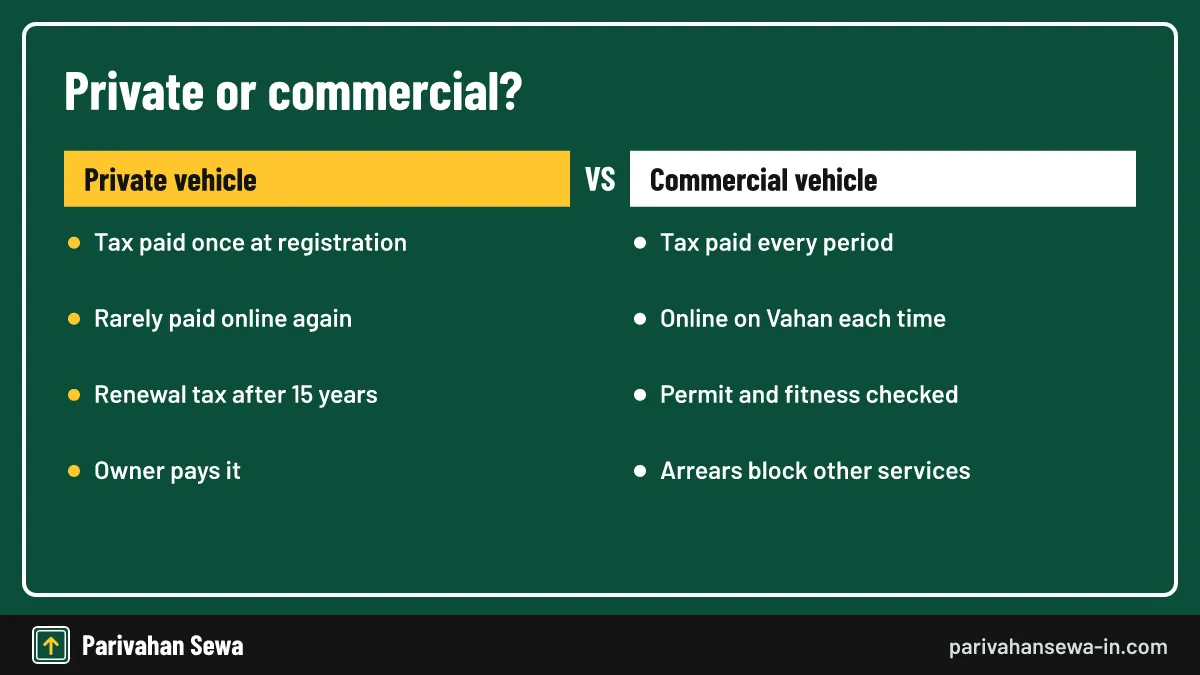
- Commercial vehicles return to the tax screen every period; private vehicles mostly pay once at registration.
- Income tax, GST and property tax use different government portals, not Vahan.
On this page · 40 sections
What does online payment mean on transport portals?
On transport portals, online payment means settling a government due, such as motor vehicle tax or an RTO service fee, through the official Vahan system and a bank gateway instead of a cash counter. The payment is linked to your registration number, so the RTO sees it at once.
Who runs the system
Vahan is the national vehicle registration database built by NIC for the Ministry of Road Transport and Highways (MoRTH). Each state transport department sets its own tax rules, but almost all of them collect tax and fees through the same Vahan screens.
Why the record matters
Because the payment posts straight to your vehicle record, the RTO, police and insurers can see that tax is paid. That is the main advantage over a paper receipt, which only proves a payment to whoever holds it.
Which transport dues can you settle by online payment?
You can settle most vehicle-linked dues by online payment: periodic and one-time motor vehicle tax, registration and transfer fees, NOC and hypothecation fees, permit fees and, in many states, tax for vehicles entering from outside. Traffic fines and licence fees use separate portals.
| Due | Where it is paid | Linked to |
|---|---|---|
| Motor vehicle tax | Vahan, Pay Your Tax | Registration number |
| RC services (transfer, NOC, address) | Vahan, vehicle related services | Application number |
| Tax for other-state vehicles | Vahan check post service | Vehicle and visiting state |
| Traffic fines | e-Challan portal or app | Challan number |
| Licence fees | Sarathi | Licence or application number |
What the tax screen does not cover
The Vahan tax screen will not take income tax, GST, property tax or land revenue. Those have their own state or central portals, explained later on this page.
Why some services are missing
A state may not have switched on every service for every RTO. If a service does not appear, the state still collects that due at the counter or through its own website.
How does online payment work on Vahan, step by step?
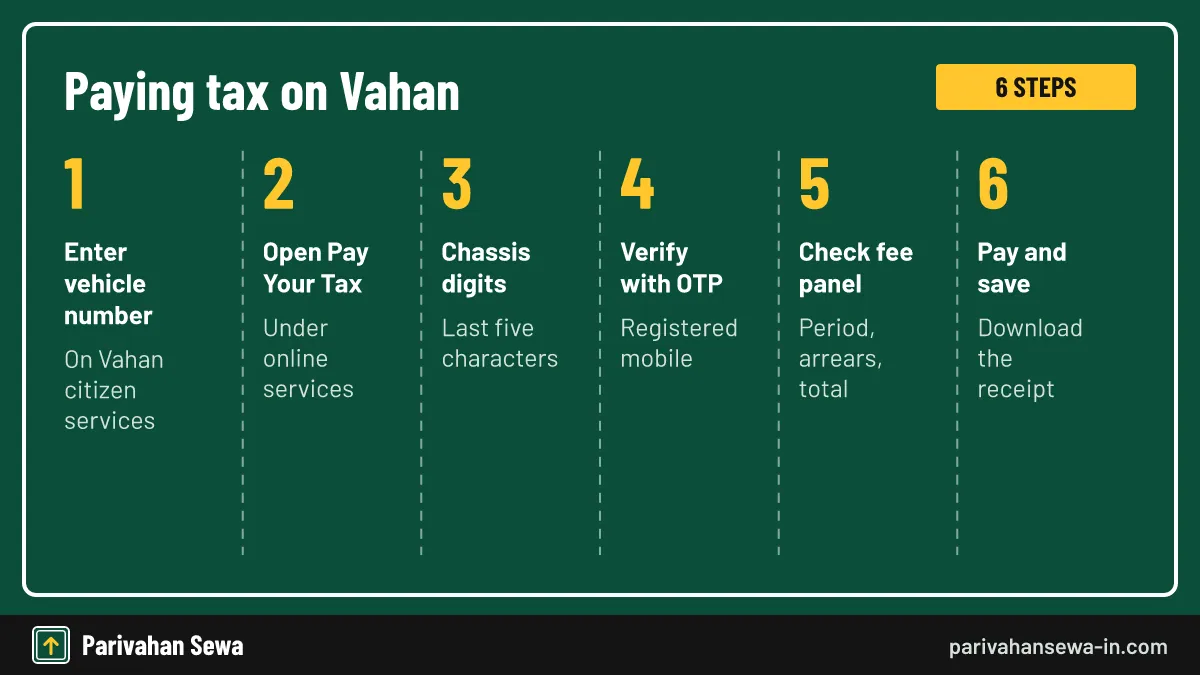
An online payment on Vahan follows the same six steps in nearly every state: enter the vehicle number, open the tax service, validate the chassis digits, verify the OTP, check the fee panel and pay. The whole process usually takes under five minutes once the OTP arrives.
- Open Vahan citizen services. Type vahan.parivahan.gov.in in the browser and enter your vehicle registration number.
- Choose the tax service. Open Online Services and pick Pay Your Tax or Pay Vehicle Tax, as your state names it.
- Validate the vehicle. Enter the last five characters of the chassis number and validate.
- Verify with OTP. Generate the OTP and enter the code sent to the registered mobile number.
- Check the fee panel. Confirm the tax mode, period, arrears and total amount shown.
- Pay and save the receipt. Pay through the gateway and download the receipt before closing the page.
Menu labels differ by state
Some states call the option Pay Vehicle Tax, others Pay MV Tax or Tax Payment. The inputs behind the label stay the same, so look for the word “tax” under online services.
Insurance check during payment
Many states ask you to confirm or update insurance details before the fee panel opens. Keep the policy number and insurer name handy, because an expired policy can stop the payment.
What do you need before you make an e payment?
Before you make an e payment, keep the registration number, the last five characters of the chassis number, the phone that holds the registered mobile number and a working bank, card or UPI account. Commercial owners also need the permit details.

Where to find the chassis number
The chassis number is printed on your RC and insurance policy and stamped on the vehicle frame. Copy it from a document rather than reading it off the frame, where letters can be hard to tell apart.
A working registered mobile
The OTP is sent only to the number stored in the vehicle record. If that number belongs to a dealer or an old phone, update it first, or the payment cannot go ahead.
What is e payment and what can it cover?
E payment is simply electronic payment of a government due, made by net banking, card or UPI through an approved gateway. For vehicle owners it covers motor vehicle tax and RTO fees; in other departments the same term is used for income tax, GST and utility bills.
E payment versus a challan at the bank
Before Vahan, owners filled a paper challan, paid at a bank branch and carried the counterfoil to the RTO. E payment removes both trips because the bank confirms the money directly to the system.
What the term does not promise
An e payment page on a private site is not automatically official. Only payments made through gov.in portals or their listed gateways reach the government record without a middleman.
Which payment modes does the gateway accept?
The modes depend on the gateway your state has linked to Vahan. Most offer net banking and debit or credit cards, and many now add UPI. The bank page that opens after the fee panel lists every option that works for that state.
Gateway charges
Vahan shows the tax and fee amounts on its own fee panel. A bank or card network can add a small convenience charge, which appears on the gateway page before you confirm. Net banking from a large bank is often the cheapest route.
State treasury gateways
Some states route money through their treasury receipt portals, such as GRAS or GRIPS. These portals issue a GRN, a government reference number, which is useful if you ever need to trace the payment.
How do you pay your taxes with the Pay Your Tax option?
To pay your taxes on Vahan, open Pay Your Tax after entering the vehicle number, validate the chassis digits and OTP, pick the tax mode and period shown, and pay. The option covers the full motor vehicle tax, any arrears and, in some states, cess or surcharge.
Choosing the tax mode
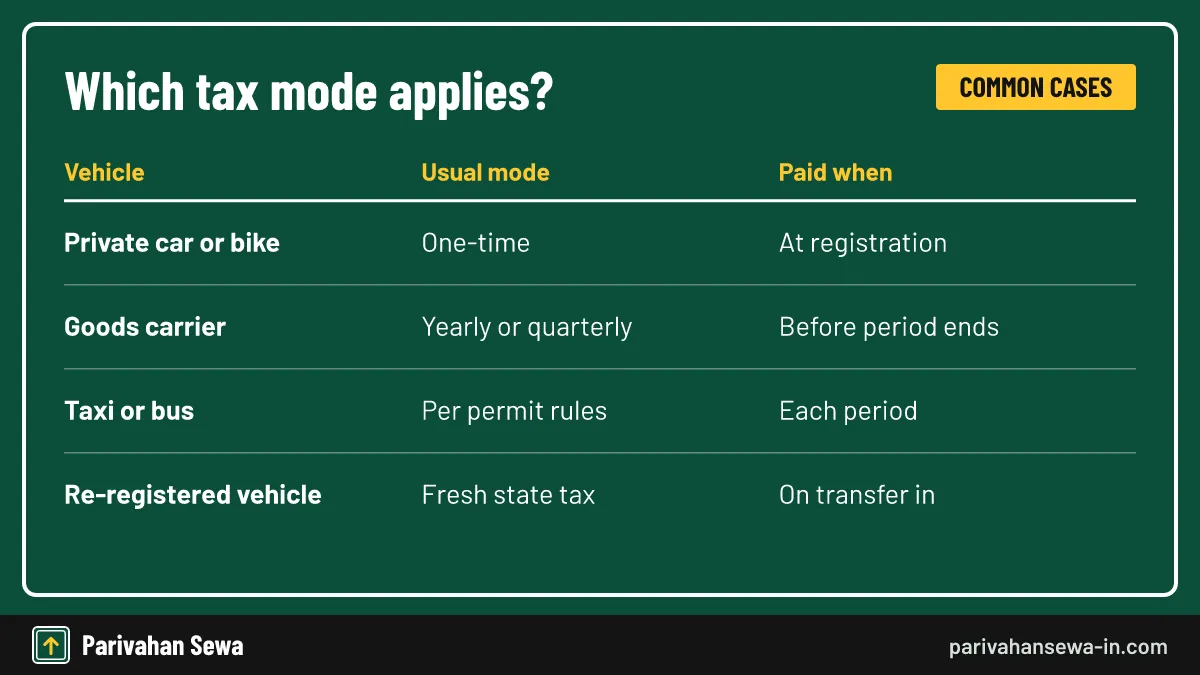
The screen lists the modes your vehicle can use: one-time, yearly, quarterly or monthly. Private vehicles usually see only one-time tax; transport vehicles see shorter periods tied to their permit.
Reading the amount
The total includes the tax for the chosen period plus any penalty or interest for late payment. If a line item looks wrong, stop and ask the RTO before paying, because corrections after payment take longer.
How to e pay tax online for a vehicle?
To e pay tax online for a vehicle, use the official Vahan route: choose your state, open the tax service, verify ownership by OTP and pay on the bank page. Private apps that offer the same service still send the money to Vahan, but often with a delay and an extra fee.
Paying from a phone
The Vahan site works in a mobile browser. Turn the phone sideways if the fee panel is cut off, and allow pop-ups so the receipt PDF can open after payment.
Paying for an older vehicle
Vehicles with records migrated from old state systems sometimes show missing data. If the screen says details are not found, the RTO has to update the record before you can pay online.
What does the e pay tax service on the income tax portal do?
The e-Pay Tax service is part of the Income Tax Department’s e-filing portal, not a transport service. It collects income tax such as advance tax and self-assessment tax using a PAN or TAN and mobile OTP. People searching “e pay tax service” often mean this.
How it differs from vehicle tax
Income tax is a central tax on earnings; motor vehicle tax is a state tax on owning and using a vehicle. They never mix, and Vahan cannot accept income tax. Use incometax.gov.in for income tax.
NSDL and older challans
Older income tax challans were paid through the NSDL (now Protean) site. Our page on NSDL payment tax and challan status covers those receipts and how to check them.
How do you pay state taxes on a vehicle?
You pay state taxes on a vehicle to the state where it is registered, almost always through Vahan. The tax rate, period and penalties come from that state’s motor vehicles taxation act, but the payment screen and receipt look the same everywhere.
Who sets the rate
Each state has its own law, for example the Delhi Motor Vehicles Taxation Act, 1962 or the Haryana Motor Vehicles Taxation Act, 2016. These laws decide whether tax is one-time or periodic and what it costs.
When you move house
If the vehicle stays in another state for more than 12 months, Section 47 of the Motor Vehicles Act requires a new registration there, which brings fresh tax in the new state.
Can you pay state taxes online from another state?
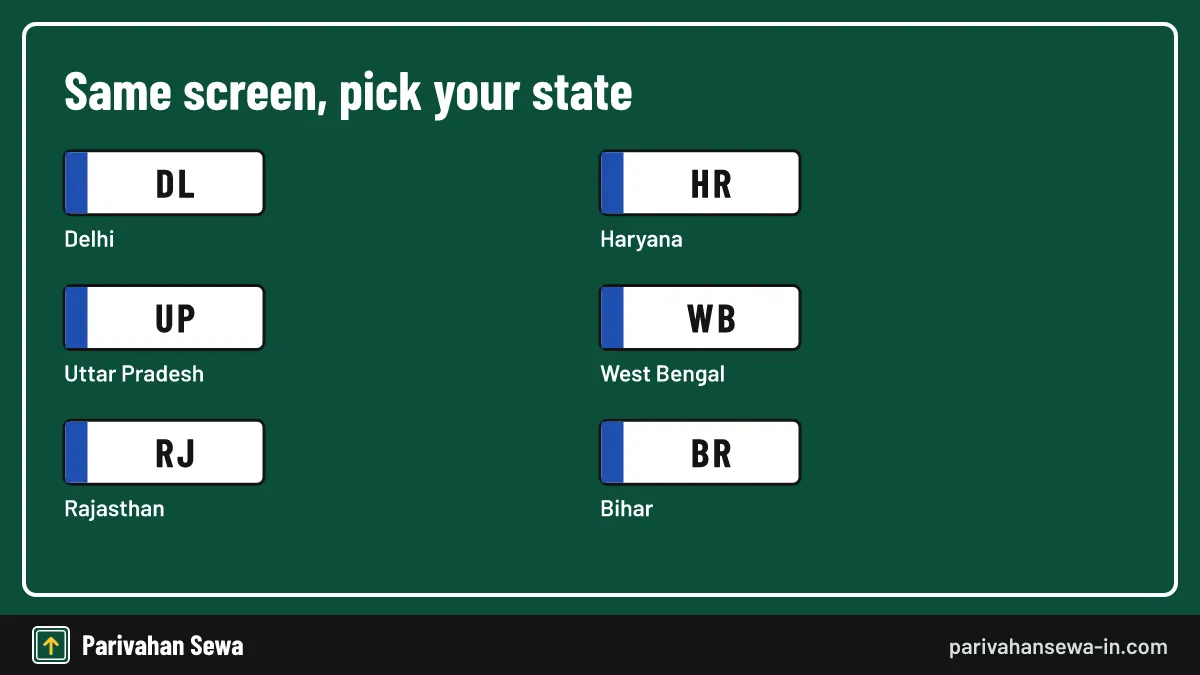
Yes, you can pay state taxes online from anywhere, because Vahan is a national website. Choose the state on your number plate, not the state where you live now, and the tax screen loads your home state’s rules and amount.
Students and workers living away
Owners who work in another city often keep the vehicle registered at home. They can pay periodic tax online without travelling, as long as the registered mobile number is still in use.
When the state is wrong
Picking the wrong state returns a “record not found” message. Check the first two letters of the registration number, which are the state code, and try again.
What is a tax challan and when do you need one?
A tax challan is the payment form or slip that records a government tax payment. On Vahan the challan and receipt are generated electronically; you need a paper challan only where a state still takes tax at a bank or treasury counter.
Challan versus receipt
The challan is raised before payment and shows what is due; the receipt is issued after payment and proves it was paid. Keep the receipt, because that is what RTOs and police ask for.
Traffic challans are different
The word “challan” also means a traffic fine notice. That is a penalty, not a tax, and it is paid on the e challan portal rather than on the tax screen.
Which online tax payment portal should you use?
The right online tax payment portal depends on the tax. Vehicle tax and RTO fees go through Vahan, licence fees through Sarathi, traffic fines through e-Challan, income tax through the Income Tax e-filing site and GST through the GST portal.
| Tax or due | Official portal | What you need |
|---|---|---|
| Motor vehicle tax | vahan.parivahan.gov.in | Registration and chassis digits |
| Licence fees | sarathi.parivahan.gov.in | Application or licence number |
| Traffic fines | echallan.parivahan.gov.in | Challan or vehicle number |
| Income tax | incometax.gov.in | PAN or TAN and OTP |
State portals that link to Vahan
Many state transport websites have a “pay tax” button. In most cases it opens the same Vahan screen with your state already selected, so either route gives the same receipt.
Treasury portals
State treasury portals collect non-vehicle dues such as stamp duty or land revenue. Use them for vehicle tax only when your RTO specifically tells you to.
How do you check Vahan payment status?
To check Vahan payment status, open the Status menu on Vahan citizen services, choose Check Pending Transaction or the re-verify payment option, enter the registration number or transaction number and click the transaction. The portal asks the bank again and updates the result.

When to check
Check status if the bank page closed, the receipt did not load or you got a debit SMS without a Vahan confirmation. A successful re-check produces the receipt straight away.
Status for applications
For RC services such as transfer or NOC, the application number also tracks the approval stage. That is a separate check, covered on our know your application status guide.
What does a pending Vahan payment status mean?
A pending Vahan payment status means the portal has sent you to the bank but has not yet received a final success or failure message. It is common when the gateway is slow, and it usually resolves within one to two hours, though the wait varies by state.
| Status shown | What it means | What to do |
|---|---|---|
| Success | Bank confirmed, tax posted | Download the receipt |
| Pending | No final reply from bank yet | Wait, then re-check |
| Failed | Bank declined or timed out | Pay again if not debited |
| Already paid | Earlier payment covers period | Reprint the old receipt |
Why you cannot pay again
While a transaction is pending, Vahan blocks a new payment for the same vehicle to stop double charges. Clear the pending one first from the Status menu.
When the pending state lasts
If it is still pending after a day, write down the transaction number and bank reference, then contact the RTO or the Vahan helpdesk listed on the portal.
Money deducted but payment failed: what now?
If money was deducted but the payment shows failed, do not pay again. Re-check the transaction from the Status menu; if the bank confirms it, the receipt appears. If the bank marks it failed, the debit is normally reversed to your account by the bank.

Keep the bank reference
Save the UTR or bank transaction number from your SMS or statement. The RTO and your bank both need it to trace the money.
If the reversal does not come
Raise a complaint with your bank first, quoting the date, amount and reference. If the bank says the money reached the government account, take that proof to the RTO so it can post the payment manually.
How to do a Vahan tax receipt reprint?
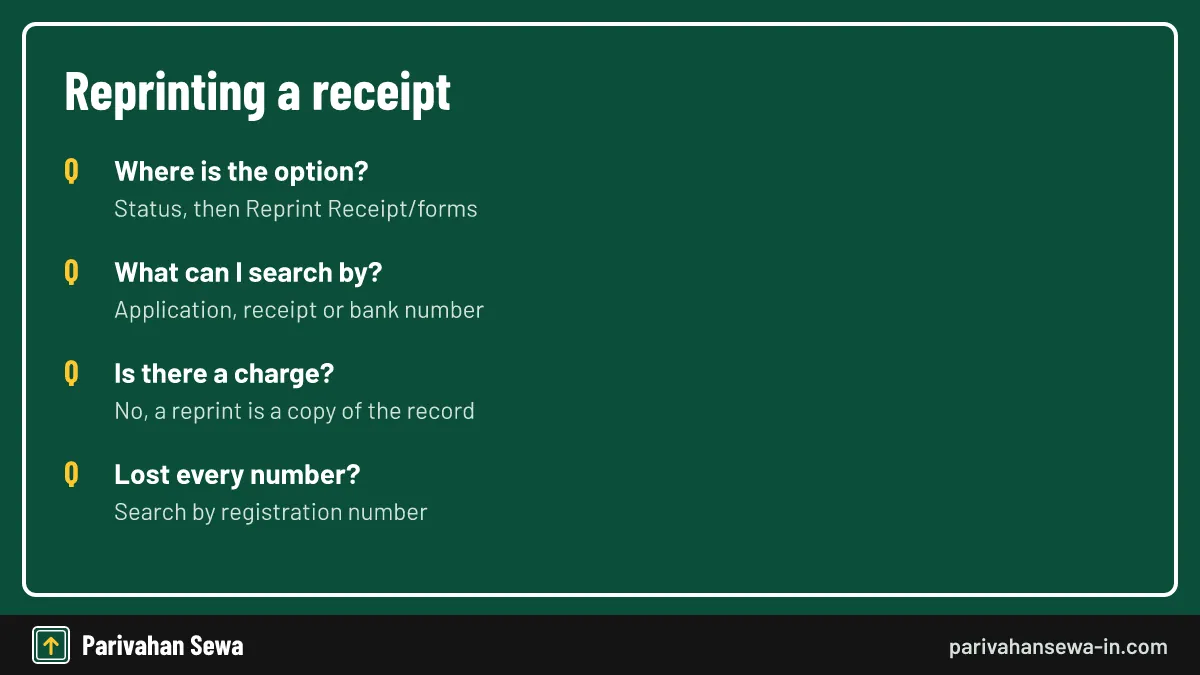
For a Vahan tax receipt reprint, open Status, choose Reprint Receipt/forms, search by application number, receipt number, bank transaction number or registration number, and open the transaction. The receipt opens as a PDF that you can save or print again.
No charge for a copy
A reprint is a copy of a payment already in the record, so there is no fee. Be wary of any site that charges to “download” a tax receipt.
Saving it properly
Rename the file with your vehicle number and tax period, store it on your phone and email it to yourself. For how official payment receipts and acknowledgements differ, see our acknowledgement receipt of payment guide.
What details are printed on the payment receipt?
The payment receipt shows the registration number, owner name, receipt number, transaction and bank reference numbers, the tax mode and period covered, each amount paid and the date and time. Some states add a QR code that officers can scan.
Check the period first
The most useful line is the tax valid up to date. Make sure it matches the period you paid for, especially for quarterly or yearly tax.
When names do not match
The receipt shows the owner from the vehicle record. If the vehicle was sold but not transferred, the old owner’s name stays on it until the transfer is completed at the RTO.
How does online commercial vehicle tax payment work?
Online commercial vehicle tax payment uses the same Vahan Pay Your Tax screen, but asks for more: the permit details, seating or load capacity and the tax period. Vahan also checks that fitness and insurance are valid before letting the payment through.
Why transport vehicles pay often
Taxis, buses and goods carriers pay tax for short periods because their tax is based on use, seating or weight. Most states let them pay yearly or quarterly, and some allow monthly payments.
Arrears block other services
If a transport vehicle has unpaid tax, Vahan usually blocks fitness renewal, permit renewal and transfer until the arrears are cleared. Paying on time avoids that hold.
Which tax periods can a goods or passenger vehicle choose?
A goods or passenger vehicle can choose only the periods its state and permit allow, usually yearly or quarterly, sometimes monthly. The tax mode list on the fee panel shows the allowed choices, and the amount changes with the period picked.
Seasonal and idle vehicles
Some states let owners declare a transport vehicle off the road and pause tax for that time. This is a separate application to the RTO, made before the period starts, not on the payment screen.
Paying ahead
Paying a full year at once saves repeat visits to the portal and reduces the chance of a late penalty. Check whether your state gives any rebate for paying a longer period in advance.
What is a tax token payment?
A tax token payment is the periodic tax a vehicle owner pays to keep the vehicle’s tax token valid. The term is common in West Bengal, Himachal Pradesh and parts of the north-east, where a token or token tax card shows the period up to which tax is paid.
Token versus receipt
In older practice the RTO issued a small token booklet stamped for each period. Today the Vahan receipt shows the same “tax paid up to” date, and the record replaces the booklet.
Where to read more
For what token tax is and how it is calculated, see our road tax guide, which explains one-time, lifetime and token tax side by side.
Can you use mParivahan online payment?
mParivahan online payment is mainly for traffic challans: you can search a challan by vehicle or licence number and pay through the gateway inside the app. Vehicle tax is still paid on the Vahan website, although the app helps you check the tax validity shown in your virtual RC.
What the app shows
The virtual RC in mParivahan shows the tax valid up to date for many states. Use it as a quick check before a trip, then pay on Vahan if it is close to expiry.
Avoid look-alike apps
Install mParivahan only from the official app stores. Look-alike apps and APK links shared on messaging apps are a common route for payment fraud.
How does Delhi road tax payment online work?
Delhi road tax payment online uses Vahan with Delhi selected as the state. Enter the registration number, choose the tax service, verify with OTP and pay. A confirmation message arrives on the registered mobile number after a successful payment, and the receipt can be downloaded at once.
When Delhi owners pay
Private cars in Delhi pay one-time road tax at registration, usually through the dealer, so most owners pay online only for transport vehicles, a change of vehicle class or a re-registration from another state.
Rates for private cars
Delhi charges private cars a percentage of the vehicle cost that rises with price and is higher for diesel. Our road tax guide lists the current slabs and their source.
What does Delhi tax payment cover for vehicle owners?
A Delhi tax payment on Vahan covers motor vehicle tax under the Delhi Motor Vehicles Taxation Act, 1962, plus any cess or arrears the record shows. It does not include traffic fines, parking charges or pollution certificate fees, which are paid elsewhere.
Vehicles from other states
A vehicle brought into Delhi for good needs re-registration within the legal time limit, and the owner then pays Delhi tax. A claim for a refund of the old state’s tax is made to that state’s RTO.
Commercial vehicles in Delhi
Taxis, goods carriers and buses registered in Delhi pay periodic tax through the same screen. The transport department may also check permit and fitness before accepting payment.
How does Vahan tax Haryana payment work?
For Vahan tax Haryana payment, either open Vahan and choose Haryana or use the Haryana transport website’s link for paying road tax for state vehicles, which leads to the same Vahan screen. Verify the vehicle and OTP, check the amount and pay.
Haryana’s tax law
Haryana collects motor vehicle tax under the Haryana Motor Vehicles Taxation Act, 2016. Rates for private and commercial vehicles are covered on our Haryana road tax page.
Treasury receipts
Some Haryana dues are collected through the state’s e-GRAS treasury portal. If an RTO gives you a GRAS challan instead of a Vahan link, the GRN on it is your proof of payment.
How do you pay road tax online UP vehicles?
To pay road tax online UP vehicles, choose Uttar Pradesh on Vahan, open the tax service, enter the chassis digits and OTP, then pick the tax mode. Commercial vehicles registered in UP usually pay quarterly or yearly; private vehicles mostly paid one-time tax at registration.
Hybrid and electric waivers
Uttar Pradesh began a road tax waiver for strong and plug-in hybrid cars in July 2024. Whether a vehicle qualifies shows up in the amount on the fee panel. Slabs and waivers are explained on our UP road tax page.
Common UP problems
UP owners often meet a missing mobile number in old records. Update it at the RTO or through Vahan’s mobile number service before trying again.
How does online tax payment West Bengal work for vehicles?
Online tax payment West Bengal uses Vahan, with West Bengal’s treasury portal GRIPS linked as a payment channel. The state’s transport department integrated e-Vahan with GRIPS for motor vehicle taxes and fees in 2017, starting with dealers in Kolkata.
Lifetime and token tax
West Bengal moved cars and small passenger vehicles to lifetime or one-time tax under a 2024 amendment, while transport vehicles keep periodic tax. Rates are on our West Bengal road tax page.
Keeping the GRN
When the payment goes through GRIPS, a GRN appears with the receipt. Keep it with the Vahan receipt, because it is the number the treasury uses to trace the money.
What is Rajasthan checkpost tax and how is it paid?
Rajasthan checkpost tax is the tax other-state vehicles pay when they enter Rajasthan to ply there, especially on tourist or temporary permits. The state’s taxation rules let it be collected at tax centres or check posts, and it can now be paid online through Vahan’s check post service.
Paying before the trip
Paying online before reaching the border saves queueing at the counter. Choose Rajasthan as the visiting state, enter the vehicle number, calculate the tax for the trip period and pay.
Which vehicles pay
Private cars on a short visit usually do not pay; commercial passenger and goods vehicles usually do. For the national rules and court cases on entry levies, see our check post tax guide.
Do you pay tax again when driving into another state?
A private vehicle on a short trip does not pay tax again. A transport vehicle may owe the visiting state’s entry or permit-linked tax unless it holds a valid All India Tourist Permit or national permit that already covers it. The check post service on Vahan calculates any amount due.
Long stays
Staying more than 12 months in another state triggers re-registration under Section 47, which brings that state’s tax. Short stays do not.
How the online check post works
The Vahan check post page asks for the visiting state, service type and vehicle number, works out the tax and issues a receipt to carry. Our check post page walks through each state’s border rules.
Are traffic penalties paid on the same portal?
No. Traffic penalties are paid on the national e-Challan portal or app, not on the Vahan tax screen. Some state police sites and kiosks also accept fines, but they all post to the same e-challan record.
Why unpaid fines still matter
Pending challans can block some RC services, such as transfer of ownership, in several states. Clear them before selling a vehicle.
Paying a court challan
Challans sent to a virtual or regular court are paid through the court’s own process. The e-challan portal shows when a challan has moved to court.
Are licence fees paid on Sarathi instead?
Yes. Learner licence, driving licence, renewal and duplicate licence fees are paid on Sarathi, the licence portal, during the application. Our DL payment guide explains each step, the fee screen and what to do if a licence payment fails.
Why licence and vehicle payments are separate
Sarathi stores licence records and Vahan stores vehicle records. A payment made on one cannot be moved to the other, so pick the right portal before paying.
Receipts on Sarathi
Sarathi also has a print-receipt option under its application status menu. The steps feel similar to Vahan’s reprint, but the search uses the application number.
How do you spot a fake payment website?
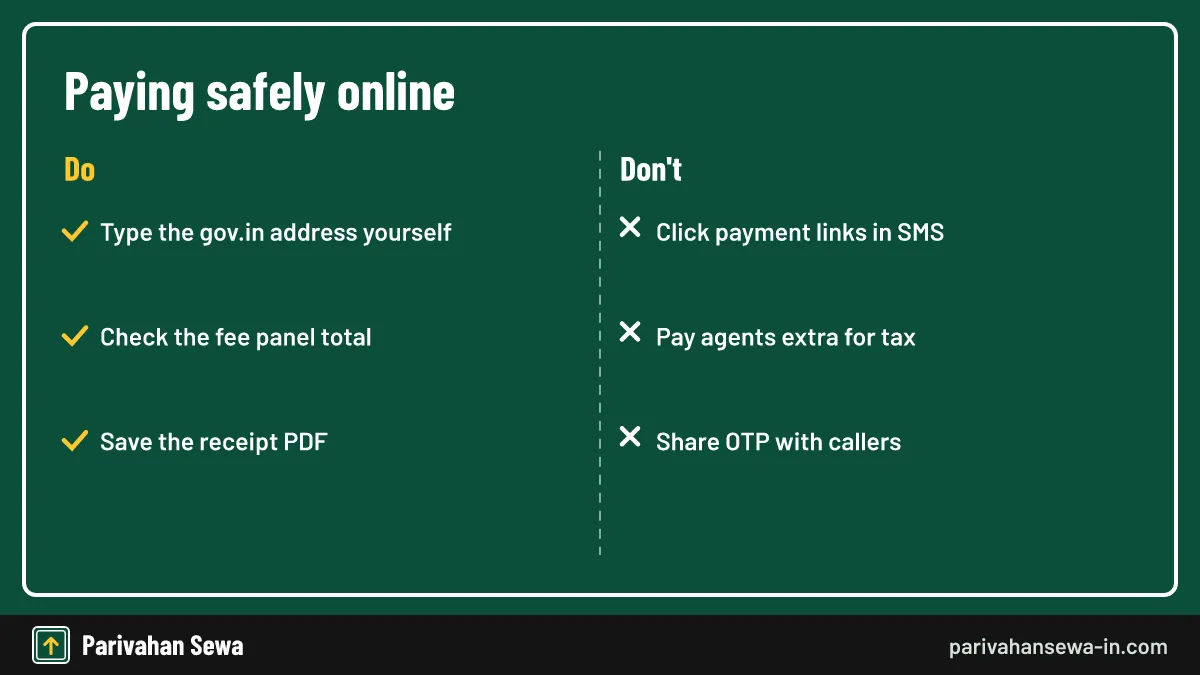
Spot a fake payment website by its address: official portals end in gov.in or nic.in, never in a free domain or app link sent by SMS. Fake sites copy the Parivahan logo, ask for card PINs or OTPs over the phone and show a fixed “service charge”.
Messages that claim tax is due
Scam SMS and WhatsApp messages often warn that tax or a challan is due and include a payment link. Do not click; check the due yourself on Vahan or e-Challan.
If you have already paid a fake site
Call your bank at once to block the card or UPI ID, report the fraud on the national cyber crime portal or helpline 1930, and keep screenshots of the site and payment.
Which payment errors are common and how do you fix them?
The most common payment errors are a missing OTP, “service not activated” for the RTO, “vehicle is blacklisted”, details not found and a blank page at the gateway. Each has a clear fix, and only blacklisting needs help from another office.
Service not activated
This message means the state has not enabled online tax for that RTO. Pay through the state transport website if it has its own system, or at the RTO counter.
Blank page or session timeout
Clear the browser cache, close other Vahan tabs and try again. If the page stays blank, wait an hour; gateway outages are usually short.
Can you pay at the RTO counter instead?
Yes. Every RTO still runs a cash or card counter for tax and fees. The clerk enters the same Vahan transaction, so the record updates exactly as it does online. Counter payment helps when the registered mobile is unavailable or the online service is not active.
What to carry
Take the RC, insurance, ID proof and, for commercial vehicles, the permit and fitness certificate. Ask for the printed receipt before you leave the counter.
Agents at the RTO
Agents outside RTOs charge for filling forms. The tax amount is fixed by the system, so check the receipt total against the fee panel you can see yourself.
What happens if a tax payment is late?
A late tax payment usually attracts a penalty or interest set by the state’s taxation act, and it keeps growing until paid. Driving a vehicle with expired tax can also lead to a fine and, for transport vehicles, detention of the vehicle.
How the penalty shows up
Vahan adds the penalty automatically to the fee panel as a separate line. The rate differs by state, so read that line before paying.
Grace periods
Some states allow a short grace period after the tax period ends. There is no single national rule, so confirm the grace period with your RTO if you are close to the deadline.
Can you get a refund of tax paid online?
A refund of tax paid online is possible in limited cases, such as tax paid twice, a vehicle moved to another state with unused one-time tax, or a vehicle scrapped or declared off the road. Refunds are claimed from the RTO, not through the payment gateway.
Double payment
If you paid twice for the same period, apply to the RTO with both receipts. Some states adjust the extra amount against the next period instead of returning it.
Moving to another state
When you re-register elsewhere, the old state may refund part of the one-time tax for the unused years. The process is state-specific and needs the new registration and the NOC.
Is the online receipt accepted as proof at the RTO?
Yes. The online receipt is generated by Vahan itself, so the RTO accepts it as proof of payment and can check its receipt and transaction numbers in the system. Police can also see the tax validity in the record during a check.
Printed or digital
A PDF on your phone is enough in most offices. Carry a printed copy for banks, insurers or courts that ask for paper.
Matching the record
If the RTO cannot find a payment you made, show the receipt and the bank reference. The office can trace it through the transaction number.
Can someone else pay for your vehicle?
Anyone can pay as long as they can receive the OTP on the vehicle’s registered mobile number. The payer’s name does not need to match the owner’s; the receipt always shows the owner from the record, not the person whose card was used.
Family members and drivers
A family member or driver can pay from their own phone if the owner shares the OTP at the moment of payment. Never share an OTP with a stranger who calls.
Fleet managers
Companies with many vehicles usually keep one company mobile number on every RC so that the accounts team can pay tax without chasing drivers.
Online or counter: which way of paying is better?
Paying online is faster and gives an instant receipt, while the counter suits owners without the registered mobile or with a record that needs correction. Both update the same Vahan record, so the choice is about convenience.
| Point | Online on Vahan | RTO counter |
|---|---|---|
| Time | A few minutes | Queue and office hours |
| Receipt | Instant PDF | Printed slip |
| Needs registered mobile | Yes | No |
| Help with record errors | No | Yes |
When online is clearly better
Periodic tax for commercial vehicles, renewals and simple fee payments are quicker online, any day and any hour.
When the counter is clearly better
Use the counter when the screen shows wrong arrears, a missing record or a blacklist. Staff can see the reason and correct it.
What should dealers and fleet owners know about bulk payments?
Dealers pay registration tax and fees for new vehicles through a separate dealer login on Vahan, and fleet owners pay each vehicle’s tax one transaction at a time. Keeping one tracker of tax-valid-up-to dates is the simplest way to avoid penalties across many vehicles.
Dealer payments for new vehicles
When you buy a new vehicle, the dealer usually collects one-time tax and registration fees in the invoice and pays them through the dealer panel. Ask for the Vahan receipt along with the invoice.
Tracking many vehicles
Fleet owners should note each vehicle’s tax period from the latest receipt and set reminders a week before expiry, so there is time to fix any OTP or record problem.
Official links
Vahan citizen servicesvahan.parivahan.gov.in ↗Parivahan Sewaparivahan.gov.in ↗e-Challan portalechallan.parivahan.gov.in ↗Income Tax e-Filing (e-Pay Tax)incometax.gov.in ↗Online payment questions
Is there an extra charge for paying vehicle tax online?
Vahan itself shows the tax and any fee on the fee panel. Some banks or card networks may add a small gateway charge; it appears on the bank page before you confirm.
How long does a Vahan payment take to confirm?
Most payments confirm within seconds. If the bank is slow, the transaction can stay pending for an hour or two, after which you can re-check it from the Status menu.
Can I pay vehicle tax with UPI?
That depends on the gateway your state uses. The bank page lists the options it accepts, which may include net banking, cards and UPI.
Can I pay tax for a vehicle registered in another state?
Yes. Choose the state shown on the number plate, because tax is owed to the state where the vehicle is registered, unless it has been re-registered elsewhere.
What if my registered mobile number has changed?
Update the mobile number in the vehicle record first, through the Vahan mobile update service or at the RTO, because the OTP always goes to the recorded number.
Does the receipt need an RTO stamp?
No. The online receipt is generated by the system and carries its own receipt and transaction numbers, which the RTO can check in Vahan.
Can I pay tax for only a few months?
Only if your state and vehicle class allow monthly or quarterly modes. The tax mode list on the screen shows what is allowed for your vehicle.
Why does the portal show arrears I did not expect?
Arrears usually come from an unpaid earlier period or a change in vehicle class. Ask the RTO for the calculation before paying if you think it is wrong.
Can I pay e-challan fines on the tax screen?
No. Traffic fines are paid on the e-challan portal or app. The tax screen covers motor vehicle tax and related dues only.
Is it safe to pay through a private app?
Private apps may pass your payment to the official system, but you lose a direct government receipt. Paying on the gov.in portal is the safest route.
Will I get an SMS after paying?
Most states send a confirmation SMS to the registered mobile after a successful payment. Keep the receipt PDF as well, because SMS alone is weak proof.
What if the receipt shows the wrong tax period?
Contact the RTO with the receipt and transaction number. Only the RTO can correct a period that was recorded wrongly.
Parivahan Sewa (parivahansewa-in.com) is an independent information website and is not affiliated with MoRTH, Parivahan or any state transport department. Confirm fees and rules on the official portal before you pay or apply.