RC mobile number update: change the phone linked to your vehicle
An RC mobile number update replaces the phone number saved in your vehicle's Vahan record. Open the Update Mobile Number option on Vahan citizen services, enter the registration number and the last five chassis digits, type the new number and confirm it with the OTP sent to that phone. Save the acknowledgement. If the record will not open, the RTO can change it at the counter.
Key takeaways
- An RC mobile number update changes only the vehicle record on Vahan; your driving licence number is changed separately on Sarathi.
- The online route needs the registration number, the last five chassis digits and the new SIM in your phone.
- The OTP goes to the new number, so you can finish the update even if the old SIM is lost.
- MoRTH has asked owners to keep their numbers current because OTPs, renewal reminders and e-challan alerts go to the saved phone.
- If the portal cannot find the record, the RTO counter is the fallback; carry the original RC and photo ID.
On this page · 41 sections
What is an RC mobile number update?
An RC mobile number update is the change of the contact phone stored against your vehicle in Vahan, the national vehicle registration database run by MoRTH and NIC. The number is not printed on the RC card, but almost every online vehicle service sends its OTP to it, so it has to be current.

Where the number is stored
The phone sits in the digital registration record that your RTO created when the vehicle was first registered. Dealers usually type it in at the showroom, which is why many owners find the dealer’s number, an old office phone or a number they gave up years ago.
What the update changes
Only the contact field changes. The owner name, address, chassis and engine numbers, and the registration number itself stay exactly as they were. That is why the online service can be simple: it changes a phone, not a legal detail of the vehicle.
Why does a vahan mobile number update matter?
A vahan mobile number update matters because the saved phone is your key to the record. RC prints, tax payments, address changes, hypothecation removal and status checks all send an OTP to that number. With an old number, every one of those services stops at the OTP screen.
Services that need the OTP
Downloading a copy through our RC download guide, paying road tax online, booking an RTO slot and tracking an application all ask for the code. A wrong number turns a two-minute task into an office visit.
Alerts you would otherwise miss
Renewal reminders for registration, fitness and permits, and traffic fine messages are also sent to the registered phone. Missing them can mean late fees or a challan you never knew about until a court notice arrives.
How to update mobile number in RC online?
To update the mobile number in RC online, open Vahan citizen services, choose the Update Mobile Number option, enter the registration number and the last five characters of the chassis number, then type the new number and verify the OTP sent to it. Submit and save the acknowledgement.
- Open Vahan citizen services. Go to vahan.parivahan.gov.in and choose the Update Mobile Number option.
- Enter the registration number. Type the vehicle number exactly as it is printed on the RC.
- Add the chassis digits. Enter the last five characters of the chassis number from the RC.
- Verify the new number. Type the new mobile number and enter the OTP sent to it.
- Submit and save. Submit the request and keep the acknowledgement as proof.
Menu names can move
Vahan redesigns its home screen from time to time. If you cannot see the option on the first screen, look under the Others or online services menus, or search the page for the word “mobile”. The service itself has kept the same inputs.
Extra checks on some screens
Some versions of the form ask for the engine number digits or an Aadhaar-based check before saving. Follow what the live screen asks; it is the official rule for your state. We could not confirm every variant, so we do not list them as fixed requirements.
How to update mobile number in Parivahan?
To update the mobile number in Parivahan, first decide which record you mean. Parivahan Sewa is the umbrella site; the vehicle record is changed on Vahan and the licence record on Sarathi. Both start from parivahan.gov.in, but they are separate services with separate forms.
Starting from the Parivahan home page
On parivahan.gov.in, the vehicle related services link takes you to Vahan, while the driving licence link takes you to Sarathi. Pick vehicle services for an RC change, then choose your state if asked.
Why there is no single profile
Parivahan does not keep one citizen account that feeds every record. Each RC and each licence keeps its own contact field, so a change on one record never flows into another. Plan to repeat the process for each vehicle and once for your licence.
What details do you need before you start?
You need the registration number, the chassis number (at least the last five characters), the new SIM working in your phone and the name of the state where the vehicle is registered. A phone browser is enough; a computer is not required.

| What you need | Where to find it | Why it is asked |
|---|---|---|
| Registration number | Number plate and RC | Opens the vehicle record |
| Chassis number (last five) | RC card, insurance policy, frame | Proves you hold the RC |
| New mobile number | Your active SIM | Receives the OTP and alerts |
| State of registration | First letters of the plate | Points to the right database |
| Engine digits (some screens) | RC card | Extra ownership check |
Copy the chassis number carefully
Chassis numbers mix letters and numbers, and O and 0 or I and 1 are easy to confuse. Read it from the RC card in good light. The stamped number on the frame can be hard to read and rusty.
Keep the new SIM in the phone
The OTP arrives within a minute or two and expires quickly. Have the new SIM active and able to receive SMS before you open the form, especially if it is a dual-SIM phone.
How to register mobile number in Vahan for the first time?
To register a mobile number in Vahan for a vehicle that has none, use the same update option: enter the registration and chassis details and verify the number you want saved. If the portal cannot find or open the record, the RTO has to add the number at the counter.

Why some records have no phone
Vehicles registered before states moved to Vahan were migrated from older systems, and many came across with a blank contact field. Owners of older cars and bikes are the ones who usually hit this.
When the record needs the RTO first
If the vehicle details screen shows missing data, the record may need a backlog entry by the RTO before any online service works. Ask the counter to complete the record and add your number in the same visit.
How to change mobile number in vehicle registration in India?
The way to change the mobile number in vehicle registration in India is the same nationwide for states on Vahan: the online Update Mobile Number service, or a request at your RTO. Only the state you select changes; the inputs and the OTP check work alike.
The online route in short
Enter the registration number and chassis digits, verify the new number by OTP, submit and save the receipt. The full method is in the steps above, and it works from any state you are in today.
The office route in short
Visit the RTO that holds the record, ask for the contact details change, show the original RC and photo ID, and get the change made on the system. Counter practice differs by state, so ask what they need before you queue.
RTO mobile number update: the offline route
An RTO mobile number update is the fallback when the online form fails, the record is incomplete or you cannot prove ownership with chassis digits. The clerk changes the contact field on Vahan after checking your identity and the RC, so the result is the same as the online change.
When the counter is the better choice
Choose the office if the record is not found online, if the owner’s name on the record is wrong, or if the RC is in the name of someone who has died. These cases need staff to look at documents.
How to make the visit short
Call or check the RTO notice board for the counter that handles record corrections. Go early in the day, carry photocopies as well as originals, and keep the new SIM with you in case the clerk triggers an OTP.
What documents should you carry to the RTO?
Carry the original RC, a photo ID such as Aadhaar, a copy of each, and the phone with the new SIM. If the vehicle is owned by a company or is on loan, carry the authorisation letter or financier papers too. The office may also ask for a written request.
The basic set
The RC proves the vehicle; the ID proves you are the owner named on it. Some offices take a simple application letter that states the registration number, the old number if you know it, and the new one.
Extra papers in special cases
A company vehicle needs a letter on the firm’s letterhead naming the person allowed to make the change. Where the owner has died, the legal heir’s papers are needed, which is really a transfer case rather than a phone change.
Online or at the counter: which route suits you?
Choose the online route if you hold the RC and the record opens on Vahan; it is faster and gives you a receipt at once. Choose the RTO counter if the record is missing, details are wrong or the online form keeps rejecting your chassis digits.

| Point | Vahan online | RTO counter |
|---|---|---|
| Where | Any phone or computer | The RTO that holds the record |
| Inputs | Registration number, chassis digits, OTP | Original RC, photo ID, copies |
| Proof | Downloadable acknowledgement | Office receipt or stamped request |
| Works for blank records | Sometimes | Yes |
| Good for wrong owner details | No | Yes |
Time and effort
The portal takes a few minutes when the server is responsive. An office visit takes at least part of a working day, depending on the queue and the state’s appointment system.
What both routes share
Both write to the same Vahan record. Once the change is saved, every service and alert uses the new number, whichever route you used.
What happens after you submit the request?
After you submit, Vahan shows an acknowledgement with a reference you should save as a PDF or screenshot. In most cases the contact field changes once the OTP is verified; where a state adds an approval step, the change appears after the RTO clears it.

Keep the acknowledgement
The receipt is your proof if the old number still shows. It carries the registration number and the date, which the RTO can use to trace the request.
Track a pending request
If your state treats the change as an application, you can follow it with the reference number. Our know your application status guide explains how to track a Vahan request.
How to change mobile number in vehicle registration in Maharashtra?
To change the mobile number in vehicle registration in Maharashtra, use Vahan citizen services and select Maharashtra as the state, then follow the same registration number, chassis digits and OTP steps. If it fails, the RTO that issued the plate code, such as MH 01 or MH 12, can update it.
Picking the right RTO
The plate’s code tells you which Maharashtra office holds the record. A car registered in Pune stays with that office’s record even if you now live in Mumbai, until the vehicle is re-registered elsewhere.
Offline help in Maharashtra
RTO counters across the state handle contact corrections with the original RC and ID. Some offices ask for an appointment for counter services, so check the slot booking options on Vahan before travelling.
How to change mobile number in bike registration?
To change the mobile number in bike registration, follow the same Vahan steps as for a car: registration number, last five chassis characters and OTP on the new number. Two-wheelers are in the same database, and nothing in the form is car-specific.
Finding the chassis number on a bike
On a two-wheeler the frame number is usually stamped near the steering head. It is much easier to read it from the RC card or the insurance policy than from the frame.
Bikes bought through a dealer
Showroom registrations often carry the dealer’s or salesperson’s number. Check yours with any OTP-based service soon after buying; if the OTP goes elsewhere, update it before you need the record.
Update mobile number in vehicle RC for cars and commercial vehicles
To update the mobile number in a vehicle RC for a car, taxi, goods carrier or bus, the inputs are the same. Commercial vehicles depend on the registered phone even more, because permit, fitness and tax reminders all go to it.
Private cars
Most private car owners only need the online route. Keep the new number on the record before insurance renewal or a sale, since both often need an RC copy sent by OTP.
Transport vehicles
Fleet owners should keep one stable office number for every vehicle, not a driver’s phone. Drivers change; the registered phone should not. Update each registration number separately.
RC book mobile number change when the old SIM is lost
An RC book mobile number change is still possible if the old SIM is lost or disconnected, because the online service checks ownership through the chassis digits and sends the OTP to the new number. You do not need access to the old phone.
Why the old phone is not needed
The form treats the chassis number as proof that you hold the RC, and the OTP proves you control the new SIM. The old number plays no part in the check.
If you also lost the RC
Without the RC you may not know the chassis number. Find it on the insurance policy or the vehicle frame, or apply for a duplicate RC first, which our duplicate RC guide covers.
Update mobile no in RC for a company-owned vehicle
To update the mobile no in RC for a company or firm vehicle, use the company’s chosen contact phone and the same online steps. If the RTO handles it at the counter, bring an authorisation letter on letterhead and the signatory’s ID.
Pick a role-based number
Use a number owned by the company, such as the admin or fleet desk, rather than a staff member’s personal phone. That keeps alerts flowing after people leave.
Update phone number in RC for a vehicle on loan
You can update the phone number in RC for a hypothecated vehicle in the same way; the loan does not block a contact change. The financier’s name stays on the record until the loan is closed and the hypothecation is removed through Form 35.
The loan entry stays
Changing the phone does not touch the financier field. When you repay the loan, the Form 35 process sends its OTP to the registered phone, so update the number before you start it. Read our Form 35 guide for that step.
Banks keep their own contact
The lender’s records use the number you gave the bank. Update the bank separately if that has changed too.
Does an e challan mobile number update happen automatically?
An e challan mobile number update happens through the vehicle record. Challan SMS alerts are sent to the phone saved on Vahan, so once you change it there, new alerts go to the new number. There is no separate number to change on the e-challan portal for vehicle challans.
Challans issued before the change
Alerts already sent went to the old phone. Check for pending challans on the official e-challan portal using the vehicle number so nothing is missed.
Licence-based challans
Some challans are tied to the driver’s licence rather than the vehicle. Those alerts follow the number on the licence record, which is changed on Sarathi.
Which number receives traffic fine alerts?
Traffic fine alerts for a vehicle challan go to the phone in the vehicle’s Vahan record, and alerts linked to a driver go to the number in the licence record. If either is old, you can miss a challan until it reaches court.
Fake challan messages
Fraudsters send SMS messages about fines with links to fake payment pages. Pay only on the official e-challan site or a state police site you open yourself, never through a link in a message.
Checking from your side
Make a habit of checking the vehicle number on the e-challan portal every few months, especially if the vehicle is driven by others.
Driving license mobile number update: is it a separate request?
Yes. A driving license mobile number update is a separate request on Sarathi, the licence portal. It uses your licence number and date of birth, and Sarathi screens add an Aadhaar OTP check before the new number is confirmed. Changing the RC phone does not change the licence phone.
Why both records matter
The licence number handles renewals, duplicates and licence-linked challans; the RC number handles vehicle services. Most owners need to update both.
A short summary of the licence steps
Choose your state on Sarathi, enter the licence number and date of birth, complete the identity check and verify the new number by OTP. The full guide is on our page on how to update mobile number in driving licence.
How to change mobile number in driving licence?
To change the mobile number in driving licence records, open sarathi.parivahan.gov.in, pick your state and use the mobile number update service. You will need the licence number, date of birth and an Aadhaar-linked phone for the identity check, then an OTP on the new number.
If Sarathi cannot verify you
When the Aadhaar details do not match the licence, the RTO can correct the licence record at the counter. Carry the original licence and ID.
More licence services
Renewals, duplicates and address changes are covered in our driving licence guide.
What is UMANG update for transport services?
An UMANG update usually means using, or updating, the UMANG app, the government’s Unified Mobile Application for New-age Governance. It is run by MeitY with the National e-Governance Division and was launched in November 2017 as a single app for central and state services.
What UMANG is
UMANG brings services from many departments into one app on Android and iOS. Keeping the app updated from the official store matters because older versions can stop loading department services.
Whether transport services are listed
We could not confirm from this machine which Parivahan services UMANG currently lists. Open the app and search for transport or Parivahan; if the service is not there, use Vahan in your browser.
Can the UMANG app change your vehicle number on record?
Treat UMANG as a gateway, not the source. Even when a department’s services are listed in UMANG, the vehicle contact field lives in Vahan. If you do not see a mobile change option in the app, the Vahan website is the reliable place to make it.
Avoid look-alike apps
Search results show many unofficial apps with UMANG or Parivahan in their names. Install UMANG only from the official store listing published by the government, and never enter chassis numbers in look-alike apps.
What does mobile RC mean?
Mobile RC usually means a registration certificate kept on your phone: the virtual RC in mParivahan or the issued RC in DigiLocker. Some people also use it to mean the mobile number linked to the RC. Both depend on the same record, so the phone must be current.
The RC on your phone
The mParivahan app adds a virtual RC after an OTP check, and DigiLocker pulls a signed RC from Vahan. Neither works if the OTP goes to an old number.
The number linked to the RC
If you searched “mobile RC” to change the phone, the online Update Mobile Number service on Vahan described above is the right place.
What is vircal m?
“Vircal m” is not an official Parivahan term. It looks like a misspelling of “virtual RC m”, meaning the virtual RC in the mParivahan app. We cover it so the search does not lead you to an unofficial site claiming a special service.
What you probably need
To show your RC on your phone, use mParivahan’s virtual RC or DigiLocker. Both need an OTP sent to the number in the vehicle record.
If the OTP fails
That is a sign the registered phone is old. Update it on Vahan first, then add the virtual RC again.
What does rc number update mean?
An rc number update search usually means updating the mobile number linked to an RC number, which is what this page covers. Less often, people mean changing the registration number itself, which is a different process with strict limits.
Updating the phone on an RC
Use the Update Mobile Number service on Vahan with the registration number and chassis digits. The RC number stays the same.
Updating other RC details
Address changes, ownership transfer and loan removal each have their own services. Ownership is covered in our guide to vehicle ownership transfer online.
Is a car registration number change possible?
A car registration number change is not something you can request to replace a phone or simply because you prefer another number. The registration number changes only in defined cases, such as re-registration in another state or a move to a scheme the state allows, each with its own rules and fees.
Re-registration after a move
When a vehicle moves permanently to another state, it may be re-registered there and get a new number. That process involves an NOC and the new state’s RTO.
Bharat series
Eligible owners can opt for the BH series under its own rules, explained on our BH number plate page. A phone change never needs a new registration number.
How long does the update take?
The online request itself takes a few minutes once the OTP arrives. The new number is usually in use as soon as it is verified, but where a state adds an approval step, give it time and then test with any OTP-based service.
Signs it has worked
The quickest check is an OTP-based service such as an RC print. If the code reaches the new phone, the record has changed.
When it seems stuck
If several days pass and the old number still receives OTPs, take your acknowledgement to the RTO and ask them to check the request.
Does the update cost anything?
We could not confirm a fee for the online mobile change from an official source, so we do not state one. The Vahan form shows any charge before you pay; if no payment screen appears, nothing is charged. Ask the RTO counter about any fee before an offline request.
Avoid paid shortcuts
Websites and agents that charge to “link your mobile to RC” are using the same free-to-access government form. You only need your RC and the new SIM.
Pay only on official pages
If a payment screen does appear, check that the address is on parivahan.gov.in or your state’s transport site before entering card details.
Why is the OTP not arriving?
An OTP that does not arrive is usually caused by weak signal, a full SMS inbox, the SIM being in the second slot, a DND or spam filter, or a busy server. Wait a minute, check the number you typed and request a new code once.
Check the phone first
Make sure the new SIM is active for SMS, not only for data. Some new SIMs take a few hours after activation before they receive service messages.
Check the server
Vahan slows down at the start of working hours and near month ends. Try again early in the morning or late in the evening.
Common errors and fixes
Most failed attempts come from five problems: the wrong state, a chassis typo, an OTP that does not arrive, an expired session or a change that has not appeared yet. Each has a simple fix, shown in the table below.

| Error | Likely cause | Fix |
|---|---|---|
| Record not found | Wrong state selected | Select the state shown on the plate |
| Chassis number mismatch | Typo or O/0 confusion | Copy from the RC card carefully |
| OTP not received | Signal, DND or busy server | Retry once, then try later |
| Session expired | Form left open too long | Restart in a single browser tab |
| Old number still active | Approval pending | Wait, then take the receipt to the RTO |
When to stop trying online
After two or three failed attempts on different days, the record itself may have a problem. The RTO can see what the portal hides.
How to check that the new number is saved?
To check that the new number is saved, start any Vahan service that sends an OTP, such as an RC print, and see which phone receives the code. Some screens also show a masked number, with only the last digits visible, which you can compare.
Test with a free service
An RC print is a good test because it needs no payment. If the OTP reaches the new phone, you are done.
Can someone else change the number on my RC?
Someone who knows your registration number and chassis digits could try to change the phone online, which is why you should keep the RC private. The OTP goes to the number they enter, so the main protection is not sharing RC copies widely.
Limit who sees the full RC
Share a full RC copy only with your insurer, lender or a confirmed buyer. On social media and resale sites, blur the chassis number.
If your number was changed without consent
Contact the RTO with the original RC and your ID. Ask them to restore your number and note the date of the change.
How to keep your RC contact safe from fraud?
Keep the RC contact safe by using your own active SIM, never sharing OTPs, and using only parivahan.gov.in or your state transport site. Fraud usually starts with an SMS about a fine or KYC that leads to a look-alike site.

Messages to ignore
Ignore messages that ask you to “update mobile number in RC or your vehicle will be blocked”. Official services do not threaten owners through SMS links.
Keep the number long term
When you change telecom operators, port the same number rather than taking a new one. Porting does not affect the Vahan record, because the number stays the same.
Why did MoRTH ask owners to update numbers?
At the end of 2025, MoRTH asked vehicle owners and licence holders to update their mobile numbers on Vahan and Sarathi as soon as possible, as reported on 31 December 2025. It said outdated numbers lead to missed OTPs, renewal alerts and fine messages. No fixed deadline was given.
What the advisory means for you
There is no penalty for a late update, but every month with an old number is a month of missed messages. Treat it as a task to finish now.
What if the vehicle is registered in another state?
Select the state where the vehicle is registered, not where you live now. The record stays with the original state until the vehicle is re-registered, so the update goes through that state’s Vahan screens and RTO.
Online is easier from afar
You do not need to travel. The online route works from anywhere, as long as you have the RC and the new SIM.
When an office visit is needed
If the online route fails, the original RTO has to make the change. Some owners ask a family member there to visit with an authorisation letter; check whether that RTO accepts it.
Can owners living abroad update the number?
Owners living abroad can update the number online if they have an Indian SIM that receives SMS, since OTPs are sent to Indian numbers. Using a family member’s phone works, but then alerts go to them.
Keeping an Indian number
Many owners keep a low-cost Indian prepaid number for OTPs. Keep it recharged; a disconnected number leaves the record stuck again.
Selling while abroad
If you plan to sell, the buyer’s number is entered during the transfer. Keep your own number on the record until then.
Update mobile number in RC book after buying a used vehicle
If you bought a used vehicle, the right time to update the mobile number in the RC book record is during the ownership transfer, when the buyer’s details are entered. After the transfer is approved, check that your number is on the record and update it if not.
The seller’s number until transfer
Until the RTO approves the transfer, alerts and OTPs keep going to the seller. Finish the transfer quickly so challans reach the right person.
After transfer
Run an OTP test. If the seller’s number still shows, use the online update with the new RC’s chassis details.
How to change mobile number in Parivahan after a number port?
If you ported your number to another operator and kept the same digits, nothing needs to change in Parivahan. Only a new number needs an update. People often confuse the two, and end up changing records that were already correct.
Same number, new operator
Porting keeps your number, so OTPs still arrive. Some service messages may be delayed for a day or two after porting; wait before assuming the record is wrong.
New number after port issues
If porting failed and you took a new SIM, change Parivahan records: the RC on Vahan and the licence on Sarathi.
Which records hold your phone contact?
Your phone is stored separately in the vehicle RC, driving licence, insurance policy and FASTag account. Each is updated with its own provider, so a single change never covers all of them. Make a list and update each one.
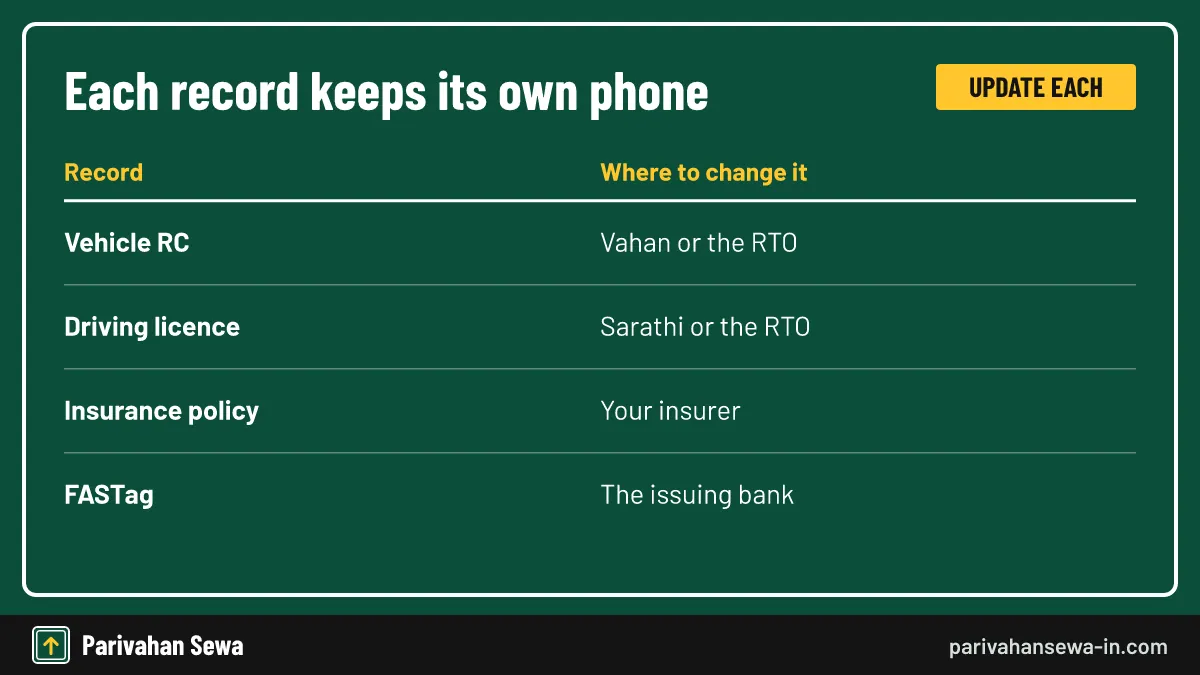
| Record | Where to change the phone | What it controls |
|---|---|---|
| Vehicle RC | Vahan or the RTO | Vehicle OTPs, renewal and challan alerts |
| Driving licence | Sarathi or the RTO | Licence OTPs and licence-linked alerts |
| Insurance policy | Your insurer | Claims and renewal messages |
| FASTag | The issuing bank | Toll and balance alerts |
Start with the RC
The RC change matters most because so many services depend on it. Do the licence next, then insurance and FASTag.
Update mobile number in vehicle registration: a quick checklist
Before you update the mobile number in vehicle registration, check five things: you have the RC, you know the state on the plate, the new SIM is active, you are on the official Vahan site and you will save the receipt. After the change, test it with an OTP service.

Before
RC in hand, chassis digits checked, new SIM in the phone, browser on vahan.parivahan.gov.in.
After
Acknowledgement saved, OTP test passed, licence updated on Sarathi and insurer and FASTag bank told. For every other vehicle service, return to our vehicle information hub or the home page.
Official links
Vahan citizen servicesvahan.parivahan.gov.in ↗Parivahan Sewaparivahan.gov.in ↗Sarathi (driving licence services)sarathi.parivahan.gov.in ↗e-Challan portalechallan.parivahan.gov.in ↗RC mobile number update questions
Is the RC mobile number update the same as the DL update?
No. The vehicle record lives on Vahan and the licence record lives on Sarathi. Each has its own update service, and changing one does not touch the other.
Can I update the number without the old SIM?
Yes. The online service sends the OTP to the new number you enter, and checks ownership through the registration and chassis details instead of the old phone.
Where do I find the chassis number?
It is printed on the RC smart card or booklet and on your insurance policy, and it is stamped on the vehicle frame. Copy it from the RC to avoid typing errors.
How do I know the update worked?
Start any OTP-based Vahan service, such as an RC print. If the OTP reaches the new phone, the record has changed. Keep your acknowledgement until then.
Will e-challan messages come to my new number?
Challan alerts are sent to the number in the vehicle record, so they follow the change once the record is updated. Check pending challans on the official e-challan portal.
Can a dealer or agent update the number for me?
They can type the details, but the OTP goes to your phone. Never share that OTP with anyone you do not trust with your vehicle record.
What if two vehicles are in my name?
Each vehicle has its own record, so repeat the update for every registration number. One request does not change the others.
Can I use a family member's phone?
You can, but alerts and OTPs will reach them, not you. It is better to use a number you control and will keep for years.
I sold the vehicle. Should the buyer change the number?
The buyer's number should be recorded during the ownership transfer. Until the transfer is approved, alerts keep reaching the seller.
The portal says the record is not found. What now?
Check that you picked the state on the plate and typed the number without spaces. If it still fails, the record may not be digitised; visit the RTO.
Does the RC smart card need to be reprinted?
The mobile number is not printed on the card, so a reprint is not needed for a phone change. The update sits in the digital record.
Is there an official app for the update?
Use the Vahan website, which works on a phone browser. Apps such as mParivahan show your RC but the mobile change itself is done through Vahan services.
Parivahan Sewa (parivahansewa-in.com) is an independent information website and is not affiliated with MoRTH, Parivahan or any state transport department. Confirm fees and rules on the official portal before you pay or apply.