Vahan beta explained: the citizen portal for tax, receipts and vehicle services
Vahan beta is the name many people use for the Vahan 4 citizen services portal run by MoRTH and built by NIC. On it you enter your registration number, choose a service such as Pay Your Tax, confirm the last five chassis characters and an OTP, then pay and save the receipt. The beta tag is only a version label.
Key takeaways
- Vahan beta and Vahan 04 beta point to the same official Vahan 4 citizen portal, not a separate website.
- Paying motor vehicle tax needs the registration number, five chassis characters and the registered mobile for the OTP.
- A lost tax receipt can be reprinted from the Status menu with any one reference number.
- If money is debited without a receipt, wait and use Check Pending Transaction before paying again.
- An electric four-wheeler is registered through the same screens and gets a green plate with no RC issue fee.
On this page · 26 sections
Vahan beta: what is it?
Vahan beta is a popular search term for the Vahan 4 citizen services portal, the national vehicle registration system run by the Ministry of Road Transport and Highways (MoRTH) and built by NIC. Vahan 4.0 was launched on 2 June 2015, and the “beta” tag stuck from its early rollout years.

Why people still say beta
When states moved from older local software to Vahan 4, the new screens carried a beta label for a long time. Shortcuts, WhatsApp forwards and old bookmarks kept the name alive, so people still search for it today.
What the portal holds
It holds the registration record of almost every vehicle in India: owner, chassis and engine numbers, tax paid, insurance, fitness and loan details. Every RTO works on this one national register.
Is the Vahan 04 beta site official?
Yes, if the address is on vahan.parivahan.gov.in. “Vahan 04 beta” is simply another way of writing Vahan 4 beta. There is no second government site with that name, so any page asking for payment on a different domain should be treated with suspicion.
How to check the address
Look at the address bar before typing anything. The domain must end in parivahan.gov.in. Lookalike sites often add words such as “online” or “services” to a private domain.
Private apps and agents
Private apps can show some vehicle details, but they are not the official portal. Tax paid through the government site gives you a receipt that every RTO can verify.
What does Vahan 04 beta status show?
Vahan 04 beta status usually means checking an application or payment on the portal’s Status menu. You can see where an application stands, re-check a pending payment or reprint a receipt there. Application tracking itself has its own detailed guide in this section.

Status options at a glance
The Status menu groups three tools: application status, pending transaction checks and receipt or form reprints. Each asks for a reference such as an application or registration number.
When status does not update
Records update after the RTO acts. If nothing has changed for several working days, call or visit the RTO with your application number.
How does Vahan 4 online work?
Vahan 4 online works through one web address for all states. You enter the vehicle number, the system finds the state and RTO from it, and only the services your state has enabled appear. Payment, verification and receipts all happen on the same screens.
One record, many offices
Because the register is central, an RTO in one state can see a vehicle’s history from another. That is why NOCs, transfers and tax checks no longer need paper letters between offices.
Logins for different users
Citizens sign in with a vehicle number and OTP. Dealers, RTO staff and fitness centres use separate logins issued by the transport department.
Which vehicle citizen services are on the portal?
Vehicle citizen services are the public-facing options on Vahan, from tax payment to ownership transfer. Most are listed under Online Services once you enter a registration number. The exact list depends on your state, because each transport department decides what to switch on.

| Service group | Typical services | What you need |
|---|---|---|
| Tax and fees | Pay Your Tax, fee payment | Vehicle number, chassis digits, OTP |
| Ownership | Transfer of ownership, NOC | Buyer and seller details, documents |
| Record changes | Address change, mobile update | Proof of address, OTP |
| Loan entries | Hypothecation addition or removal | Bank NOC, Form 35 |
| Documents | Duplicate RC, print forms | Vehicle number, OTP |
| Tracking | Application status, receipt reprint | Application or receipt number |
Services that still need a visit
Some steps, such as vehicle inspection or biometric checks, may still need you at the RTO. The portal tells you when an appointment is required.
Seeing the full list
Use the search box on the citizen page and type a word such as “tax” or “transfer” to find a service quickly.
How do you open vehicle citizen services for your state?
To open vehicle citizen services for your state, go to vahan.parivahan.gov.in/vahanservice/vahan/ and enter the registration number. The portal reads the state code from the number, so you rarely need to pick a state by hand. Some service pages still show a state drop-down.
If the wrong state appears
This happens when a vehicle was re-registered in another state but the old number is typed. Enter the current number shown on the RC.
State portals that link back
Several state transport sites have their own “pay online” buttons. Most of these send you to the same Vahan screen.
Which Vahan beta services work without an RTO visit?
Many Vahan beta services are fully online: tax payment, receipt reprint, status checks, mobile number update and, in many states, address change and hypothecation removal. These “visitless” services rely on Aadhaar or OTP checks instead of a counter visit.
Faceless options
Some states run Aadhaar-based faceless services for transfers and duplicate RCs. The portal shows an Aadhaar option on those service pages when it is available.
When a visit is still needed
Inspections, fitness tests for transport vehicles and disputes over records still go to the RTO.
How does Vahan payment online work?
Vahan payment online links the Vahan fee calculation to a bank gateway. The portal works out what is due, you confirm it on the fee panel, and the gateway takes the money. Once the bank confirms, Vahan records the payment against the vehicle and generates a receipt. For all payment types, see our online payment guide.
What the fee panel shows
It lists the tax mode, the period covered, arrears, any penalty and the total. Read it carefully, because the gateway charges exactly this amount.
Payment methods
The gateway page shows the methods your state accepts, which can include net banking, cards and UPI.
What do you need to pay tax Vahan?
To pay tax Vahan online you need the registration number, the last five characters of the chassis number, the mobile phone registered with the vehicle and a payment method. Valid insurance details may also be asked for, because some states check insurance before accepting tax.
Where to find the chassis number
It is printed on the RC and the insurance policy, and stamped on the vehicle frame. Copy it carefully; one wrong letter blocks validation.
If the mobile number is old
Update the registered mobile first. Without it, the OTP never reaches you and the payment cannot start.
How to pay tax online Vahan, step by step?
To pay tax online Vahan style, follow six steps on the citizen portal. The flow below is the common pattern; menu wording changes a little from state to state.
- Enter the vehicle number. Open vahan.parivahan.gov.in/vahanservice/vahan/ and type your registration number.
- Open Pay Your Tax. Choose the tax service under Online Services; some states call it Pay Vehicle Tax.
- Confirm chassis digits. Enter the last five characters of the chassis number and validate.
- Verify the OTP. Enter the code sent to the mobile number in the vehicle record.
- Read the fee panel. Check the tax mode, period, arrears and total before you proceed.
- Pay and save the receipt. Pay through the gateway and download the receipt before closing the tab.
Do not close the tab early
After paying, wait for the portal to return from the bank. Closing the window too soon is the most common reason a receipt does not appear.
Keep two copies
Save the PDF on your phone and email it to yourself. An SMS confirmation alone is weak proof.
What is Parivahan MV tax?
Parivahan MV tax is the motor vehicle tax a state charges for using a vehicle on its roads, collected through the Vahan system on the Parivahan platform. It is a state tax, so rates and rules come from each state’s own motor vehicle taxation law, not from the central government.
MV tax and road tax
Road tax and MV tax mean the same thing in daily use. Our road tax hub explains state rates and rules in detail.
Who collects it
The state transport department collects it, while Vahan is only the system that calculates and records the payment.
How is Vahan MV tax worked out?
Vahan MV tax is calculated by the system from the vehicle’s class, fuel, price or weight, seating, permit and the state’s rules. You do not enter the amount yourself. The fee panel shows the result, and the same calculation applies at the RTO counter.
Private and transport vehicles
Private cars and two-wheelers mostly pay a one-time tax at registration. Taxis, buses and goods vehicles usually pay for a period and return to the portal when it ends.
Arrears and penalties
If an earlier period was missed, the panel adds arrears and any penalty set by the state. Ask the RTO for a breakdown if the figure looks wrong.
Which tax modes appear in Vahan 4 tax payment?
Vahan 4 tax payment screens offer tax modes such as one-time, yearly, quarterly or monthly. Only the modes your vehicle class and state allow appear in the list, so a private car usually sees one-time tax while a goods carrier may see shorter periods.
| Vehicle type | Usual tax mode | When you pay again |
|---|---|---|
| Private car or two-wheeler | One-time at registration | On re-registration or when the state asks |
| Taxi or cab | Periodic, as the state allows | When the paid period ends |
| Goods vehicle | Quarterly or yearly in many states | At the end of each period |
| Bus on permit | Periodic, linked to permit | At the end of each period |
Choosing a mode
A longer period means fewer payments but a larger single amount. Pick what suits your cash flow, as long as the state allows it.
Tax for another state
Entering another state on a temporary trip may need a separate border tax, which is a different service from the home-state tax.
What is a Vahan tax receipt?
A Vahan tax receipt is the system-generated proof that tax was paid for a vehicle and period. It shows the registration number, owner, tax mode, period, amount, receipt number and bank transaction reference. RTOs, police and fitness centres can check it against the record.
Why you should keep it
The receipt is needed at fitness tests, permit renewals, transfers and roadside checks for transport vehicles. A missing receipt can delay these services.
Details to check
Confirm the vehicle number and tax period on the receipt the moment you download it. Errors are easier to correct while the payment is fresh.
How to reprint receipt Vahan?
To reprint receipt Vahan copies, open the Status menu on the citizen portal, choose Reprint Receipt/forms, and search with one reference: application number, receipt number, bank transaction number or registration number. The receipt opens again for printing or saving.

| Search by | Where to find it | Good to know |
|---|---|---|
| Registration number | Number plate or RC | Lists receipts for that vehicle |
| Application number | Payment screen or SMS | Most direct search |
| Receipt number | Earlier printout | Brings back that one receipt |
| Bank transaction number | Bank statement | Useful when no SMS arrived |
Reprinting an old receipt
Older payments made on Vahan can also be reprinted. Payments made before your state moved to Vahan may need a copy from the RTO.
Printing clearly
Print at actual size on A4 so the receipt number and QR code, where present, stay readable.
Vahan payment online failed: what next?
If a Vahan payment online fails but money left your account, do not pay again at once. Banks can take an hour or two to confirm. Then open Status and use Check Pending Transaction to re-check the payment with the bank. If it shows failed, the bank reverses the debit.

Common error messages
“Service not activated for the concerned State/RTO” means your state has not enabled that service online. “Vehicle is blacklisted” blocks payment until the office that blacklisted it clears the entry.
When to contact the RTO
If the transaction stays pending for more than a day, take the bank statement and transaction number to your RTO.
How do you pay WB Vahan tax?
To pay WB Vahan tax, enter your West Bengal registration number on the Vahan citizen portal and choose the tax service. West Bengal linked e-Vahan with its GRIPS government receipt portal in January 2017, so some payments pass through GRIPS and carry a GRN reference.
Checking a GRIPS payment
Keep the GRN from the GRIPS screen. It lets you trace the payment if Vahan does not show the receipt straight away.
West Bengal lifetime tax
West Bengal moved private cars and small omnibuses to lifetime or one-time tax in a 2024 amendment, so most private owners pay once.
How does Vahan4 Odisha work?
Vahan4 Odisha is the same national portal used for Odisha vehicles, with OD registration numbers. Odisha launched visitless services under the name Mo Parivahan Seva along with the Next Gen mParivahan app on 23 August 2023, and those services run on Vahan.
Paying tax for an Odisha vehicle
Enter the OD number on the citizen portal and follow the same Pay Your Tax steps. The Odisha transport website links to the same service.
Old OR numbers
Vehicles registered before the code changed still carry OR plates. Type the number exactly as it is on the RC.
Which Vahan 4 data sits behind the portal?
Vahan 4 data is the national register of vehicle records kept by NIC for MoRTH. Each record holds owner and address, vehicle make and model, fuel, class, chassis and engine numbers, tax, insurance, fitness, permit and loan entries. State registers feed one National Register.
Aggregate figures
Monthly totals by state, fuel and vehicle class are published on the public Vahan dashboard, which journalists and makers use for sales trends.
How fresh the data is
Records change the moment an RTO approves an application, so the dashboard and portal reflect new registrations quickly.
Who can see Vahan 4 data?
Full Vahan 4 data about a vehicle is open only to the owner, through OTP, and to authorised officials. Public lookups show limited, masked details, so treat any site that sells full owner records with caution.
What a public lookup shows
Basic vehicle details such as model, registration date and validity, with the owner name partly hidden.
Protecting your own record
Keep your mobile number current and never share an OTP. That OTP is the key to changing your record.
What does Vahan 4 139 refer to?
Vahan 4 139 is a search phrase without a clear official meaning. We could not find any Vahan service, form or page named “139”. It may come from a part of a server address, an old bookmark or a link shared on forums. Use the official domain instead of any number-based address.
Rule 139 is different
Rule 139 of the Central Motor Vehicles Rules allows documents such as the RC to be shown in electronic form through DigiLocker or mParivahan. It is a rule, not a portal address.
Safe way to reach Vahan
Type vahan.parivahan.gov.in yourself rather than following number-based links.
Is Vahan 4 139 2 a real web address?
Vahan 4 139 2 is not a web address we could confirm as official. Strings like this often appear when people copy part of an IP address or page path. A bare IP address cannot be checked as easily as a gov.in domain, so it is safer to avoid it.
Why domains matter
A domain ending in gov.in is reserved for government bodies. An IP address shows no owner, which is why scam pages sometimes use them.
If you already paid through such a link
Check your bank statement, then search your vehicle on the official portal to see whether the payment was recorded.
How is an electric 4 wheeler in India registered?
An electric 4 wheeler in India is registered on Vahan in the same way as any car: the dealer files the application, uploads documents and pays fees through a dealer login, and the RTO approves it. The record shows electric (battery) as the fuel and the car gets a green number plate.

Plate colours for electric cars
Private electric cars carry white characters on a green plate; taxis and other transport EVs carry yellow characters on green.
Counting electric cars
Monthly electric car registrations by state appear on the Vahan dashboard under the fuel filter.
What does an electric 4 wheeler in India pay at registration?
Since August 2021, an electric 4 wheeler in India pays no fee for issue or renewal of the RC or for a new registration mark, under a central rule. State road tax is separate: several states offer waivers or lower rates for EVs, but these differ and change.
| Item | Electric car | Petrol or diesel car |
|---|---|---|
| RC issue or renewal fee | Exempt (G.S.R. 525(E), 2021) | Payable as per rules |
| Number plate background | Green | White or yellow |
| BH series tax rate | 2 points below base rate | Base rate (diesel 2 points above) |
| State road tax | Set by each state, often reduced | Full state rate |
Checking your state’s EV waiver
The fee panel on Vahan shows the tax your state applies to the vehicle. Check it with the dealer before delivery.
Insurance and PUC
Electric cars still need insurance. They do not produce exhaust, so a pollution certificate is not part of their record.
How do you contact the Vahan helpdesk?
You can contact the Vahan helpdesk by email at [email protected], and through the contact or feedback options on the Parivahan website. For tax, receipts or records, your own RTO can often fix the problem faster, because it can see and correct your file.
Phone numbers
We could not verify a current Vahan helpdesk phone number from an official source, so we do not list one. Use the number on the Parivahan contact page.
Reporting fraud
If you paid a fake site, report it at cybercrime.gov.in or on the national cyber crime helpline 1930.
What should you send the Vahan helpdesk?
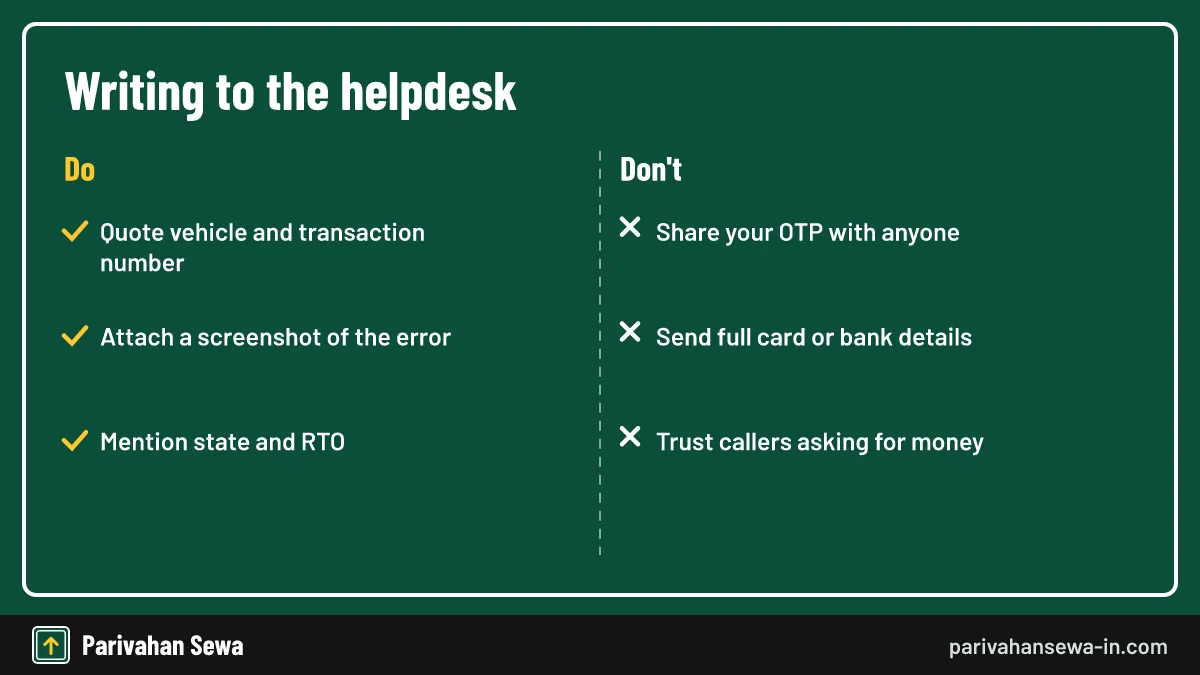
Give the Vahan helpdesk everything needed to find your case: registration number, state and RTO, application or transaction number, date of payment and a screenshot of the error. A clear, short email gets a faster answer than a long one without references.
Keep personal data safe
Never send card numbers, passwords or OTPs. Genuine staff do not need them.
Following up
Reply on the same email thread so the history stays together, and quote the vehicle number in the subject line. For other vehicle services, start from our vehicle information hub.
Official links
Vahan citizen servicesvahan.parivahan.gov.in ↗Parivahan Sewaparivahan.gov.in ↗Ministry of Road Transport and Highwaysmorth.gov.in ↗National Cyber Crime Reporting Portalcybercrime.gov.in ↗Vahan beta questions
Is Vahan beta free to use?
Yes. Opening the portal and checking records costs nothing. You pay only the tax or service fee shown on the fee panel, plus any charge your own bank adds.
Why does the address say vahanservice?
That is the path of the citizen services module inside the Vahan 4 system. It sits on the vahan.parivahan.gov.in domain, which is the part to check.
Can I pay tax for a vehicle from another state?
Pick the state shown on the plate. Tax is due to the state where the vehicle is registered, unless it has been re-registered elsewhere.
Does the tax receipt need a stamp from the RTO?
No. The receipt is generated by the system with its own receipt and transaction numbers, which any RTO can look up.
How long is a tax receipt kept on Vahan?
Paid receipts stay linked to the vehicle record, so you can reprint older ones as long as the record is on Vahan. Save each PDF anyway.
Can a dealer pay tax for my new car?
Yes. For new vehicles the dealer usually pays tax and fees during registration through a dealer login, and the receipt is linked to your vehicle.
Is there a Vahan beta app?
There is no separate beta app. The portal works in a phone browser, and the mParivahan app covers virtual RC and some services.
What if the portal says my vehicle is not found?
Check that you typed the number without spaces and chose the right state. Very old records may not be digitised; the RTO has to add them.
Can I get a refund of tax paid twice?
Refunds are handled by the RTO, not the portal. Take both receipts and the bank statement to your RTO and ask for the refund process.
Parivahan Sewa (parivahansewa-in.com) is an independent information website and is not affiliated with MoRTH, Parivahan or any state transport department. Confirm fees and rules on the official portal before you pay or apply.