Status Parivahan guide: Vahan, DL and transfer tracking
Status parivahan means checking where your transport application stands on the government's two national portals. Vehicle work such as registration, RC transfer or NOC is tracked on Vahan with the application number. Licence work such as a new DL or renewal is tracked on Sarathi with the application number and date of birth. Pick your state first, then read the stage shown.
Key takeaways
- A status parivahan check runs on Vahan for vehicles and on Sarathi for licences; choose the right one first.
- Vahan needs the application number and a captcha; Sarathi also asks for your date of birth.
- Every state, from Kerala and Karnataka to Punjab and Jharkhand, uses the same national screens after you pick it.
- An RTO transfer stays pending until the office checks the papers; the seller remains owner on record until then.
- Keep the fee receipt: it carries the number every status screen asks for.
On this page · 25 sections
What is status parivahan?
Status parivahan is the everyday name for checking a transport application online. The Ministry of Road Transport and Highways runs two national databases built by NIC: Vahan for vehicles and Sarathi for licences. Each has a status screen that shows how far your file has moved at the RTO.
Why the search term exists
People search the phrase because the parivahan.gov.in home page lists many services, and the status link is not always obvious. Once you know which database holds your file, the right screen takes under a minute to find.
What a status result tells you
The result names the stage your application has reached, such as submitted, pending at verification, approved or dispatched. It may also show an objection, which is the office asking you for a missing paper or detail.
Which status checks can you run online?
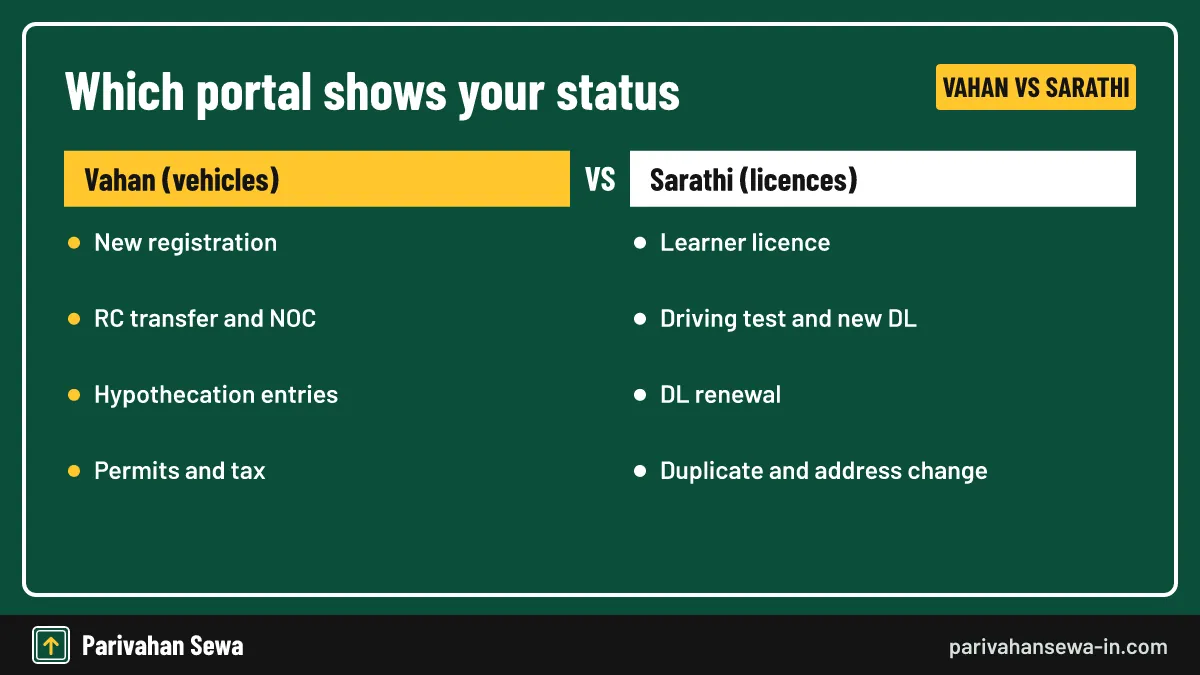
You can track almost every RTO service online. Vehicle files on Vahan include new registration, ownership transfer, NOC, hypothecation entries, permits and tax. Licence files on Sarathi include the learner licence, driving test result, new DL, renewal and duplicate licence.
Vehicle checks on Vahan
Any application that carries a vehicle registration number sits on Vahan. That covers a new car awaiting its RC, a sale awaiting the buyer’s name, a loan entry being added or removed, and a request to move the vehicle to another state.
Licence checks on Sarathi
Anything tied to your licence number or a licence application sits on Sarathi. A learner licence, the permanent DL after the test, a renewal, an address change and a duplicate card all appear there.
How do you run a status check step by step?
The steps are the same nationwide. Pick the portal, choose your state, open the status option, enter your application number and captcha, and read the stage. Sarathi also asks for your date of birth to confirm you are the applicant.
- Choose the portal. Use Vahan citizen services for vehicle work or Sarathi for licence work.
- Select your state. Pick the state of the RTO that is handling your application.
- Open the status option. On Vahan open Status, then Know Your Application Status; on Sarathi open Application Status.
- Enter your details. Type the application number, your date of birth on Sarathi, and the captcha.
- Read and act. Note the stage and deal with any objection the office has raised.
Using a phone
Both portals work in a mobile browser. Avoid refreshing halfway, which can clear the state you selected.
Saving the result
Take a dated screenshot. If you later complain to the RTO, it shows how long a stage has been stuck.
Vahan know your application: how does it work?
The know your application option sits under the Status menu of Vahan citizen services. You enter the application number and captcha, and the screen lists each step of the service with the office that handled it. It works for every vehicle service started online or at the counter.

What the table on screen means
Each row is one desk at the RTO, such as verification, approval or RC printing. A tick or date means that desk has finished. The first blank row is where the file is now waiting.
SMS alerts along the way
Applicants also receive SMS updates at each stage on the mobile number in the record. For a fuller walk-through of every Vahan screen, read our guide to know your application status.
Where do you find the application number?
The application number is printed on the fee receipt and the acknowledgement slip, and it arrives by SMS when the application is saved. Dealers give it to new-vehicle buyers. Keep it until the service is fully complete and the card reaches you.
If you applied at the counter
The counter gives a printed receipt with the number. Photograph it, because thermal paper fades.
If the number is lost
Search your SMS inbox for the word Vahan or Sarathi, then your email. Failing that, visit the RTO with photo ID and the vehicle or licence details; staff can trace the file.
Vahan application status Kerala: how do you check it?
For vahan application status Kerala, open Vahan citizen services, select Kerala, then use the Status menu and enter your application number. Kerala vehicle applications follow the same national Vahan stages, so a file at a KL-coded RTO reads exactly like one anywhere else.
Kerala RTO and sub-RTO offices
Kerala has many sub-RTOs alongside its main offices. Your file is handled by the one that issued the receipt, so a delay is solved at that office, not at the state head office.
Kerala licence work is separate
A Kerala learner licence or DL is tracked on Sarathi, not Vahan. The Kerala High Court has held that a licence renewed more than one year after expiry needs a fresh driving test, so check renewal timing early.
What do the Kerala status stages mean?
The stages are the national Vahan ones: application submitted, fee received, document verification, approval and RC printing or dispatch. A Kerala file may also show an inspection step when the officer must see the vehicle, for example after a modification or change of colour.
When an inspection is needed
If the screen shows the file waiting at inspection, the RTO expects the vehicle. Call or visit the office to book a time rather than waiting for the status to move.
After approval
Once approved, the updated record is live on Vahan. You can carry the digital RC on mParivahan or DigiLocker while the printed card is on its way.
RTO transfer status: how do you follow it?
RTO transfer status is tracked on Vahan with the application number from the transfer of ownership fee receipt. The stages move from filing to document receipt, verification, approval and the new RC. Both buyer and seller can check it with that number.

Why sellers should watch it
The seller stays the owner on record until the RTO approves the transfer. The Supreme Court has held that the owner shown in RTO records remains liable for an accident even within the reporting period, so sellers should follow the file to the end.
Deadlines in the law
Under Section 50 of the Motor Vehicles Act, the seller reports the sale within 14 days for a vehicle in the same state, and the buyer applies within 30 days.
What does RTO transfer status show at each stage?
Each stage confirms one office step. Filed means Forms 29 and 30 are in and the fee is paid. Papers received means originals reached the RTO. Verified means an officer checked them. Approved means the buyer’s name is entered. RC printed means the new card is made.
| Fee item (central rates) | Amount |
|---|---|
| Transfer of ownership, private car | ₹300 |
| RC issued as a smart card | ₹200 |
| Hypothecation endorsement for a new car loan | ₹1,500 |
State charges on top
States can add service or user charges, and some levy a transfer tax, so the final amount on the Vahan fee screen can be higher than these central figures.
If the file is stuck at papers received
The RTO is waiting for originals, often the old RC or an NOC from the financier. Send or deliver the missing paper and ask the counter to update the file.
Know your DL status: what do you need?
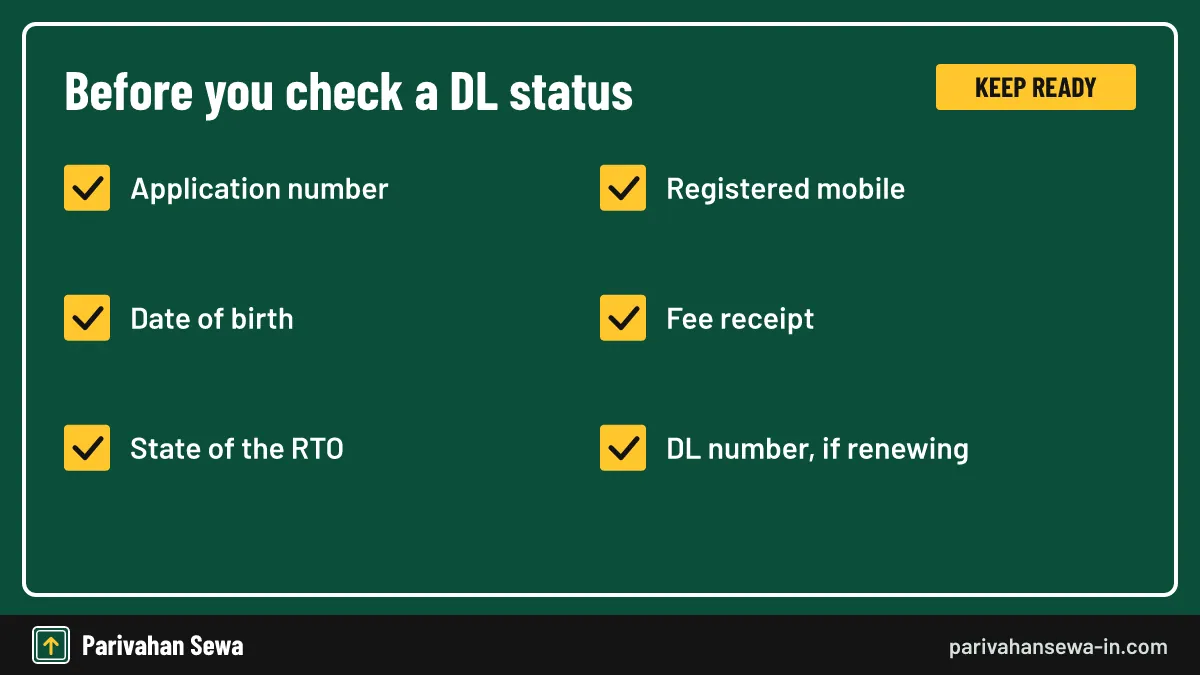
To know your DL status, keep the licence application number, your date of birth and the state of your RTO. Sarathi uses all three to find your file. For renewals or changes, your existing DL number also helps, along with access to the registered mobile.
Application number vs DL number
The application number tracks a pending request. The DL number identifies an issued licence. A new applicant has only the first; a renewal applicant has both.
Why the date of birth is asked
It confirms that the person checking is the applicant. If you typed a wrong birth date on the form, the status search may fail, which is itself a sign the record needs correcting.
How to know your DL status online?
Open Sarathi, select your state, choose Application Status, then enter the application number, date of birth and captcha. The screen shows the current stage, such as test pending, approved or card dispatched.
Stages you may see
A new licence typically moves through learner licence issued, test slot booked, test passed, approved and card dispatched. A renewal skips the test stages for most applicants.
Payment shown as failed
Sarathi accepts payment against an application number only once. If money left your account but the status shows unpaid, use the Payment Status option to confirm it before paying again.
Driving licence application status Punjab: how to check it?
For driving licence application status Punjab, open Sarathi, select Punjab, choose Application Status and enter your application number, date of birth and captcha. The stages are the national Sarathi ones. Applicants at any Punjab RTO or test centre use the same screen.
Learner licence first
Most Punjab applicants hold a learner licence before the permanent DL. Its status appears on the same screen with its own application number, so keep both receipts.
After the driving test
When you pass the test, the status changes to approved within the RTO’s processing time. If it still shows the test as pending a week later, ask the test centre to confirm it updated your result.
Driving license status Punjab after the test: when does the card arrive?
For driving license status Punjab after a pass, RTOs usually dispatch the card about two weeks after the test, though the time varies by state and office. Many states send cards by speed post, and the consignment number shows on India Post only after the RTO hands the parcel over.
Tracking the post
When the status shows dispatched, look for a postal or consignment number on the screen or in an SMS. Enter it on the India Post tracking page to follow the parcel.
Using the licence before the card arrives
Once approved, the licence is live on the national register. A copy in mParivahan or DigiLocker can be shown to traffic officers while the plastic card is in transit.
DL status Karnataka: how do you track it?
For DL status Karnataka, open Sarathi, select Karnataka and use Application Status with your number and date of birth. Karnataka licence services, including those of the Bengaluru RTOs, run on Sarathi, and applicants book an RTO slot through the same portal.
Bengaluru offices
Bengaluru has several RTOs. Your file stays with the one shown on the receipt, so questions about a stuck stage go to that office.
Slot booking status
If the status shows test or document verification pending, check whether you still need to book a slot. Sarathi will not move the file until the visit is done.
Driving license renewal status Karnataka: how do you follow it?
Driving license renewal status Karnataka is tracked on the same Sarathi screen with the renewal application number. A renewal uses Form 9. Applicants aged 40 or more also upload a Form 1A medical certificate, while younger applicants give a Form 1 self-declaration.
Why a renewal stalls
The usual reasons are a missing medical certificate, a photo or signature that fails the upload check, or a renewal filed long after expiry that needs a fresh test. Each shows as pending verification.
Full renewal rules
Fees, the grace period and documents are covered in our DL renewal guide, so this page only tracks the status.
Vehicle owner details Karnataka: what can you see?
For vehicle owner details Karnataka, the public Vahan search and the mParivahan app show a vehicle’s registration date, RTO, maker, model, fuel, insurance validity and a partly masked owner name. Full owner details are not public, to protect privacy.
Fields in the public result
Expect the registration authority, vehicle class, fuel type, fitness or registration validity, insurance expiry and whether the vehicle is financed. These help a buyer judge a used vehicle before paying.
What stays hidden
The full name, address and phone number of the owner are not shown. Sites that promise them for any number are not official services and may misuse your data.
Karnataka vehicle registration owner details: who gets full records?
Karnataka vehicle registration owner details in full are released only by the RTO, on a written request with a valid reason, such as an insurer handling a claim, police in an investigation or a court order. The owner can always see their own record after OTP verification.
Applying at the RTO
Write to the RTO that registered the vehicle, state the reason and attach proof such as an FIR or claim reference. The office decides whether to share the record.
Checking your own vehicle
Owners log in to Vahan with the registration number, chassis digits and an OTP on the registered mobile to see their full record and download the RC.
Driving license status Maharashtra: how do you check it?
For driving license status Maharashtra, use Sarathi, select Maharashtra and enter your application number, date of birth and captcha under Application Status. The Maharashtra Motor Vehicles Department publishes office details and notices on transport.maharashtra.gov.in.
Large RTO networks
Maharashtra has a large network of RTOs and sub-RTOs. If your status is stuck, contact the office printed on your receipt rather than a nearby one.
Learner and permanent licence
The learner licence and the permanent DL have separate application numbers. Check the right one, since the learner status stays complete even while the DL is pending.
Uttar Pradesh driving license: which portal handles it?
An Uttar Pradesh driving license is applied for, renewed and tracked on Sarathi after you select Uttar Pradesh. UP vehicle work, such as registration or transfer, is tracked separately on Vahan. Using the right portal is the first step to a working status check.
UP districts and RTOs
UP has many RTOs and ARTOs across its districts. The office printed on your receipt holds your file, so contact that office if a stage does not move.
Checking an issued UP licence
To confirm an existing UP licence is valid, use the DL details search on Sarathi with the DL number and date of birth rather than the application status screen.
UP DL renewal: how do you apply online?
For UP DL renewal, open Sarathi, select Uttar Pradesh, go to Services on Driving Licence, enter your DL number and date of birth, choose renewal, upload documents and pay. Applicants aged 40 or above add a Form 1A medical certificate. Track it afterwards under Application Status.
Aadhaar-based contactless renewal
Since March 2021, MoRTH allows renewal without an office visit where Aadhaar authentication is used and no driving test is due. If your state offers it, the Sarathi flow will show the option.
When an office visit is still needed
A visit is needed if biometrics must be captured, if the licence lapsed long ago and a test is due, or if the RTO raises an objection to your documents.
What does UP DL renewal cost?
The central fees in Rule 32 of the Central Motor Vehicles Rules are ₹200 for renewal, ₹300 for renewal after the grace period plus ₹1,000 for each year of delay, and ₹200 extra for a smart card. UP may add user charges; the Sarathi fee screen shows the final total.

| Renewal item | Central fee |
|---|---|
| Renewal of a driving licence | ₹200 |
| Renewal after the grace period | ₹300 |
| Additional fee for each year of delay | ₹1,000 |
| Licence issued as a smart card | ₹200 |
Paying only once
Pay against your application number one time. If the bank confirms the debit but Sarathi does not, wait and use the payment status option before trying again.
Late renewal adds up
A licence renewed several years late attracts the per-year additional fee and may need a test. Renewing on time is cheaper and faster.
DL status Jharkhand: where do you check it?
For DL status Jharkhand, open Sarathi, select Jharkhand and use Application Status with your application number and date of birth. Jharkhand applicants follow the same national stages as other states, from learner licence to card dispatch.
Temporary vehicle registration is different
Jharkhand’s vehicle papers, such as a temporary registration that is valid for one month, are tracked on Vahan, not on the licence screen.
Getting help locally
If the status shows no progress, visit the District Transport Office named on your receipt with the application number and a copy of the slip.
Driving licence sarkari result: is there an official result page?
No. There is no official transport service called driving licence sarkari result. Your learner test and driving test results appear only on Sarathi, under Application Status. Websites with “sarkari result” in their name publish government job and exam news and are not run by MoRTH or any RTO.
Where your test result really shows
After a learner test, the result and the learner licence print appear on Sarathi. After the driving test, the status changes to passed or failed on the same screen.
Avoiding look-alike sites
Never pay a third-party site to see a licence result. The official address always ends in parivahan.gov.in, and status checks there are free.
Why does a status stay pending and how do you fix it?
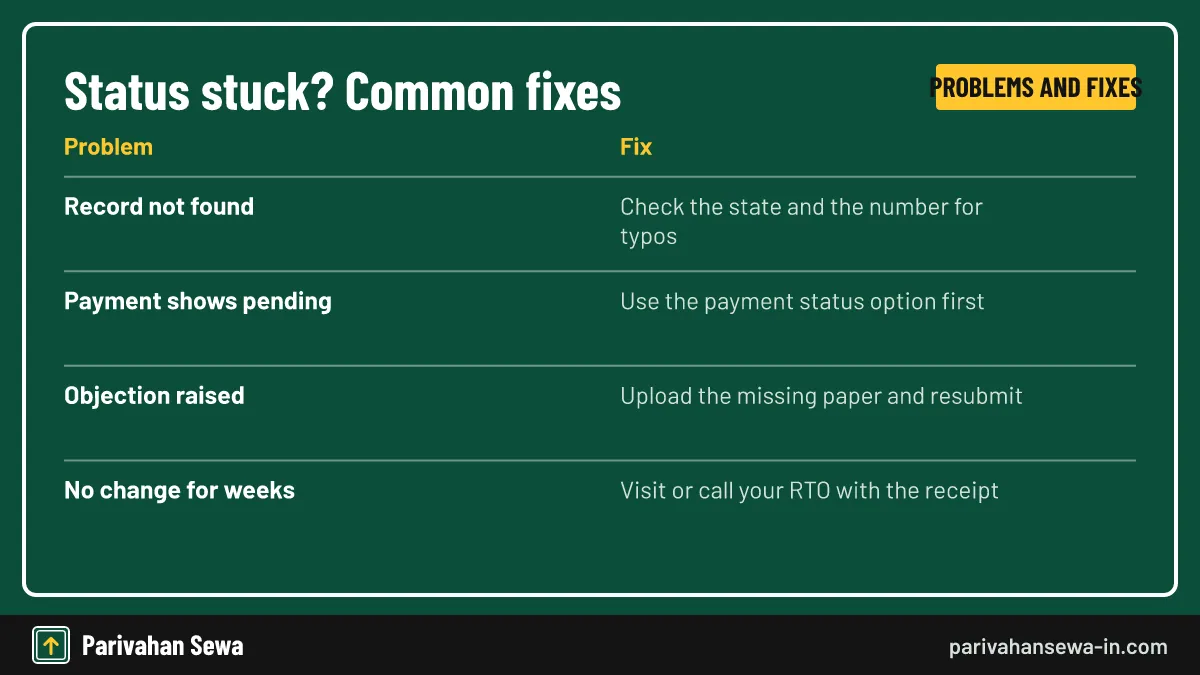
Most stuck checks come from a wrong state choice, a mistyped number, a payment not yet confirmed, or an objection that needs a document. Fix the simple causes yourself first; if a stage still does not move for several weeks, contact the RTO with your receipt.
Objections are not rejections
An objection means the officer needs something, such as a clearer photo or a missing page. Upload it through the same service and the file returns to the queue.
When to visit the RTO
Go in person if the screen shows the same stage for weeks with no objection, or if the RTO has asked to see the vehicle or your original documents.
Which portal checks which status?
Use this table to pick the right screen before you start. The left column is what you applied for; the right shows where to look and what to type. For other Vahan services, start from our Vahan guide.
| What you applied for | Portal | Details to enter |
|---|---|---|
| New vehicle registration | Vahan | Application number |
| RC transfer or NOC | Vahan | Application number |
| Hypothecation added or removed | Vahan | Application number |
| Learner licence or new DL | Sarathi | Application number and date of birth |
| DL renewal or duplicate | Sarathi | Application number and date of birth |
| Card in the post | India Post | Consignment number |
One receipt, one number
Each service has its own application number, even on the same day. Keep every receipt.
Old addresses still circulate
Some older state pages still point to vahan.nic.in. Current citizen services run on vahan.parivahan.gov.in, so use that address for vehicle status checks.
Official links
Vahan citizen servicesvehicle status ↗Sarathi licence servicesDL status ↗Parivahan Sewaparivahan.gov.in ↗India Post trackingindiapost.gov.in ↗Status parivahan questions
What is status parivahan?
It is the online check of a transport application on the national portals: Vahan for vehicle services and Sarathi for licence services. You enter the application number and see the current stage.
Is there a fee to check status on Vahan or Sarathi?
No. Checking a status is free on both portals. Fees apply only to the service itself, such as a renewal or a transfer.
I lost my application number. What can I do?
Look in the SMS and email sent when you paid, or the fee receipt. If none survive, take your ID and vehicle or licence details to the RTO, which can trace the application.
Why does the portal say no record found?
Usually the wrong state is selected or a digit is mistyped. Choose the state of the RTO that took your application and type the number exactly as printed.
Can I check someone else's licence status?
The status screen needs the application number and date of birth, so only the applicant or someone they share these with can see it.
How long does a DL take to arrive after approval?
Many RTOs dispatch the card about two weeks after the test is passed, but timing varies by state and post office.
Does a transfer status change on its own?
It changes as each office step is finished. If nothing moves for several weeks, contact the RTO with the receipt.
Is Parivahan Sewa (this site) the government portal?
No. This is an independent guide. Status checks are done only on the official parivahan.gov.in portals linked on this page.
Can I check status on a phone?
Yes. Both Vahan and Sarathi open in a phone browser, and the mParivahan app shows licence and RC details once approved.
Parivahan Sewa (parivahansewa-in.com) is an independent information website and is not affiliated with MoRTH, Parivahan or any state transport department. Confirm fees and rules on the official portal before you pay or apply.